
Google Play External Links: 2026 Builder’s Guide
Google Play external links are finally real, and the U.S. compliance clock runs through January 28, 2026. If you want to link users from your Android app to external purchases or even to an external app download, you now can—provided you enroll in the right program, wire the required APIs, and accept a new fee model. This guide explains how the Google Play external links programs actually work in production, what they will cost, and how to ship a compliant implementation this week without blowing up your funnel.
What changed, and when?
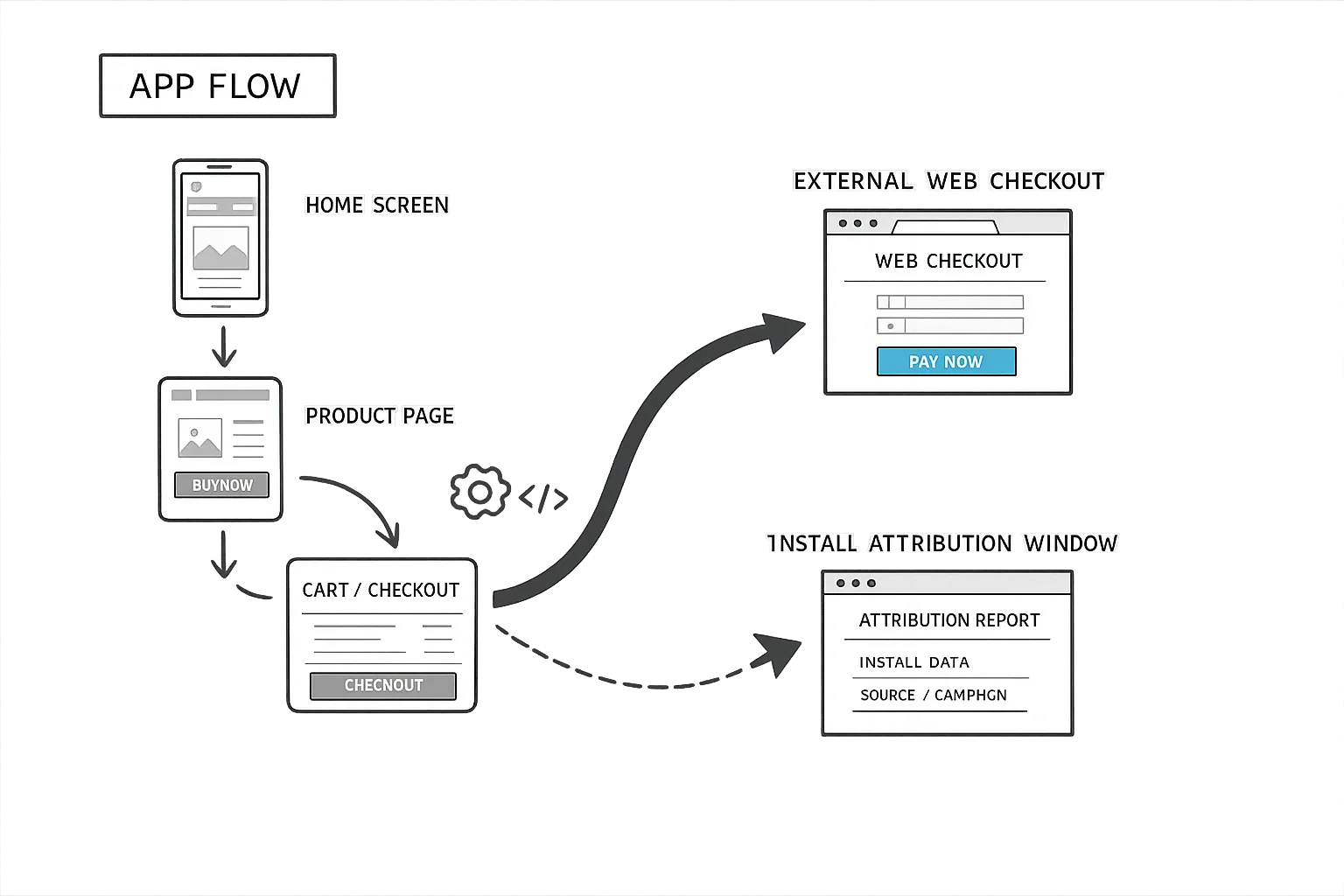
Google created two pathways that matter to most teams in the U.S.: Alternative Billing (process the payment inside your app via a non‑Play processor) and External Content Links (send the user out of your app to a web page for offers or to download another app). Both require program enrollment and app review changes. For external content links, you must implement Play’s UI interstitial, integrate specific Play Billing Library versions, and pass tokens to report qualifying transactions.
Deadlines and versions to keep on your radar: January 28, 2026 is the compliance date to keep using external links and alternative billing with U.S. users. External links require Play Billing Library 8.2.1 or higher for the new APIs. Separately, beginning January 1, 2026, Google’s Play Age Signals data is restricted to providing age‑appropriate experiences within the receiving app, which affects how you handle youth flows if your experience changes when users leave your app. These dates shape both the engineering plan and your data governance notes.
Google Play external links: the moving parts
Let’s get specific about the pieces you have to wire together. The program is not just “put a link in a WebView and call it a day.” There are enrollment, UX, SDK, and server obligations that reviewers will check.
Program enrollment and pre‑approval
Enroll in Google’s external content links program in Play Console. You’ll register the domains that host your offers and, if you link to app downloads, the exact download destinations. Expect a review; unregistered destinations are a routine rejection. Keep your domain list lean to start so you don’t block your launch on edge environments.
Mandatory information screen
When a user taps an external offer or download link, Play shows a standardized screen that explains they’re leaving your app and what that means for billing and support. You can’t style it away or skip it. Plan for the extra tap and microcopy changes in your conversion funnels.
SDK requirements and tokens
External content links ride on Play Billing Library 8.2.1+ and use tokens to track qualifying transactions. You’ll generate and pass an external transaction token and your own external transaction ID so Google can reconcile the user’s click path and the resulting purchase or install. If you’re linking to downloads, Google treats an install within a short window as attributable to that click; if it’s a purchase, your backend must call back with the token so the transaction is recognized.
Initial and ongoing service fees
Google applies a 3% initial acquisition fee for off‑Play purchases made within six months of a Play‑originating app install, then 0% after that window. There’s also an ongoing service fee while your app benefits from Play Store services (security scanning, parental controls, distribution). For off‑Play transactions linked from your app, model 10% for most in‑app digital purchases and 10% for auto‑renewing subscriptions under the current external links guidance; for alternative billing inside your app, model your current program’s rates. These stack with the initial acquisition fee during the first six months from the Play install.
Fixed per‑install fees for external downloads
When you link to an external app download, Google uses a fixed, per‑install fee if the user installs within the attribution window after clicking your in‑app link. Google publicly documents fixed rates by country and category in Europe. For the U.S., Google has described a similar structure; reporting from major outlets indicates reference rates on the order of $2.85 per app install and $3.65 per game install when the install occurs within roughly a day of the Play‑originating click. Treat these as planning figures until Google finalizes the U.S. rate cards in Console.
Is using Google Play external links mandatory?
No. You can keep using Play Billing and never link out. External links are an option that can improve margin or flexibility—but only if the economics pencil out and the UX cost (extra taps, trust shifts) doesn’t outweigh the fee savings. Many teams will A/B test external links on specific SKUs or promotional offers rather than move everything on day one.
Engineering plan: ship in a week
Here’s a pragmatic one‑week plan that scales from a single product engineer to a small squad. Adjust the owner hours to fit your team velocity.
Day 1: Scope and enroll
List your candidate SKUs or offers to move off‑Play. Decide whether you’ll test external purchases, external downloads, or both. Enroll in the program in Play Console and register your production domains. Start a compliance doc that lists feature flags, domain allowlists, how you’ll route U.S. users, and which metrics will determine success (conversion rate, refund rate, CPM shifts for any upsells on the landing page).
Day 2: Upgrade libraries and gate the UX
Upgrade to Play Billing Library 8.2.1+ across your modules. Add a geography gate so U.S. users see the external links and others continue to use your existing flow. Instrument the Play information screen entry to measure drop‑off. Add a remote config switch, because you will need to roll back quickly during review or if conversion tanks.
Day 3: Token the flow and build the landing
Generate and pass the external transaction token and your external transaction ID from the app. On the landing page, collect those identifiers server‑side and store them with your order. If you’re linking to a download, build a clean download page that detects device type, provides a safe APK link or store link as allowed, and records the click. Avoid marketing bloat; keep it focused on completion and support.
Day 4: Server callbacks and reconciliation
Implement your callback to Google with the token so external purchases are recognized as qualified. Add nightly reconciliation jobs matching Play tokens to orders and flagging mismatches. Expose a simple dashboard for finance that reports gross revenue, Play fees by bucket (initial acquisition, ongoing services), and net take by SKU. If you use subscriptions, validate renewal logic and proration behavior off‑Play.
Day 5: Age flows and parental gates
Audit youth experiences. If the Play Age Signals API marks a user as verified adult or supervised minor in a covered jurisdiction, ensure your external flow still provides an age‑appropriate experience and that you only use the signal within the receiving app. For supervised accounts, decide whether to suppress certain external links, require sign‑in, or show a parent‑friendly landing with clear support routes.
Day 6: QA, review prep, and log hardening
Test with U.S. accounts on current Play Store versions. Validate the interstitial appears, tokens flow end‑to‑end, and analytics capture exits. Write a reviewer note in Play Console that explains your external link use, domains, and how the token round‑trip works. Harden logs to avoid dumping PII in event payloads or crash traces. Run failure drills: what if the token call fails, your domain is down, or the Play Store is outdated?
Day 7: Ship and stage the A/B
Roll out to 5–10% of U.S. traffic behind the remote flag. Watch conversion, support contacts, and refund rates daily. Only expand when the economics meet your floor. If you’re also testing external app downloads, cap that traffic until you’re confident in the per‑install cost curve.
Need a deeper engineering checklist? We’ve published a companion build plan in Google Play External Links: The Engineering Plan with module‑by‑module tasks your team can copy into Jira.
Pricing math: model your new unit economics
Let’s get practical about numbers. Suppose you sell a $50 non‑subscription item. If the buyer installed your app from Play within the last six months and you route them to an external web checkout, model a 3% initial acquisition fee plus a 10% ongoing service fee. That’s $6.50 to Google on a $50 order, plus your processor’s interchange. After six months from the Play install, the 3% drops to 0%, leaving the 10% ongoing fee.
For auto‑renewing subscriptions billed off‑Play, plan on 10% of each renewal as the ongoing service fee. You’ll need to budget for refunds handled outside Play’s tooling and ensure your account systems don’t double‑charge when users switch between on‑Play and off‑Play subscriptions.
For external app downloads, include a per‑install fixed fee in your model if the user installs within the attribution window after clicking your in‑app link. Use conservative U.S. planning numbers—e.g., $2.85 per install for apps and $3.65 per install for games—as a sensitivity range. Run scenarios at 10k, 50k, and 200k installs and decide where external downloads make sense versus a traditional Play listing or partner store placement.
People also ask: Will Google charge immediately in the U.S.?
Google’s language has been that the fee framework exists and you must integrate the APIs and program requirements now. Actual fee assessment for external links may ramp, but teams should plan as if it will be charged and ensure reporting is correct from day one. You do not want to retrofit server callbacks after you’ve scaled.
People also ask: Is alternative billing better than external links?
It depends on your UX and your margins. Alternative billing keeps users in your app but still involves program enrollment, UI requirements, and a service fee tied to transactions processed with a third‑party provider. External links add an interstitial and a context shift to the browser, which can ding conversion—but they can simplify PCI scope and let you standardize a single checkout across Android and the web. We usually pilot both: subscriptions via alternative billing (to limit churn friction) and big one‑time purchases via external links where we can present richer offer pages.
Gotchas that trip review—and how to avoid them
We’ve seen these patterns cause pain in review or production:
- Unregistered domains: Every destination must be registered in Console. Staging links sneaking into prod are a common rejection.
- Interstitial bypass: Don’t try to wrap the info screen or deep‑link past it. It’s required UX.
- Old Play Store clients: The external links flow requires up‑to‑date Play Store bits. Implement graceful fallback and user prompts.
- Token mismatch: If your backend drops the token or fails the callback, your transactions may be non‑qualifying. Add reconciliation and alarms.
- Youth flows: If your app behavior changes for minors, ensure external paths don’t accidentally expose disallowed purchase options.
Cross‑platform heads‑up: Apple deadlines next
Shipping Android first? Good—because iOS has its own January work. Apple’s age rating overhaul requires developers to answer updated age rating questions by January 31, 2026, or app updates will be blocked until you do. If your content ratings change, your merchandising and UA targets might need updates. Our iOS guidance is in App Store Age Rating Update: Ship by Jan 31.
Compliance and privacy notes for leaders
Document where age signals, tokens, and identifiers flow. Limit Play Age Signals usage to age‑appropriate UX decisions in the receiving app, and purge or segregate that data from analytics models that power other properties. Update your privacy policy to reflect external purchases and off‑Play subscription management. Provide a clear support pathway on your landing page because refunds and billing questions for external purchases don’t go through Google.
The quick ROI worksheet
Use this five‑line sheet to decide if an external link test makes sense today:
- Gross AOV or ARPU of the candidate SKU (G).
- Expected conversion delta due to interstitial and browser hop (ΔC). Start with −5% to −20%.
- Play fees: initial acquisition (3% if within six months) + ongoing service (10%), plus any per‑install fixed fee if linking to a download (F).
- Processor costs and fraud lift off‑Play (P). Start with 2.5–3.2% + $0.10 per transaction unless you have negotiated rates.
- Net margin delta vs. Play Billing baseline. If net margin increases ≥2–3 points at your target scale, proceed to A/B. Otherwise, punt.
For a step‑by‑step financial model and rate scenarios, see Google Play External Links: Fees, Flows, ROI.
What to do next
- Enroll and register domains today; reviewer notes ready by tomorrow.
- Upgrade to Play Billing Library 8.2.1+, gate U.S. traffic, and ship a tokenized MVP behind a remote flag.
- Stand up server callbacks and nightly reconciliation; expose a finance dashboard.
- Pilot a single SKU or promo for external checkout; keep subscriptions in‑app via alternative billing if your churn model is sensitive.
- Audit youth experiences with Play Age Signals and document data handling limits.
- Run the ROI worksheet; expand only when it beats your baseline by ≥2–3 points.
If you’d like a seasoned partner to pressure‑test your flows or shoulder the implementation, our team ships these programs end‑to‑end. Explore our mobile services or use our U.S. checklist in Ship Google Play External Links by Jan 28 (U.S.), then ping us when you’re ready to go live.
Zooming out
Here’s the thing: the courtroom created permission, but the platform still sets the rules. External links open real strategic options—lower fees on some SKUs, richer web merchandising, and a single checkout stack across platforms. But there’s a catch: the interstitial friction, per‑install fees for external downloads, and token plumbing mean you need to treat this as a new channel, not a free lunch. Ship a small, strongly‑instrumented experiment now. You’ll either unlock a durable margin edge—or get hard data showing that your current Play Billing setup is the better choice for your audience.





Comments
Be the first to comment.