Google Play External Links: Fees, Flows, and ROI
Google Play external links are finally real—and they come with deadlines, APIs, and a fee model you must plan for. If you link users in the U.S. to web purchases of digital items or to app downloads outside Play, you need to enroll in Google’s programs and be compliant by January 28, 2026. Done well, this unlocks pricing freedom and first‑party relationships. Done poorly, it can kneecap conversion or saddle you with unexpected costs.
What changed on Google Play (Dec 2025 → Jan 2026)
Between early December 2025 and late January 2026, Google formalized two tracks for outbound commerce from Play‑distributed apps serving U.S. users:
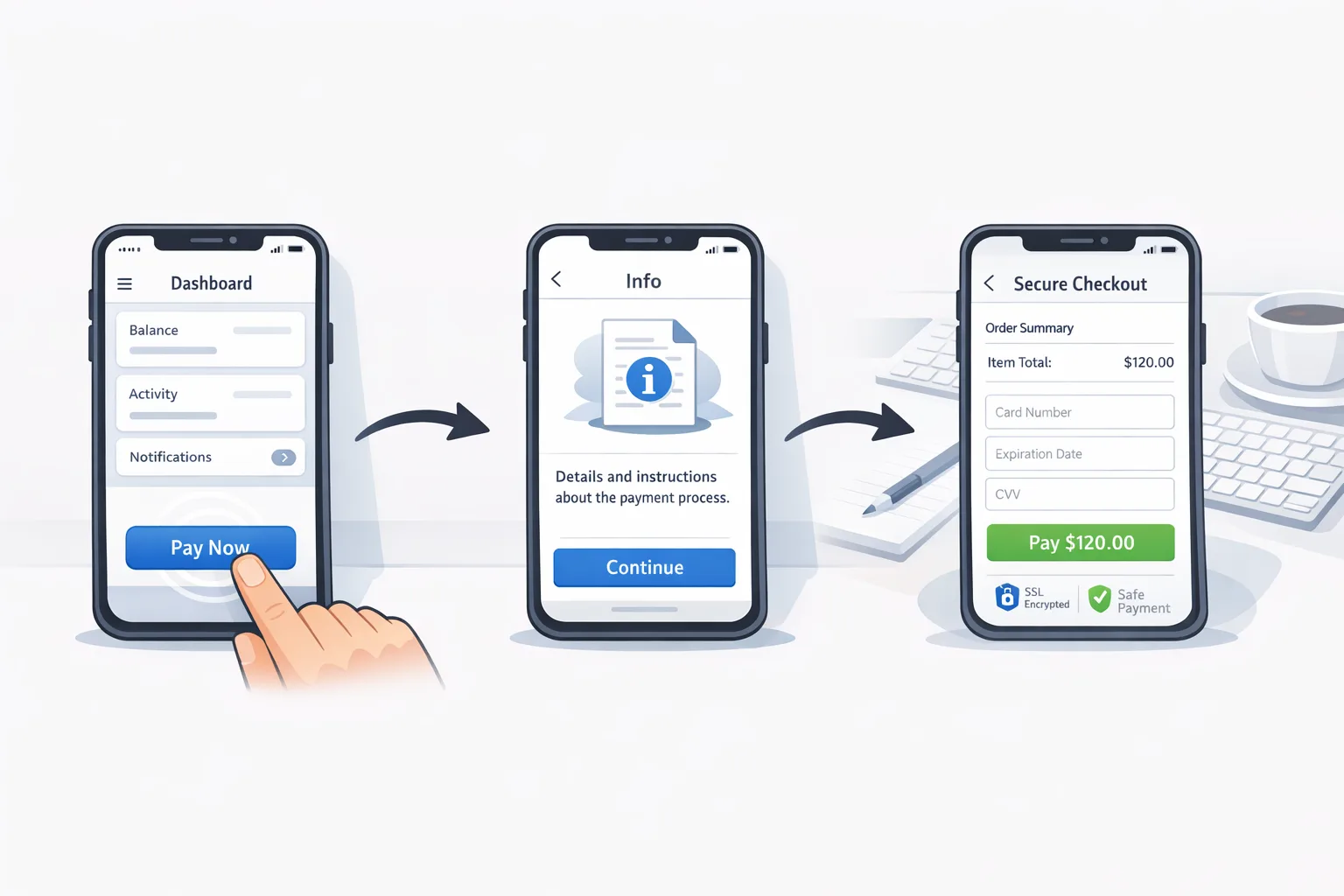
External Content Links. Lets you link out to a website to sell in‑app digital items or to a landing page where a user can download an app outside Play. You must register destination URLs and any off‑Play apps you link to, show Google’s information screen before sending users out, and report qualifying transactions.
Alternative Billing. Lets you show a third‑party payment processor inside your app (instead of—or alongside—Play Billing) for digital goods, with strict UX rules and reporting.
Both paths require enrollment, UX conformance, and server‑side reporting. Practically, that means:
- Integrate Play Billing Library 8.2.1 or higher for the External Content Links APIs.
- Show the mandated information screen before handing off to a browser or webview.
- Register links and off‑Play apps in Play Console; expect review and approvals.
- Generate and pass tokens, then report external transactions on your backend.
There’s also a clear compliance date: January 28, 2026. If you plan to keep external links live, ship the integration and be ready.
If you want the fast tactical deep dive, keep this tab open and also skim our Jan 28 playbook for Google Play links and the companion 4‑week implementation plan.
Google Play external links: how the fees actually work
Google has outlined fees for both programs in the U.S., some already in effect elsewhere and some pending final court approval in January 2026. Build as if they’ll land.
For External Content Links:
- Digital item purchases attributed to your links: proposed 20% service fee (10% for auto‑renewing subscriptions).
- Attribution install fee: if a user installs an external app within 24 hours of clicking your Play‑origin link, proposed fixed fee of $2.85 per app or $3.65 per game.
For Alternative Billing (in‑app):
- Most non‑subscription purchases: effectively 25% (i.e., 5 percentage points below Google’s 30% standard).
- Subscriptions: typically 10% (i.e., 5 percentage points below the 15% subscription rate).
There are program nuances for smaller developers and subscriptions, but the shape is consistent: a discounted commission for alternative billing and a separate set of commissions plus a fixed per‑install fee for external links. Also note: Google requires transaction reporting and can enforce fees retroactively on reported qualifying transactions. Treat this like a tax engine—accurate data in, clean fee calculation out.
Build the flow: a developer checklist that won’t waste a sprint
If you’re starting today, this is the sequence we’ve used with engineering, growth, and legal teams to hit dates without thrash.
1) Decide the path per screen (don’t mix blindly)
Map every screen that offers value for money. For each, choose one of three options: Keep Play Billing, adopt Alternative Billing, or link out using External Content Links. Many teams keep Play Billing where it already performs and add external links to upsell bundles or annual plans on the web.
2) Upgrade SDKs and gate with flags
Update to Play Billing Library 8.2.1+ where the External Content Links APIs live. Wrap new UX and reporting behind feature flags scoped by country, version, and campaign. You will tweak copy and fee logic after Jan 22 (the court milestone), so build for agility now.
3) Implement the information screen and link registry
Use Google’s interstitial to inform users they’re going off‑app. Register all destinations and off‑Play apps in Play Console. Don’t leave this to the last week: reviews and re‑submissions happen.
4) Wire the token handoff and server events
When a user taps an external link or completes an external purchase, generate and persist the IDs Google requires. On your backend, reconcile those events and report them to Google within the window. If you have a webshop, extend your order pipeline to attach Play tokens for fee attribution.
5) Validate edge cases
Test flows on child accounts, enterprise‑managed devices, and poor network conditions. If you link to app installs, verify the 24‑hour attribution path for the per‑install fee and failure states (user bounces to store, cancels, re‑tries).
6) Build kill switches and rails
Add a remote config kill switch for external links per market. Add simple rails for legal copy, refund terms, and customer support macros. You’ll thank yourself if the fee picture shifts mid‑quarter.
Need a structured week‑by‑week? We published a pragmatic 4‑week rollout plan for the Jan 28 deadline you can drop into Jira today.
The fee math: a spreadsheet you can model in 10 minutes
Here’s the thing: strategy debates end once you see the numbers. Use this lightweight model to compare Play Billing vs Alternative Billing vs External Links for a single SKU.
Assumptions (tune to your app):
- Monthly U.S. audience on target screen: 100,000 users
- Tap rate on external link button: 8%
- Interstitial continue rate: 60%
- Web checkout conversion: 12%
- Average order value (AOV): $18 (digital item), payment processing 2.9% + $0.30
- If linking to an external APK for a game, install rate within 24 hours: 4% of link clickers
External Links path math:
Clicks = 100,000 × 8% = 8,000. Continue past interstitial = 8,000 × 60% = 4,800. Purchases = 4,800 × 12% = 576. Gross revenue = 576 × $18 = $10,368.
Processing cost ≈ $10,368 × 2.9% + $0.30 × 576 = $300.67 + $172.80 ≈ $473.47.
Google external link fee at 20% (non‑subscription) = $10,368 × 20% = $2,073.60.
Net revenue (before other costs) ≈ $10,368 − $473.47 − $2,073.60 = $7,821.
If you also link to an external game download and 4% install within 24 hours of clicking the link: 8,000 × 4% = 320 installs. Per‑install fee = 320 × $3.65 = $1,168. That’s a meaningful new line item; model it explicitly.
Alternative Billing path math:
Keep your in‑app UX; conversion generally stays higher than web. Say your existing in‑app conversion on this screen is 16%. Purchases = 100,000 × 16% = 16,000 purchases across the month (for illustration—adjust to your reality). Gross = 16,000 × $18 = $288,000. Google service fee at 25% = $72,000. Payment processing ≈ $288,000 × 2.9% + $0.30 × 16,000 ≈ $8,352 + $4,800 = $13,152. Net ≈ $288,000 − $72,000 − $13,152 = $202,848.
Play Billing baseline math (30% purchase):
Same 16% in‑app conversion. Gross = $288,000. Play fee at 30% = $86,400. Net (no external processor fee) ≈ $201,600. In this example, Alternative Billing nets slightly more than standard Play Billing thanks to the 5‑point discount—if your processor costs are efficient and your internal ops don’t add hidden overhead.
Takeaway: External Links give pricing and offer flexibility but add an interstitial step and new fees (commission plus potential per‑install). Alternative Billing keeps conversion but rarely slashes fees enough to move mountains unless you have large volumes or subscription mix. Blend the two: keep Play Billing (or Alternative Billing) for core flows; use External Links for high‑AOV bundles, enterprise offers, and cross‑sell to the web where you can lift LTV with better merchandising.
Measurement and attribution that won’t backfire
Google’s programs hinge on accurate reporting. Your backend must attach Google’s tokens to orders, send timely transaction notifications, and reconcile refunds. Expect audits. For app downloads outside Play, keep a clean log of link clicks, redirects, landing‑page installs, and 24‑hour windows.
Don’t rely solely on third‑party cookies for campaign measurement on the web shop. Chrome is tightening the screws, and even if deprecation timing shifts, you need durable signals. Use first‑party data, UTM discipline, server‑side events, and post‑purchase surveys to fill gaps. If your team needs a reality check on web tracking durability, share our pragmatic guide to the new normal: Third‑Party Cookies in 2026: Your Realistic Plan.
People also ask: the questions teams keep Slacking me
Do external links replace Play Billing entirely?
No. You can keep Play Billing where it converts and layer external links for specific offers. If you opt into Alternative Billing, follow the UI rules and report transactions just the same.
Can I advertise lower prices on the web?
Yes, anti‑steering restrictions have eased, but your app must still follow Google’s disclosure and interstitial rules. Keep pricing truthfully aligned across channels to avoid churn or support blowups.
Do the fees apply to physical goods or services?
Fees target digital goods and services used in‑app. Physical goods and most offline services aren’t in scope—but your external checkout still needs to respect the program terms and reporting where required.
What’s different for games?
Two things: the fixed per‑install fee for external downloads is higher for games ($3.65 vs $2.85), and gameplay‑affecting purchases may face different commission tiers pending final rulings. Model the install fee explicitly in UA budgets.
UX tactics that protect conversion
External links introduce friction—an information screen, then a browser hop. Reduce the tax with small, boring wins:
- Pre‑fill the user’s account on the web shop and keep cart context in the URL.
- Use concise interstitial copy that mirrors the benefit (“Pay securely on our website with your saved card”).
- Offer one high‑AOV choice, not a menu of nine. Decision fatigue is conversion’s enemy.
- Return users to the app with deep links and success toasts; don’t strand them in the browser.
For Alternative Billing, favor processors with low dispute rates and proven Android SDKs. A 50 bps savings is meaningless if your support load doubles.
Risk checklist (yes, you should read this)
Teams get tripped up by the same edge cases. Run this checklist before your staged rollout:
- Child accounts. Confirm the interstitial and off‑Play flows comply with family policies.
- Enterprise profiles. Test on work profiles and managed devices; some external intents are restricted.
- Refund sync. Web refunds must flow back to your entitlement system and to Google’s reporting.
- Geo fences. Your program enrollment today is U.S.‑specific. Hard‑gate links outside supported markets.
- Tax and KYC. Web sales shift obligations to you. Validate tax logic by state and run test orders through your invoicing pipeline.
A simple framework to pick the right path per SKU
Use this quick triage before writing a single line of code:
- Keep Play Billing if: low AOV impulse buys where every extra tap kills conversion; or if you lack a compliant web checkout.
- Alternative Billing if: you want immediate UI control and already have a processor with strong fraud tooling; your margin improves with a 5‑point discount vs standard Play Billing.
- External Links if: you can lift AOV with bundles/annuals, want to run promotions freely on the web, and can stomach a browser hop plus a commission and potential per‑install fees.
Most teams end up hybrid: Play or Alternative Billing for core flows, External Links for D2C‑style upsells and enterprise plans. Document the decision per SKU so finance and growth stay aligned.
Zooming out: why this matters beyond Android
Even if most of your revenue is iOS, building external commerce competency now pays off. Apple’s EU model switched to a core‑technology commission starting January 1, 2026, and Brazil has its own timeline for external options. The direction of travel is clear: more linking freedom, more reporting, and new fee structures. If you can run a great web shop and reconcile fees cleanly, you’ll be ahead of the policy curve.
What to do next (this month)
- Engineering: Upgrade to Play Billing Library 8.2.1+, implement the interstitial, token handoff, and server reporting. Add a per‑market kill switch.
- Growth: Pilot one external‑link offer with high AOV. Drive a 50/50 A/B and set a guardrail on effective take rate (revenue − fees − processing).
- Finance: Add a line item for per‑install external fees in your UA model. Reforecast with both the 20%/10% commissions and the $2.85/$3.65 install fees.
- Legal/Support: Ship updated disclosures and refund terms; prepare macros for “why did I see a warning screen?”
- Leadership: Decide now which SKUs stay Play, go Alternative, or use External Links. Write it down.
If you want a turnkey rollout without burning the quarter, talk to us about implementation. See how we ship policy‑sensitive builds in our portfolio and what’s included on our services page, or reach out directly via contacts.
For more tactical color and date‑stamped details, keep our Google Play External Links: Jan 28 Playbook open while you implement.
Bottom line
External links on Google Play are no longer a thought experiment. By January 28, 2026, you either have a compliant, measurable flow—or you turn the links off. Treat this as a product launch, not a policy chore: build the plumbing, put guardrails around fees, and give growth a clean sandbox to experiment with bundles and plans the stores never let you run. If you model the unit economics honestly and keep your reporting tight, you can expand margin and control without nuking conversion.





Comments
Be the first to comment.