
Google Play External Links: Your Jan 28 Plan
Google Play external links are now live in the U.S., and there’s a concrete cutoff: January 28, 2026. If your Android app or game links users to a website to download the app, buy digital goods, or manage subscriptions, you must enroll in Google’s programs and ship specific changes. The headline: you can offer alternative billing and link out—but there are disclosures, APIs, and reporting requirements that change how you design flows and model revenue. Here’s the playbook we’re running with clients to get compliant without torching margins.
What changed—and what Google expects you to ship
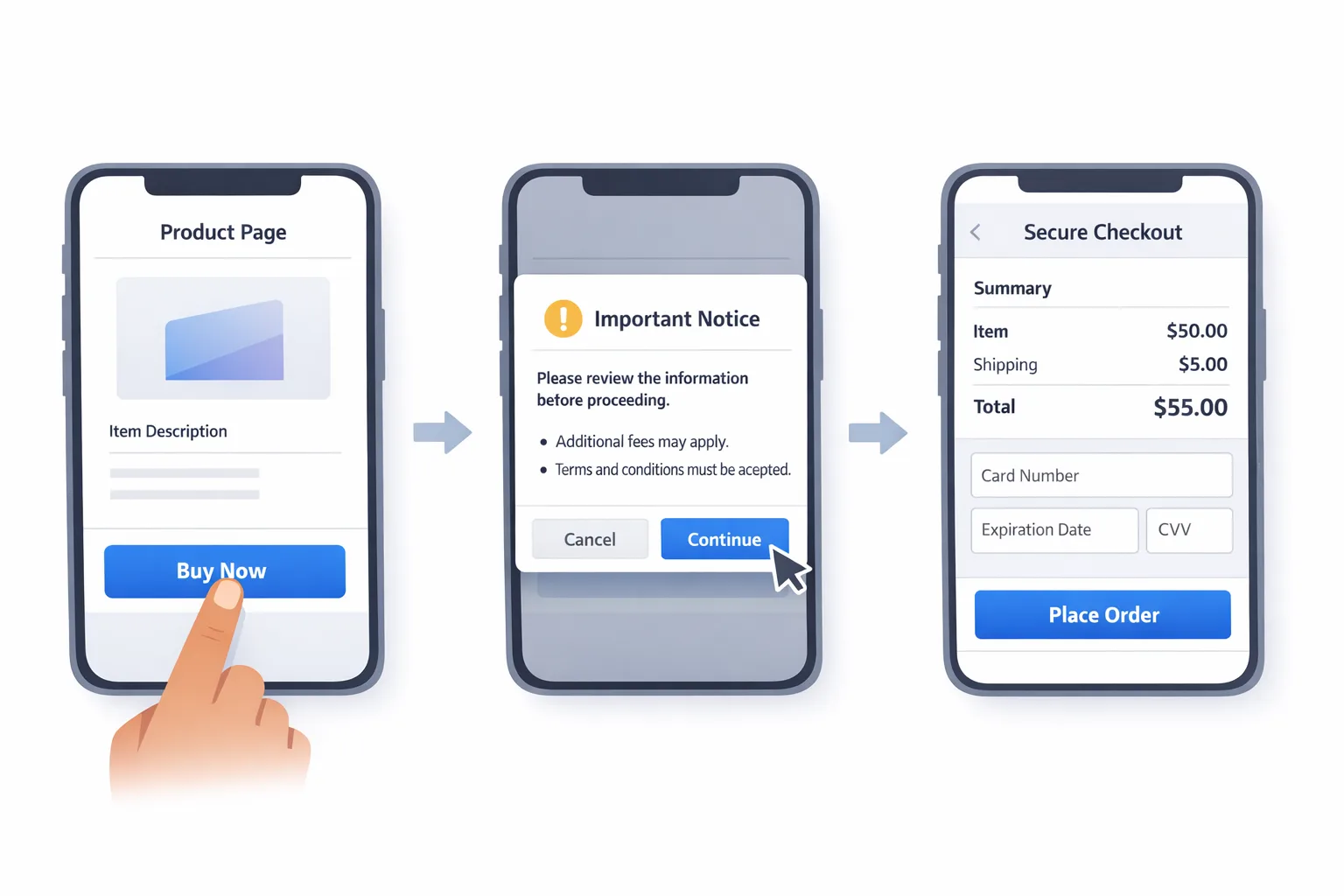
Two programs matter: External Content Links (for linking to downloads and web purchases) and Alternative Billing (to offer a non‑Google checkout in‑app). Both are U.S. only for now, and both require explicit onboarding in Play Console. Expect to show a Google‑provided information screen before any external link, integrate the latest Play Billing Library (PBL) for tokens and reporting, and send transaction/installation signals back to Google for reconciliation. If you’ve been doing quiet experiments since October, you still need to formalize enrollment and wiring.
The integration details aren’t hand‑wavy. If you link to a webshop, your app triggers an interstitial explaining you’re heading outside Google Play, then you pass a token so the external transaction can be reported later. If you link to a direct APK or an alternative store, that download link must be registered and approved in Play Console. And if you keep Google Play Billing alongside your own checkout, you need parity in entitlements and support, plus clear disclosures so users aren’t confused.
“Are there new fees?” The honest answer: plan as if yes
Google has outlined a fee structure tied to these programs. The wording in help docs uses “intends to apply,” and there’s a court milestone in January that could tweak timing. But ignoring fees is wishful thinking. For planning purposes, assume three buckets:
First, a per‑install charge if a user clicks a Play Store link to your external download and completes the install within a short attribution window. Reports circulating across the industry peg the U.S. rates at roughly $2.85 per app install and $3.65 per game install. Second, a service fee on external purchases: think 20% on one‑time digital items and 10% on auto‑renewing subscriptions when you link out. Third, an “initial acquisition” fee of a few percent in a limited window after a Play‑origin install, plus an ongoing services tier if you’re receiving Play services. The exact mix depends on which program you use and how you configure it, but the shape is consistent: choose your flexibility, and expect to pay for the distribution and services you still depend on.
Here’s the thing: even if fees aren’t invoiced on day one, the technical plumbing (tokens, reporting, and approvals) is mandatory now. Teams that wire this correctly keep optionality when the policy dust settles. Teams that don’t will be yanking links at the last minute—or worse, facing removals.
Primary keyword focus: Google Play external links
If you only take one step this week, audit where your app uses Google Play external links today. Inventory every button, banner, and deep link that jumps to a webshop, native checkout, alternative store, or direct download. Then map each to one of Google’s allowed pathways and make sure you can show the information screen, send the token, and receive the external result for reporting. Most compliance hiccups we see aren’t philosophical—they’re missed edge cases in modals, promotions, and support pages embedded in WebViews.
Will external links help or hurt margins?
Short answer: it depends on your mix of products, your adoption rates, and whether you’re a game. For a non‑game app with high subscription attach and low install churn, linking out can be attractive if the external checkout fees plus your processor fees still land below the traditional app store take—especially if you own the billing relationship. For core games, the per‑install charge can swamp savings if a meaningful slice of installs flow through Play‑origin links. If you drive the majority of external revenue through channels that don’t start inside the app—email, web CRM, social, desktop—your exposure is lower. The math is specific to your funnel.
Model it: the 6‑variable external links calculator
Grab a sheet and plug these in:
1) External link installs (ELI): number of installs completed within the attribution window after users click your Play‑origin link.
2) Proposed per‑install fee (PIF): use $2.85 for apps or $3.65 for games as a planning anchor.
3) External checkout volume (ECV): gross revenue from purchases that begin with a Play‑origin link and complete off‑Play.
4) External service rate (ESR): plan with 20% for one‑time items and 10% for auto‑renew subscriptions.
5) Processor costs (PC): combine gateway + network + fraud tools; 2.9%–4.5% plus fixed fees is common in the U.S., higher if you add chargeback cover.
6) Retained revenue lift (RRL): the incremental LTV you capture by owning billing (churn reduction, cross‑sell), expressed as a percent of ECV. Teams with strong CRM see 5%–15% over 12 months; conservative default is 3% if you’re just starting.
Estimate Net Impact = (ECV × (1 − ESR − PC) + (ECV × RRL)) − (ELI × PIF). If Net Impact is negative, tighten eligibility (fewer links in‑app, more off‑app channels) or stick with Play Billing for those flows. If positive, keep going—but verify with an A/B gated rollout.
People also ask: Do I need to join if I only link to our website?
Yes, if that link lets a user buy digital content, subscribe, or download your app, it falls into the program. “Just opening a help page” is different; “opening a page where a user can complete a purchase or install” is the trigger. Treat any link that could convert as in‑scope and show the information screen.
What Play Billing Library version should I target?
Use the current Play Billing Library version specified for the external links and alternative billing integrations. That version exposes the tokens and callbacks you need for the information screen and transaction reporting. Teams that try to bolt this onto older SDKs end up re‑doing work when the reporting fails or the interstitial doesn’t render as expected.
What about iOS—should I mirror the flow?
If you’re shipping cross‑platform, mirror the decision tree but not the UI chrome. Apple’s rules, disclosures, and fee structure differ by region, and the language around warnings is stricter. If you’re balancing both platforms, our take is to implement a policy‑aware link component with platform flags and a central registry of approved destinations. For a deeper iOS roadmap, read our take in App Store Policy Changes: What to Ship by Q1 2026.
Designing the flow without wrecking conversions
The unavoidable friction is the information screen. You can’t ditch it, but you can design around it. Clearly state the benefit before the tap (for example, “Annual plan—two months free”), place CTAs where the user expects them, and pre‑fill account state so the landing page is one step from a decision. If you run paywalls, make the “learn more” link the bridge to the external flow and log events so you can tune copy and value props per cohort.
Data and deadlines you can’t miss
• Enrollment deadline: January 28, 2026. Put it on the wall. If you link out today, you should be enrolled and integrated before that date. Google’s programs include approvals for specific URLs and download links; those take time if your app is large or your catalog is dynamic.
• Court calendar: There’s a January hearing on proposed changes to fees and implementation. Treat it as a variance on timing, not an excuse to stall. Your integration work doesn’t change if fees slip by a few weeks.
• SDK baseline: Update to the current Play Billing Library version now. You’ll also need to handle tokens and transaction IDs server‑side—budget at least a few backend sprints if you’ve never reported external purchases back to a platform.
The compliance checklist we use in production
1) Inventory every external link and download path in your app. Include promotions, WebViews, and support hubs.
2) Register destinations in Play Console and request approvals for downloads and offers. Keep a source‑controlled manifest so engineering, growth, and legal stay aligned.
3) Integrate the information screen and token handoff. Confirm that your landing pages accept parameters to stitch sessions.
4) Implement server‑side reporting: store external transaction tokens and postbacks; reconcile with your billing provider; produce auditable logs.
5) Build a “policy‑aware link” component. Centralize copy, interstitial triggers, and disable logic if policy changes. Don’t scatter magic strings across the codebase.
6) Update receipts and support flows. Users expect refunds, chargebacks, and entitlements to behave consistently whether they pay on Play Billing or your checkout.
7) Add analytics: mark every session that viewed the information screen, capture abandonment at the interstitial, and tag cohorts separately for Play vs. external conversions.
8) Run a kill switch. If fees or rules change overnight, feature flag your external links per market, store, and cohort.
Engineering gotchas nobody tells you about
• Deep link drift: Marketing swaps URLs; apps cache them. Build link discovery into startup and refresh at session start so you don’t ship stale links that fail approval.
• Token mismatch: If the user opens in a different browser profile or device, your token chain can break. Add graceful fallback and a “resume purchase” route in your web checkout.
• Subscription proration: Switching from Play Billing to your checkout mid‑cycle is messy. Decide whether you’ll honor remaining time pro‑rata and document it prominently.
• Device policy variance: Enterprise devices and child accounts may block external downloads or non‑Play payments. Log the reason and show a compliant path instead of a dead end.
How to message users without sounding shady
Users don’t care about platform politics; they care about value, safety, and control. Say what changes and why it benefits them. Examples that test well: “Manage your plan on our website—no app store lock‑in,” or “Annual web price includes two bonus months.” Avoid implying that the web is “free” of fees; emphasize account portability and better bundle options. And make sure your support team has macros for the new flows—confusion spikes in the first two weeks.
People also ask: Will these rules extend beyond the U.S.?
They already exist in different forms elsewhere, and they may keep evolving. Don’t hardcode U.S. assumptions. Build your link registry and fee modeling with market flags so you can turn on additional locales without refactoring the app. You’ll thank yourself when another region opens up or adjusts terms mid‑quarter.
ROI guardrails: When to pull back
External links are not a religion. If your game pays more per install than you save in avoided store fees, throttle in‑app links and push DTC acquisition off‑app instead. If your non‑game subscription business sees higher churn on external billing because users lose platform‑level conveniences, keep Play Billing as the default and use web for annual plans or business accounts. You can be compliant and still optimize for margin and LTV.
Security and risk: keep receipts
External checkouts invite fraudsters to test your fences. Enable 3‑D Secure or network tokens where available, tune velocity checks for micro‑transactions, and wire dispute evidence so you can fight chargebacks efficiently. Keep audit logs that join the Play token, your order ID, and processor transaction ID. When policy teams ask for proof, you don’t want to be diffing CSVs in Slack.
Cross‑store strategy: one plan, two platforms
If you sell on both Android and iOS, align the business logic, not the pixels. Centralize pricing, offers, and entitlements in your backend, then render platform‑specific experiences that satisfy each store. We’ve shipped this with a “store policy adapter” that exposes capabilities (linking, side‑by‑side billing, promos) and lets growth teams target offers per platform without violating rules. For a broader policy roadmap across both stores, see our App Store action guide and our Android‑specific explainer in our breakdown of Google Play’s linking fees.
A 4‑week plan to hit January 28, 2026
Week 1 (now): Inventory links and downloads, choose program(s), update to the latest Play Billing Library, and create your link registry. Kick off legal copy for information screens. File initial Play Console enrollment.
Week 2: Implement the interstitial + token handoff, wire server‑side reporting, and register all destinations. Build the kill switch and admin UI to toggle links by market and campaign.
Week 3: QA across devices, child accounts, and enterprise profiles. Run A/Bs on copy and offers. Validate refund and receipt flows for both Play and your checkout. Train support on new macros.
Week 4: Stage rollout to 5%, then 25%, with monitoring on abandonment at the interstitial and checkout success. Finalize your fee model and plan toggles ahead of the late‑January court milestone. Document everything for submission notes and policy reviews.
People also ask: Should I still build a webshop?
Yes—if you want durable margin improvements and direct relationships. But treat the in‑app link as an acquisition channel you can throttle. The real DTC lift comes from email, web SEO, desktop, and community—not from a single button inside your app. If you lack a DTC muscle, start small: annual plan only, single SKU, and a simple migration flow for existing subscribers.
What to do next (developers)
• Update to the current Play Billing Library and set up server‑side reporting endpoints.
• Build a single “policy‑aware link” component and migrate every external CTA to use it.
• Register destinations in Play Console and test the information screen end‑to‑end.
• Land the kill switch and market flags. Don’t ship without the off switch.
• Ship a staged rollout before January 28 so you can discover issues with time to fix.
What to do next (product and finance)
• Run the 6‑variable calculator with your real cohorts and ACVs.
• Decide which SKUs live on Play Billing versus web, and how you’ll message price differences.
• Set risk and support SLAs for external payments and make sure refunds are symmetrical.
• Build dashboards that break out Play vs. external revenue, interstitial abandonment, and post‑purchase churn.
Need help shipping this fast?
If you want a team that’s implemented these flows on both stores, we can help. See how we operate in what we do, browse relevant case studies in our portfolio, or reach out through our contact page. If you’re balancing the Android work with an iOS upgrade, we’ve outlined a complementary plan in our iOS policy playbook. Deadlines don’t move just because roadmaps are full.
Zooming out
The strategic win here isn’t “beating the store tax” outright; it’s control. External links and alternative billing let you shape offers, own the billing relationship, and reduce platform dependency—all while staying on the right side of policy. But control comes with responsibility: disclosures, reporting, risk, and support that feel enterprise‑grade. Do the boring plumbing now, and you’ll be free to experiment with pricing and bundles when everyone else is still arguing about fees.





Comments
Be the first to comment.