
App Store Connect Update Feb 2026: Ship After Deadline
The App Store Connect update on February 3, 2026 quietly reset the board for teams trying to get releases out after Apple’s January 31 age‑ratings deadline. You can now upload builds with Xcode 26.3 RC and SDKs at 26.2 for App Store and TestFlight again—useful if your last build stalled while you were reworking age gates or product pages. (developer.apple.com)

Here’s the thing: we’re now in the enforcement phase. If your app didn’t complete the revised age‑rating questionnaire by January 31, you’ll find updates blocked until you do. And even if you did, the new 13+/16+/18+ tiers are live in Apple’s ecosystem and reflected in App Store editorial curation for families. If you want to keep shipping this week—without surprise rejections—take a beat to align your App Store Connect settings and your runtime behavior.
What exactly changed in App Store Connect this week?
On February 3, Apple enabled submissions with Xcode 26.3 RC targeting the 26.2 SDK line across iOS, iPadOS, macOS, tvOS, visionOS, and watchOS. This applies to both App Store distribution and TestFlight, so you can resume betas even if you’re still working through age‑gating changes. Treat this as your green light to ship fixes behind server flags while you finish policy work. (developer.apple.com)
If your CI still pins older images, update your runner to 26.3 RC and confirm your Signing & Capabilities haven’t regressed (I’ve seen entitlements flip during RC swaps). Also sanity‑check your build metadata, screenshots, and privacy nutrition labels—reviewers are reading those more closely when age stands out as a risk factor.
The age‑ratings shift: from four tiers to five—and now it bites
Apple’s age‑ratings system moved from four public tiers to five: 4+, 9+, 13+, 16+, and 18+. The 12+ and 17+ labels are gone, and your app likely received an automatic reassignment based on your prior questionnaire answers. Under the new regime, Apple is asking every developer to answer additional questions about in‑app controls, capabilities (UGC, messaging, advertising), medical/wellness content, and violent themes. Missed it by the January 31, 2026 deadline? You can’t submit updates until you complete it. (macrumors.com)
Apple also published public‑facing definitions for each rating. A few that routinely surprise teams: unrestricted web access pushes you toward 16+; frequent medical/treatment info can also tip you higher than you expect; and simulated gambling or realistic violence accelerates the jump. (developer.apple.com)
And for families using Screen Time or Ask to Buy, Apple won’t surface age‑restricted apps in editorial areas or let kids install beyond set limits—so your visibility can change even if your search ranking holds steady. (apple.com)
Can I lower my rating if Apple’s reassignment feels too strict?
You can always choose a stricter, developer‑assigned global rating (for brand protection or to simplify moderation). But you can’t choose a rating lower than Apple’s calculated minimum. In practice, that means the quickest path forward is to adjust features and disclosures—then resubmit the questionnaire. (apps.apple.com)
Your App Store Connect update checklist (Feb 2026)
Let’s get practical. If you need to ship this week, use this order of operations. It assumes today is Monday, February 9, 2026, and you’re targeting a Thursday or Friday submission window.
- Lock the toolchain. Move CI to Xcode 26.3 RC, rebuild archives, and validate in Organizer. If you hit entitlement drift, regenerate profiles and re‑sign. (developer.apple.com)
- Finish the questionnaire. In App Store Connect > App Information > Age Ratings, answer the new sections about in‑app controls, capabilities, medical/wellness, and violent themes. Cross‑reference your marketing copy and screenshots so disclosures and imagery don’t contradict. (9to5mac.com)
- Set a conservative global rating (optional). If you’re close to a threshold, picking the stricter rating now avoids last‑minute rejections while you refine gating. (apps.apple.com)
- Gate risky surfaces. Add server‑controlled feature flags for UGC uploads, DMs, external webviews, or loot boxes. Test with a "teen" profile and log decisions for auditability.
- Update your privacy labels and app description. If you added parental controls or changed data flows, reflect that in your product page so reviewers see alignment with your claims.
- Prep a TestFlight build. Use the new toolchain to gather last‑mile QA and capture reviewer notes before you submit for release. (developer.apple.com)
- Time the release. Submit mid‑week, avoid Friday evening if you expect a back‑and‑forth on rating or safety claims.
Feature-to-rating map: a fast self‑assessment
This isn’t a legal standard—it’s a practical triage guide based on Apple’s public definitions and what reviewers have actually enforced this winter.
- User‑generated content (posts, comments, profiles), messaging, or advertising SDKs: Plan for at least 13+ unless controls are unusually strict and limited. (developer.apple.com)
- Unrestricted web access via in‑app browser: Expect 16+ unless you add robust content filters and link‑out interstitials. (developer.apple.com)
- Medical/treatment info beyond casual wellness tips: 13+ can become 16+ if the content is frequent or core to the app. (developer.apple.com)
- Simulated gambling or realistic violence: You’re flirting with 18+; err on the side of stricter gating. (developer.apple.com)
One more nuance: Apple’s editorial surfaces for kids filter out age‑restricted apps entirely. If your growth strategy leans on Today stories or app collections, a small rating bump can affect discovery even if conversion holds. (apple.com)
People also ask: do I need a new build just to update ratings?
No—you can update the questionnaire and metadata without submitting a new binary. But if your disclosures don’t reflect actual behavior (say, a webview is still open or DMs are on), expect a rejection. Treat the questionnaire as a contract with your runtime. (developer.apple.com)
Will TestFlight get blocked if I miss the questionnaire?
For builds uploaded after the deadline, your ability to move a build through review can be affected until the questionnaire is complete. That’s another reason to finish the paperwork before you waste QA cycles. (macrumors.com)
Does my visibility change for teen accounts?
Yes. With Screen Time and Ask to Buy configured, Apple hides age‑restricted apps in editorial zones for kids—lowering incidental discovery. Plan paid acquisition and owned channels accordingly while you stabilize your rating. (apple.com)
Don’t forget Google Play: 2026 Age Signals parity
If you ship on Android, align your approach with the Play Age Signals API (supported on Android 6.0+). The API returns verified age ranges where Play is required by law (defaults are 0–12, 13–15, 16–17, 18+) and includes a user status—VERIFIED, SUPERVISED, and pending/denied states—to help you tailor access. It’s live via the com.google.android.play:age‑signals library (0.0.2 as of December 2025). (developer.android.com)
More importantly, Play treats “significant changes” to your app (like enabling DMs or opening a webview) as a separate, parent‑approval workflow. You schedule an effective date in Play Console; from that date, supervised users show status flags like SUPERVISED_APPROVAL_PENDING until a parent approves. Your app must respect that at runtime—don’t enable the feature until approval clears. (developer.android.com)
Tip: Pair Age Signals with Play Integrity to reduce spoofing risk when you gate features. And if you need customized cohorts (say, your app is 10+, 15+, 17+), you can configure custom age ranges in Play Console and the API will reflect them. (developer.android.com)
The minimal architecture that passes review
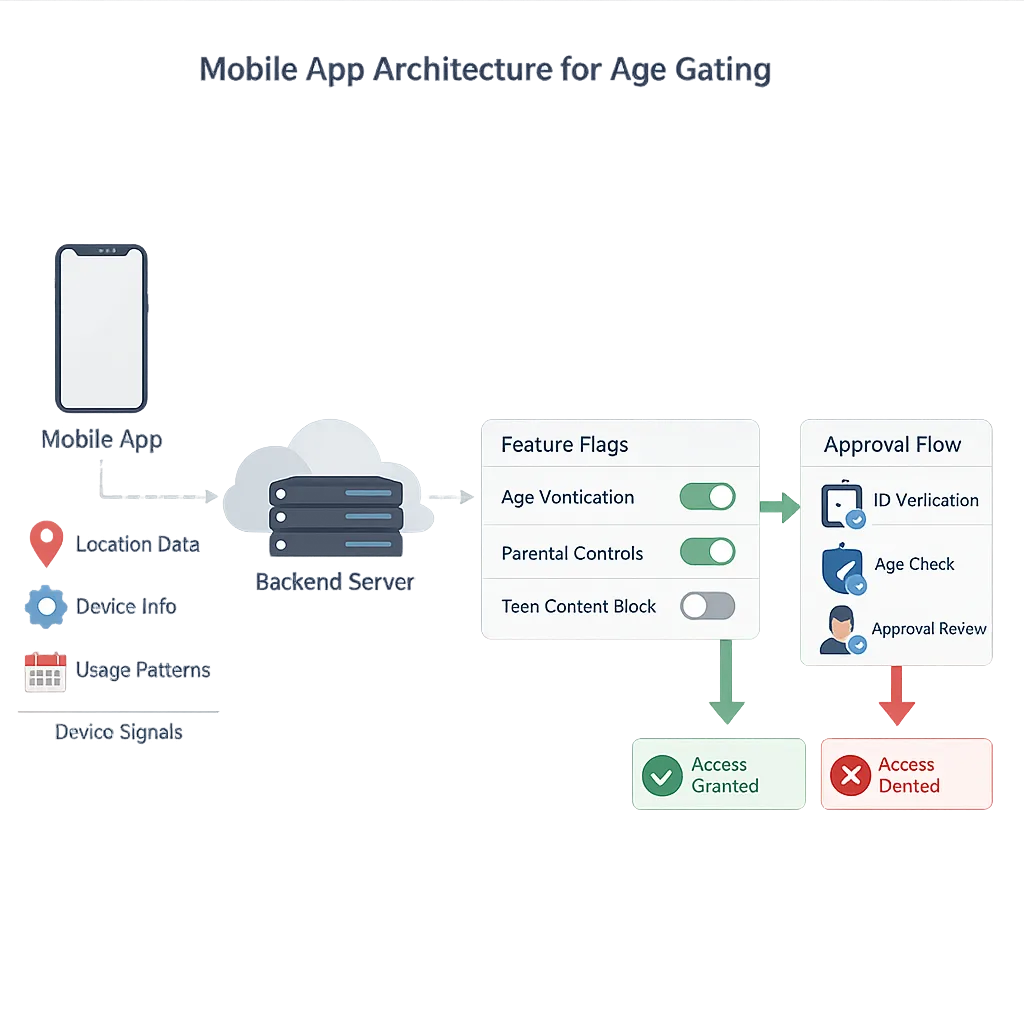
Age assurance isn’t just a toggle—it’s a runtime contract. Here’s the lean version I’ve shipped with startups that needed to move fast:
- Device‑level signal first. On iOS, honor Apple’s declared rating and your own feature flags. On Android, call Age Signals early (with a timeout and a safe default) and cache the result per session. (developer.android.com)
- Server feature flags per cohort. Maintain flags like ugc_enabled_13_15, dm_enabled_16_17, webview_allowed_16_17. Default to “off” for unknown/unauthenticated users.
- Parent‑approval handshake (Android). If status is SUPERVISED_APPROVAL_PENDING after a scheduled significant change, keep the feature disabled and show a non‑blocking toast explaining why. Retry on app resume; don’t nag. (developer.android.com)
- Explain, don’t stonewall. Use a compact modal: “This feature isn’t available for your age range.” Link to support, not to a policy wall.
- Event logging. Log the gating decision and the inputs used (without PII). If review asks, you can demonstrate consistent enforcement.
- Backdoor tests. QA tries to bypass with deep links, notifications, and share sheets. Gating must hold across app surfaces.
Common rejection traps (and how to dodge them)
1) Mismatched disclosures vs. runtime. If you say “no UGC” but comments exist on nested screens, reviewers will find them. Audit every path—including share sheets and external SDK dialogs.
2) Webview blind spots. Unrestricted web access pushes you toward 16+. If you must keep it, inject safe‑browsing filters and add a content warning step. (developer.apple.com)
3) Medical content creep. Fitness content that drifts into treatment advice can trigger a higher rating. Scrub copy for “diagnose,” “treat,” or “cure,” and add editorial standards if you truly provide medical info. (developer.apple.com)
4) Ads and tracking in teen contexts. If ads are on by default for 13–15, ensure creative standards and frequency controls. Consider turning ads off until the user is 16+ unless you can guarantee brand‑safe inventory.
5) Out‑of‑date screenshots. If your product page showcases an unrestricted browser or peer‑to‑peer messaging, your questionnaire needs to match—or the screenshots must change.
Data, dates, and versions you should actually write down
- February 3, 2026: App Store Connect supports submissions with Xcode 26.3 RC, SDKs 26.2, including TestFlight. (developer.apple.com)
- January 31, 2026: Deadline for completing Apple’s updated age‑ratings questionnaire; updates blocked afterward until completion. (macrumors.com)
- Age tiers now live in Apple’s ecosystem: 4+, 9+, 13+, 16+, 18+ with public definitions. (developer.apple.com)
- Play Age Signals library: 0.0.2 current; default bands 0–12, 13–15, 16–17, 18+. Significant‑change approvals managed via Play Console. (developer.android.com)
What to do next (this week)
- Finish the Apple questionnaire and, if needed, set a stricter global rating to stabilize reviews.
- Ship a TestFlight build using Xcode 26.3 RC and collect reviewer‑style feedback from your team. (developer.apple.com)
- Implement server‑side flags for UGC, DMs, and webviews; default to off for unknown or underage cohorts.
- On Android, integrate Age Signals and schedule any “significant changes” for parent approval before enabling teen‑sensitive features. (developer.android.com)
- Update your product page copy and screenshots to match your disclosures and gating.
Zooming out: policy shifts are product strategy now
Age assurance moved from a dusty policy PDF into your actual release checklist. If you treat it like a compliance chore, you’ll spend spring fighting rejections. Treat it like part of product design—clear disclosures, smart defaults, and respectful messaging—and it unlocks shipping velocity again. If you want a deeper dive into shipping tactics, we broke down practical architectures and rollout patterns in our recent posts, including a step‑by‑step build‑and‑release plan and an enforcement playbook. Read our App Store Connect February guide, then pair it with what to ship for age‑ratings 2026 and our Play Age Signals API playbook for Android parity.
Need a partner to accelerate? See how we build and harden mobile systems under real deadlines on our portfolio, or talk to us about a focused two‑week compliance sprint via our services page.

FAQ for founders and PMs
Will my rating affect ad partners or brand deals?
Possibly. Some agencies filter for 4+/9+ placements in family inventory. If you’re 13+ with UGC, share your moderation and reporting tools to keep deals on track.
Is raising my global age rating a growth killer?
Not if you’re honest about your audience. Many social and creator apps thrive at 16+. Use a clear value proposition for teens, and invest in onboarding that explains why certain features are limited by age.
What about international differences?
Apple applies regional standards in some countries, and Play only returns age signals in jurisdictions that require it. Build your gating to handle “unknown” or “not applicable” gracefully; don’t block adult users without cause. (9to5mac.com)
We’ve been through enough review cycles to say this with confidence: when age assurance is an explicit, testable part of your product, you ship faster—because reviewers can see you designed for it, not papered it over.





Comments
Be the first to comment.