App Store Age Verification 2026: A Dev Playbook
The phrase “app store age verification” moved from policy blog fodder to an engineering priority in 2026. Apple finished rolling out new age ratings and submission gates, Google shipped a runtime API for age signals on Android, and states are flipping the switch on laws that make age and parental consent flows part of your product surface. If your release trains aren’t age‑aware by Q2, you’ll feel it in blocked updates, conversion drop‑offs, and support tickets.
Why this matters now: the 2026 timeline (with dates)
• January 31, 2026 — Apple finished auto‑updating App Store age ratings and required every developer to answer a new questionnaire. Ratings now surface consistently across iOS, iPadOS, macOS, watchOS, tvOS, and visionOS. If you didn’t respond by the deadline, submissions get interrupted until you do. (developer.apple.com)
• February 3, 2026 — App Store Connect began accepting builds from Xcode 26.3 RC (SDKs for the 26.2 OS family). This is a signal that the spring SDK minimum bump is close. (developer.apple.com)
• April 28, 2026 — Apple’s next SDK minimum requirement kicks in. New uploads must be built with Xcode 26+ using OS 26 SDKs. If you’re stuck on older toolchains, plan migrations now. (developer.apple.com)
• May 6, 2026 — Utah’s App Store Accountability Act starts imposing obligations on app stores and developers (rolling effective dates). Expect platform‑provided signals and enforcement to harden after this date, with full enforcement set for December 31, 2026. (insideprivacy.com)
• July 1, 2026 — Louisiana’s version takes effect, requiring store‑level age checks and passing down age categories; developers must act on the signal. (lafamilyforum.org)
• Texas — The Texas law slated for January 1, 2026 is currently blocked by a federal preliminary injunction (December 23, 2025). Track the case, but don’t pause implementation—the Utah and Louisiana timelines still bite. (macrumors.com)
What actually changed on the platforms
Apple: new ratings and stricter submission hygiene
Apple’s 2026 ratings update wasn’t cosmetic. The new rubric feeds parental controls (Screen Time and system‑wide content filters) across device families, and your app’s distribution can be throttled if your metadata or content flags are off. If your category touches UGC, commerce, or AI‑generated content, re‑auditing your questionnaire answers isn’t optional. Apple has also pinned a spring 2026 SDK minimum, so assume Xcode 26.x is table stakes for shipping updates. (developer.apple.com)
Practical read‑through: run a gap analysis between your disclosed age rating and your real UX. If your “16+” label coexists with one‑tap access to mature UGC or external links to unrestricted web content, App Review will notice—especially as these ratings now drive built‑in OS controls. For a deeper primer on getting the answers right, we covered patterns and traps in this field guide on what changed and what to ship.
Google: Play Age Signals API at runtime
On Android, you don’t verify ages yourself; you read a signal. The Play Age Signals API returns a verification status (for example, SUPERVISED, VERIFIED, or APPROVAL PENDING), an optional age range (bands such as 0–12, 13–15, 16–17, 18+ depending on region), a most‑recent approval date, and a Play‑generated install ID for supervised accounts (used for revocation notices). It supports Android 6.0+ and is designed for gating experiences—not for ads or analytics. (developer.android.com)
Policy nuance: Google’s January 2026 Play newsletter reminded developers that age signals can only be used to provide age‑appropriate experiences in the receiving app—don’t dump them into your growth stack. Build for least‑privilege and separate storage. (developer.android.com)
People also ask: do developers have to verify age themselves in 2026?
Short answer: in states adopting app store accountability laws, app stores verify the user’s age category at account creation and pass down signals. Developers must then adapt UX and data handling based on that signal. Utah’s obligations for stores and developers arrive May 6, 2026; Louisiana follows July 1, 2026. Texas is enjoined for now, but similar proposals are circulating elsewhere. (insideprivacy.com)
What happens if Play returns UNKNOWN or null?
UNKNOWN means the user is in an applicable region but hasn’t been verified or supervised. Best practice: degrade gracefully—limit sensitive UGC and payments, and prompt the user to resolve status in Play. If userStatus is null, treat it as out‑of‑scope and proceed with your standard policy. Avoid dark patterns that coerce verification; nudge only where required for safety features. (developer.android.com)
Will Chrome’s cookie decision affect this work?
No. Google’s reversal on deprecating third‑party cookies doesn’t change your age‑gating obligations. The privacy plumbing for ads is now a separate track; age signals remain a runtime compliance interface. Build as if cookies don’t exist for this problem space. (theverge.com)
A pragmatic framework: A‑G‑E‑F‑L‑O‑W
Here’s the battle‑tested sequence we’re rolling into client sprints. Assign each letter to an owner, add it to your release checklist, and you’ll clear reviews without sandbagging experiments.
A — Assess
Map jurisdictions (Utah, Louisiana; track Texas) and products affected. Catalog features that change by age: UGC posting, chat, purchases, external links, personalization, and data collection. Align legal, security, and growth on a single matrix of “age gates” vs. “feature flags.” (insideprivacy.com)
G — Gate
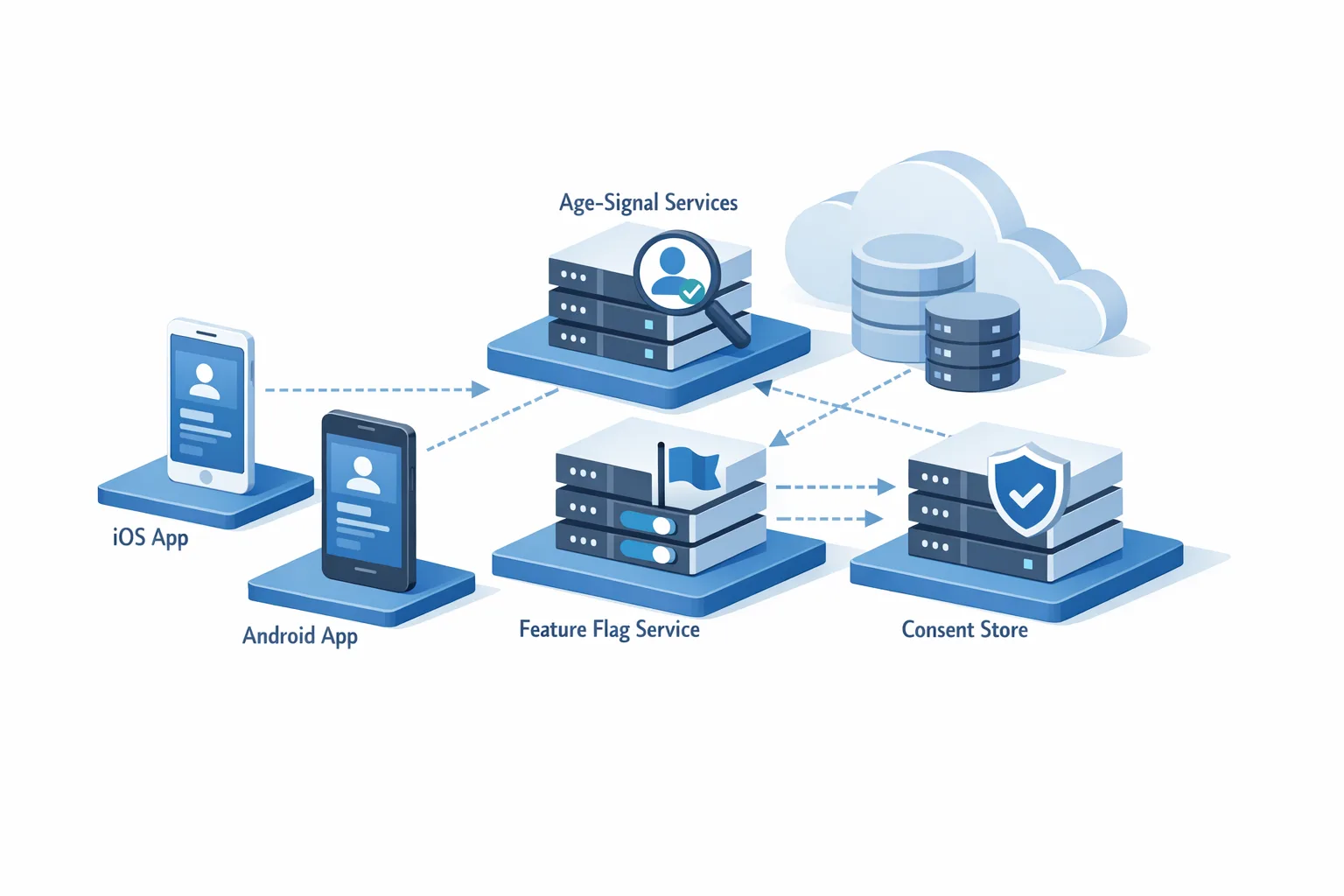
Introduce a centralized AgeGate service in your app that consumes platform signals once per session start and exposes a single API to the rest of the client: AgeContext.current(). Don’t scatter calls across views; one source of truth avoids drift.
E — Enforce
Translate policy to code with deterministic rules. Examples:
- Under 13: read‑only UGC, no DMs, no external links that bypass safe web views, no personalized ads, and no account deletion without parent‑mediated flow.
- 13–15: post with content filters on by default; payment features behind explicit parental approval if the store signal says supervised/approval pending.
- 16–17: enable creation features; prompt for parental approval only where required; tighten reporting and moderation SLAs.
- 18+: full feature set.
Mirror these in server checks. Client‑only enforcement is brittle.
F — Flag
Wire feature flags so you can change enforcement without a new binary. Utah and Louisiana may issue clarifications; you don’t want to wait on the app review queue to react.
L — Log
Maintain a minimal, purpose‑bound audit trail: the age band (not birthdate), the enforcement rule applied, and a consent state hash. Store separately from analytics; set strict TTLs to honor data‑minimization provisions. For supervised installs on Android, be prepared to process a revocation event tied to the install ID. (developer.android.com)
O — Orchestrate consent
Design parent approval journeys that your support team can actually explain. On Android, reflect Play’s mostRecentApprovalDate in your UI where it matters (for example, attempting a first in‑app purchase). On Apple, align with Family Sharing expectations and keep your copy tight: who approves what, for how long, and how to revoke.
W — Watchlists and war‑rooms
From May through July, run a weekly cross‑functional stand‑up: review state rollouts, app review feedback, and customer tickets. Keep a “policy hotfix” release train warmed up.
The reference architecture that actually ships
At a high level, you want three layers working in lockstep:
1) Signal layer (client) — A thin adapter for Apple/Google signals. On Android, it calls the Play Age Signals API at session start and caches in memory with a short TTL; on Apple, it mirrors the system’s age rating and your declared gating logic tied to App Store metadata. Avoid persisting beyond what’s necessary. (developer.android.com)
2) Policy layer (shared) — A rules engine encoded in a single, versioned JSON (or protobuf) file pulled from your config service. It maps age bands to capabilities. Example schema: { "band":"13-15", "features": {"ugc_post": false, "dm": false, "purchases": "parent_ok"}}. This lives outside the binary so you can patch fast.
3) Enforcement layer (server+client) — Server validates requests against the policy file and the age band included in a signed client token (short‑lived). The client renders only allowed UI states. When the platform revokes approval (Android) or the store signals change, your policy drives a soft lock (prevent action, explain why) and a clear recovery path.

Data model and storage
Keep it lean. Persist only:
- ageBand (string or enum) with a short TTL.
- enforcementReason (for example, “unknown_status_purchase_blocked”).
- consentState (approved/denied/pending) and a consentUpdatedAt timestamp.
- For Android supervised installs, the installId if you must process revocations; never join it to marketing data. (developer.android.com)
Delete logs on schedule. Texas (if revived) contemplated deletion after verification; Utah/Louisiana differ. Align retention with the strictest plausible path, and isolate storage from analytics to avoid accidental misuse. (capitol.texas.gov)
Gotchas we keep seeing
• Treating age signals as segmentation fuel. Don’t. Google’s guidance limits usage to age‑appropriate experiences within the app. Run your personalization stack without these fields. (developer.android.com)
• Assuming “Texas is blocked, so we can wait.” Utah and Louisiana dates still land in May and July. Teams that wait will ship hurried hotfixes—and eat the conversion loss from rushed UX. (insideprivacy.com)
• Missing Apple metadata drift. If your on‑device gates don’t match your App Store Connect answers, rejections follow—especially post‑January 31. Keep your questionnaire, in‑app disclosures, and moderation policies in sync. (developer.apple.com)
• SDK minimum surprise. If you’ve got tooling pinned to pre‑26 SDKs or ancient CI images, April 28 will hurt. Test your pipeline with Xcode 26.3 RC and lock a migration sprint. (developer.apple.com)
Let’s get practical: your two‑sprint checklist
Week 1:
- Stand up a client AgeGate module and read Play Age Signals on Android; stub Apple to consume your policy file’s bands for now. (developer.android.com)
- Author the shared policy file (bands → capabilities) and pull it from your config service.
- Add server middleware to enforce policy on sensitive endpoints (post, DM, purchase, external link).
- Draft parent‑approval copy and UI; add analytics to measure friction points (without storing age signals).
- Answer Apple’s 2026 rating questionnaire and fix any metadata/UX mismatches. (developer.apple.com)
Week 2:
- Wire revocation handling (Android supervised install ID) and a soft‑lock UX.
- Feature‑flag all enforcement so legal can change posture without a release.
- Pen‑test the flows; add basic abuse checks (jailbroken/rooted detection + Play Integrity pairing recommended). (developer.android.com)
- CI/CD: upgrade to Xcode 26.x images and validate signing/provisioning with the 26.2 SDK family. (developer.apple.com)
How this fits your roadmap (and budget)
Yes, compliance can be value‑add. Age‑aware defaults are also safer defaults. Teams that ship clean gating and clear parent approvals see fewer chargebacks, fewer bad‑fit users in teen cohorts, and fewer moderation escalations. If you need a blueprint and implementation partner, our product and engineering services team has patterns ready to drop into your stack, from feature‑flag strategy to consent UX.
Want deeper dives? We’ve covered platform specifics in Play Age Signals API: 2026 Compliance Playbook and walked through Apple shipping nuances in February 2026 App Store Connect Update: Ship Smarter and App Store Age Ratings 2026: What Changed and What to Ship.
FAQ: Do I need to geofence by state?
Build the hooks, but avoid spaghetti. Use a policy file keyed by jurisdiction and platform. Most enforcement will ride platform signals, but you may need state‑specific copy and fallback behaviors. Keep experiments (like invite‑only teen features) behind flags so you can pivot if guidance changes.
What to do next
- Schedule a 60‑minute age‑gating design review with eng, product, legal, and support.
- Implement the AgeGate module and shared policy file this sprint.
- Ship a parent‑approval UX with analytics on abandonment points.
- Lock your toolchain upgrades for the April 28 Apple SDK minimum.
- Set a weekly compliance stand‑up from May through July to react fast.
Here’s the thing: age‑aware apps aren’t just compliant—they’re easier to trust. Do the plumbing once, manage it with flags, and get back to shipping features your users love.





Comments
Be the first to comment.