
App Store Age Ratings 2026: Ship What Actually Matters
Apple’s App Store age ratings update hits a real deadline this week. By January 31, 2026, developers must answer the updated age rating questions in App Store Connect or risk being blocked from submitting app updates. Sounds administrative. It isn’t. The new 13+, 16+, and 18+ tiers carry design, data, and monetization consequences that your product team has to absorb—fast.
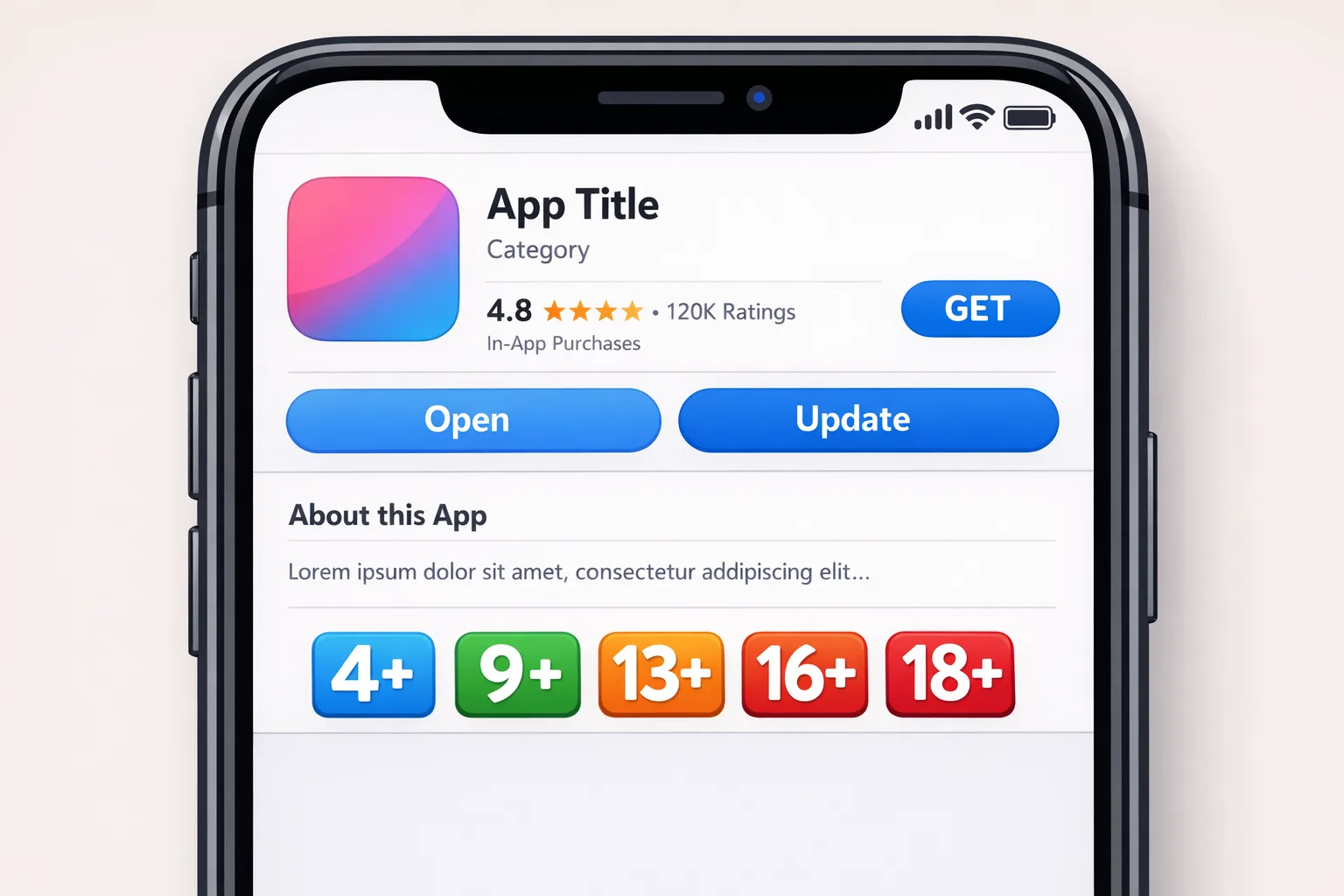
What actually changed—and why it’s more than a form
Apple re-cut age categories to 4+, 9+, 13+, 16+, and 18+ and required developers to re-answer the age rating questionnaire by January 31, 2026. Apple has already auto-mapped legacy ratings, but your answers recalibrate the public label and, more importantly, how system-level protections interact with your app on Apple OS versions shipping across iOS 26, iPadOS 26, macOS Tahoe 26, tvOS 26, visionOS 26, and watchOS 26.
Two things make this more than paperwork. First, the questions are more granular—think user-generated content (UGC) controls, simulated gambling, realistic violence, medical or wellness content, and whether you provide parental controls. Second, these answers don’t live in a vacuum. They prevent you from marketing to people who shouldn’t see you, and they gate what teenagers can do on-device when parents enforce restrictions.
Also note the platform floor: apps submitted since April 2025 already require modern SDKs (Xcode 16+ and current platform SDKs). If your pipeline still builds on older tooling, fix that now or your compliance work won’t ship anyway.
Age ratings vs. age verification: they aren’t the same
Ratings describe app content. Verification determines a user’s age class and whether parental consent is required for teens and children. Apple’s privacy-preserving approach exposes age categories—not birth dates—via APIs like Declared Age Range, and gives developers hooks to request parental consent after a significant change. In 2025, the Texas App Store law (SB2420) pushed Apple to expand these tools and testing sandboxes.
Here’s the twist: as of January 27, 2026, Texas’s law is blocked by a court order, so Apple paused Texas-specific enforcement plans. But the APIs and test flows remain available, and similar laws are queued or in effect elsewhere. Translation: design your flows as if verification will be required in multiple jurisdictions, because that’s where policy winds are blowing.
Where the new age ratings hit product teams first
Ratings ripple through four core areas: storefront visibility, on-device restrictions, data policy, and monetization. If you over-declare, you’ll shrink your reachable audience and ad inventory. If you under-declare, you risk rejections, takedowns, or reputational blowback. Treat the questionnaire like a product spec, not a checkbox.
- UGC and community features: you’ll need robust content controls (report/ban/mute, filters) to justify teen-appropriate ratings.
- Ads and tracking: teens face tighter targeting in many ad networks; combine your declared rating with runtime signals to avoid serving restricted creatives.
- Payments and gambling sims: 16+ and 18+ boundaries matter for simulated gambling and certain pay-to-enter contests.
- Health and medical content: even “wellness” features can tip a rating if they imply treatment or diagnosis.
Do I need to re-rate my live app by January 31?
Yes—re-answer the updated questions by January 31, 2026, or App Store Connect will block new submissions. Your live binary won’t vanish on February 1, but you don’t want a hotfix held because you forgot a questionnaire. Plan ten focused minutes to submit, and an hour with product and legal if you’re in the gray zones (UGC, gambling mechanics, intimate content, or teen engagement).
“But my app is for everyone.” Really? Pressure-test your claim.
Let’s get practical. If your app includes open chat, unmoderated profiles, or links to external web content that you don’t control, you probably aren’t “4+.” If you show user avatars that can include suggestive imagery, profanity in usernames, or violent gameplay clips, you’re likely 13+ minimum—possibly 16+ if you can’t reliably filter. When in doubt, ship better controls and documentation, then choose the lowest rating you can defend in an App Review escalation.
How to map features to the new tiers
Use this quick rubric in sprint planning. It’s not legal advice; it’s battle-tested product triage.
- 4+: closed experiences, no UGC, no violence, no simulations of adult themes, no external content surfaces.
- 9+: mild fantasy violence or humor; still no open UGC. Heavily curated feeds or story-only experiences qualify here.
- 13+: UGC with strong safeguards, realistic but infrequent violence, references to alcohol/tobacco, medical/wellness content that avoids diagnosis and includes disclaimers.
- 16+: frequent intense contests, horror themes, more realistic violence, or mature humor—even if you moderate well.
- 18+: explicit sexual content, gambling simulations tied to value, or persistent adult themes.
Testing the age flows without tanking your roadmap
Set aside one afternoon for end-to-end tests. You’re validating three layers: declared rating, runtime age category, and parental consent after a significant change.
- App Store Connect: complete the updated age rating questions; note the resulting label.
- Runtime: in a test environment on iOS 26.2 or later, retrieve the user’s age category (e.g., under 13, 13–15, 16–17, 18+). Make sure your app gracefully handles “unknown.”
- Significant change: simulate a “significant change” (policy update, monetization shift, new social feature). Ensure your app requests parental consent where required and blocks access if consent is revoked.
- Marketing and ads: verify your SDKs can adapt creative categories and tracking based on teen usage, not just region/language.
Need a deeper primer? Our hands-on walkthrough of verification patterns breaks down flows and edge cases in plain English—see App Store Age Verification in 2026: Ship Smart.
Common gotchas we keep seeing
These are the traps that burn time during review or cause surprise rejections.
- Webviews and external links: if you let teens jump to content you can’t control, your rating should reflect the worst-case experience.
- “Profile pictures are safe”… until they aren’t: add default safe avatars, blur previews in teen contexts, and moderate uploads server-side.
- Simulated gambling: slot-machine spins, loot boxes, or raffle mechanics can push you up the ladder—even with virtual currency.
- Medical or wellness claims: avoid diagnostic wording; provide disclaimers and clear language about informational purposes only.
- Ad creative drift: your app may be 13+, but an ad network could serve 18+ creatives if you don’t pass correct context or blocklists.
How does Texas factor in now?
As of late December 2025, Texas’s app store law is on hold pending litigation. Apple paused Texas-specific enforcement plans, but the developer tools remain. Whether or not Texas proceeds this year, other states are circling similar rules. If you build for families or teens, implement verification-aware flows now because they align with Apple’s platform philosophy and reduce future rework.
Our rapid response piece from the fall still holds up: if a jurisdiction activates age assurance, you’ll want a ready path to re-request parental consent after material changes. We outlined concrete patterns and copy blocks in our 7‑day ship plan for the new ratings.
What about Android? March 2026 matters for security and trust
Android’s developer verification push goes live in March 2026, with increasing enforcement across markets. Even if you don’t sideload, your organization should centralize app ownership, keys, and contact info. If you distribute outside Play, expect checks on identity and provenance. We published a prep list and budget notes here: Android Developer Verification: March 2026 Plan.
Monetization and ads: the teen reality check
Expect reduced addressability for teens this year. Combine your App Store age ratings label with runtime signals to decide which SDK features to enable. For advertising, maintain two creative catalogs: all-audience and teen-safe. For analytics, make sure you can suppress device identifiers and sensitive events when the user is categorized as a teen. On web touchpoints, modernization around cookie loss is still essential; our 2026 Chrome cookies playbook covers pragmatic patterns.

The RATE framework: a one-sprint plan
If you’re short on time, use this framework to get compliant without derailing your roadmap.
R — Re-assess content against the new tiers
Audit features, screenshots, and ad placements against 13+/16+/18+ thresholds. Document your rationale in a one-pager to use if App Review asks for clarification.
A — Assure age at runtime (without over-collecting)
Adopt the platform signals that provide age category, not birthdays. Prepare your app to handle unknown or unverifiable cases conservatively. Log events only at the category level.
T — Test consent and significant change
Wire up flows to re-request parental consent after any material shift: monetization, data handling, or safety-critical features. Add kill switches for access if consent is revoked.
E — Explain your safeguards in copy and policy
Ship plain-language disclosures: what you restrict for teens, how reports are handled, and how parents can reach you. Update your in-app policy surface to match your App Store listing.
People also ask
Can I lower my rating later if I add better controls?
Yes. Improve moderation and add guardrails, then update your answers and resubmit. Keep evidence (screens, admin tools) handy in case App Review requests more detail.
Will Apple reject me if my rating conflicts with my ads?
They can. If your in-app ad creative shows mature themes while your declared rating targets teens, expect friction. Coordinate with networks and pass contextual flags.
Does the rating affect my search ranking?
Indirectly. If your rating shrinks your eligible audience, you’ll see fewer impressions. Conversely, a too-low rating that triggers complaints can hurt review velocity and merchandising.
Implementation checklist you can use today
Block three hours. Pair a PM with an engineer. Use this list verbatim.
- Complete the updated App Store Connect age rating questionnaire (owner role).
- Review UGC safeguards: report, mute, block, and automated filters; document thresholds.
- Gate risky surfaces for teens: external linkouts, public profiles, and discovery feeds.
- Instrument age-category toggles in analytics; anonymize teen events.
- Ad SDKs: enable teen-safe creative catalogs and disable sensitive interest targeting.
- Payments: scrub copy and positioning of chance-based mechanics; avoid pay-to-enter contests for teens.
- Prepare “significant change” consent requests; add a server-side flag for temporary lockouts if consent is pending.
- Update screenshots and descriptions to reflect safeguards; avoid glamorizing mature themes.
- Ship policy copy in-app and sync with your listing; include a parental contact path.
For deeper implementation patterns, including runtime UI states for consent pending/denied, see our practical guide: Ship Smart for App Store Age Verification.
A word on process: treat this like safety engineering
This is not a one-and-done chore. Assign an owner for teen safety, run quarterly reviews of moderation metrics, and treat age features as safety-critical: feature flags, staged rollouts, and rapid rollback paths. Keep a short internal memo explaining your current rating rationale and the preventive controls in production. It’s your shield when a policy reviewer asks tough questions.
What to do next
- Today: file your updated answers in App Store Connect. Don’t risk a blocked hotfix next week.
- This week: implement basic runtime age-category handling and teen-safe ad settings.
- Next sprint: add significant-change consent flows and polish moderation UX.
- February: align Android org data for March developer verification; centralize keys and legal contacts. Our brief can help: March 2026 Android plan.
- Quarterly: review metrics (reports per 1,000 sessions, consent churn, teen session share) and revalidate your rating.
If you want a partner to review your rating logic, instrument age-aware analytics, or harden your moderation stack, our team can help—start here: mobile product and compliance services.
Here’s the thing: “We’ll just pick 13+ and see what happens” is how teams end up fighting fires in App Review and ad ops. A few hours now—tight controls, clear copy, tested consent flows—will save you weeks later and keep your roadmap intact.



Comments
Be the first to comment.