
Google Play Policy Update 2026: What To Ship Now
Google Play policy update activity hasn’t eased up in 2026—if anything, it’s stricter and more data-driven. On February 19, 2026, Google detailed its 2025 enforcement results, including aggressive actions against policy‑violating apps and accounts. That report is the clearest signal yet about what will trigger blocks this year. If your next release still treats permissions, store data, or integrity checks as an afterthought, expect delays. This article translates the latest rules into a tactical plan you can ship against—today.

What actually changed—and why it matters now
Here’s the thing: Google’s public numbers show a tougher gate. In 2025, Play blocked more than 1.75 million policy‑violating submissions and banned over 80,000 bad developer accounts. Play Protect now scans on the order of hundreds of billions of apps per day and flagged tens of millions of malicious apps distributed outside Play in 2025. Those are not abstract stats; they justify tighter review paths and more automated rechecks post‑publish. If you’ve felt reviews getting pickier, you’re not imagining it.
Two timelines to keep on your radar in early 2026: first, the Android Security Bulletin for February 2026 landed on February 2, reinforcing Google’s monthly cadence for mitigations. Second, early February also brought a Play System Update label glitch that confused some teams about patch levels; Google said it was a display‑only issue. Don’t burn time chasing a phantom downgrade—focus your energy where reviewers are actually blocking releases: permissions, disclosures, and integrity signals.
Google Play policy update 2026: what it means for your next release
The headline is simple: permissions must map to real, user‑visible features; your store data must accurately reflect collection and deletion practices; and integrity signals should be integrated, not bolted on. Let’s get practical.
Photo & Video Permissions: pass or remove—no middle ground
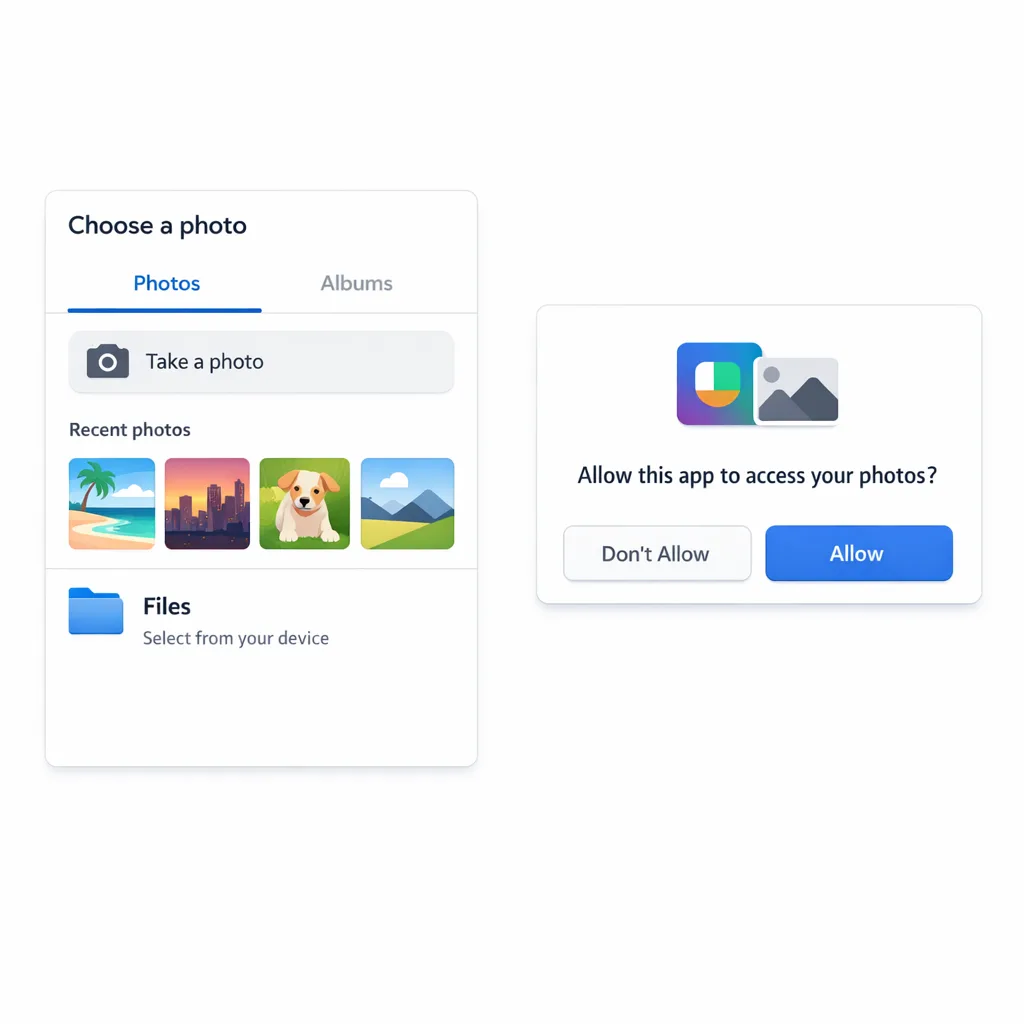
Google’s Photo and Video Permissions policy tightened over 2024–2025 and is fully enforced now. If your app targets Android 13+ and declares READ_MEDIA_IMAGES or READ_MEDIA_VIDEO, reviewers expect either (a) a clear, core use case that needs frequent or persistent access to the camera roll, plus an approved declaration; or (b) those permissions removed with a switch to the Android photo picker for one‑off or occasional selection.
Practical guidance that’s been working for us this year:
- Audit the manifest across all active tracks (internal, closed, open, production). A single lingering build with broad media permissions can block promotion of a compliant build elsewhere.
- If your use is infrequent, remove the permissions and integrate the system photo picker. Don’t ship your own file picker just to keep broad access.
- If your use is core (e.g., gallery, camera, UGC editor, QR/barcode flows with saved frames), submit the Play declaration with concise, testable descriptions. Avoid hand‑wavy language like “for better UX.”
- Fail gracefully when access is denied. Provide a picker‑based alternative or tighten the feature scope—reviewers check this path.
Data safety, deletion, and truth‑in‑store
The “Data safety” section is a living contract. Reviewers cross‑check it against runtime behavior and SDK calls. If you changed analytics vendors, enabled new device signals, or started collecting media metadata for AI features, update disclosures before you submit. If you support user accounts, ensure in‑app deletion is discoverable and consistent with your store listing’s deletion policy. Inconsistent or stale disclosures are low‑effort rejections.
Play Integrity API is table stakes
Fraud and sideloading protections expanded over the past year, and integrity verdicts are easier to adopt than most teams assume. At minimum, wire the standard verdict to gate sensitive flows (e.g., payouts, gift card redemption, promo abuse hotspots). On devices running Android 13 and above, improvements to Play Integrity’s underlying tech have made verdicts faster and more reliable. Bonus: use signals to inform gradual feature degradation instead of blunt access denials—reviewers reward proportional responses.
SDK hygiene still matters
Reviewers routinely flag issues originating in third‑party SDKs: outdated ad SDKs requesting restricted identifiers, crash reporters collecting device‑wide logs beyond your disclosure, or analytics kits toggling file access you don’t use. Make the Google Play SDK Index and release notes review part of your sprint definition of done. If an SDK adds a sensitive permission by default, explicitly opt it out and document that decision in code.
The 30‑Day Fast‑Track Compliance Plan
Need to turn a shaky pipeline into a green‑light release inside a month? Use this cadence. Adjust the team size, not the order.
Week 1: Inventory and triage
- Enumerate all declared dangerous or restricted permissions in every active track. Flag
READ_MEDIA_IMAGES,READ_MEDIA_VIDEO,MANAGE_EXTERNAL_STORAGE, location (foreground/background), and anything toggled by SDKs. - Map each permission to a user‑visible feature and a store listing claim. If there’s no one‑to‑one mapping, plan to remove or switch to a system surface (photo picker, share sheet, intents).
- Review your “Data safety” answers, account deletion flow, and age rating. Draft diffs for what changed since your last release.
Week 2: Implement and instrument
- Remove broad media permissions if the use is not core; integrate the Android photo picker and add graceful fallbacks.
- Wire the Play Integrity API. Start by gating high‑risk actions; log verdicts and device state so support can see why a session was limited.
- Add pre‑submit checks to CI that fail builds if restricted permissions appear in the manifest without a matching feature tag and test.
Week 3: Verify and document
- Run scenario tests for permission denial, revocation, and downgraded integrity verdicts. Record screen captures—attach them to your internal review notes.
- Update the store listing, “Data safety,” and privacy policy language to match actual behavior. Keep it specific: what, why, when, and how users opt out.
- Draft the Play declaration (if applicable) with a testable narrative: feature, frequency, and why the system picker won’t suffice.
Week 4: Stage and submit
- Ship to internal testing with reviewers’ POV in mind: exercise the paths you just edited and verify fallbacks.
- Promote to closed testing with staged rollout. Monitor crash‑free sessions, permission denial metrics, and integrity‑gated event fallout.
- Submit to production with a concise “What changed” note in Play Console. Keep it factual and reviewer‑friendly.
Pre‑flight checklist before you hit “Submit”
- Manifest clean across all tracks; removed unneeded media permissions and verified no older build re‑introduces them.
- Android photo picker integrated for occasional media access; flows remain usable when permissions are denied.
- Play Integrity API verdicts logged and enforced proportionally in sensitive flows.
- “Data safety” and privacy policy updated for any new collection, retention, or deletion behavior.
- SDKs audited; restricted identifiers and storage access are opt‑out by default where possible.
- In‑app account deletion present, discoverable, and matches text in your store listing.
People also ask: quick answers you can use
Do you still need READ_MEDIA_IMAGES in 2026?
Only if the feature is core and needs persistent or frequent camera‑roll access. If users occasionally attach a photo, the Android photo picker is the expected pattern. If you can accomplish the task with a one‑time selection, reviewers will expect you to remove broad access.
How strict is Google Play review right now?
Stricter on mismatches and over‑collection. If a permission isn’t justified by a clear, user‑visible feature described in your listing, expect a block. Integrity signals and truth‑in‑store are also under the microscope.
What if I’m stuck because old testing tracks still declare restricted permissions?
Update those tracks with compliant builds, or—if you legitimately qualify—submit the declaration explaining prior usage and the new path. Teams often miss that testing tracks can block promotion even when production is clean.
Does the Play System Update label bug mean my security patch is old?
No. In early February 2026, Google said the label issue was display‑only. Focus on shipping your compliance work; keep OS and Play services current, but don’t chase an already acknowledged cosmetic glitch.
Risk, limitations, and trade‑offs you should plan for
There’s a catch with the Android photo picker: it prioritizes user privacy over bulk file access. Apps that previously scanned directories (e.g., for batch imports, custom galleries, or per‑album analytics) must redesign flows to request files explicitly, or, if the use is truly core, maintain declarations and build robust denial fallbacks. Similarly, aggressive integrity gating can create false positives for legitimate users—start with rate‑limited or read‑only modes instead of full lockouts, then tune thresholds with real telemetry.
A practical framework: PERMIT
Use this six‑part rubric during design and code review. It shortens review cycles because it mirrors how reviewers think.
- Purpose: Is the permission or SDK access strictly tied to a user‑facing feature described in the store listing?
- Experience: What happens when users deny access—does the feature degrade gracefully?
- Retention: Do you store the data? Where, for how long, and is that reflected in “Data safety”?
- Mechanics: Is the Android system surface (photo picker, intents) available as the default?
- Integrity: Are Play Integrity verdicts used to shape sensitive flows without punishing legitimate users?
- Testing: Do CI checks, QA scripts, and release notes prove the above for every track?
If you lead the business: how to de‑risk roadmaps
Budget time for policy rewrites the way you budget for performance. Treat permissions and disclosures as product requirements, not legal afterthoughts. Don’t green‑light marketing features that require broad media access unless you’ve validated they qualify under today’s rules. And expect reviewers to re‑check after launch—post‑publish safety scans are standard now. If your org needs a repeatable ship process, our mobile compliance engineering services can help you build guardrails that last beyond this release.
Real‑world scenario: the “simple share” trap
A social shopping app allowed users to post product photos a few times a week. The team kept READ_MEDIA_IMAGES because “everyone else has it.” Reviewers blocked the update. We removed the permission, implemented the system photo picker, added an in‑app explainer, and logged the denial path. The next submission passed in 48 hours. Lesson: if the use is occasional, broad access hurts more than it helps.
What to do next
- Run the Week 1 inventory today. If you find broad media permissions, decide this week whether to remove them or file a declaration.
- Wire the Play Integrity API on your highest‑risk flows and start logging verdicts.
- Rewrite your “Data safety” section to mirror reality—no placeholders, no wishful thinking.
- Stage a clean build to all tracks to avoid legacy‑track blocks.
- Need a battle‑tested plan? Steal tactics from our Android developer checklist and adapt them to your app.
Helpful resources from our team
If your app roadmap touches sensitive communications or identity, pair this work with a short, time‑boxed readiness plan. Our guide to secure messaging rollouts includes a compact, time‑bounded process that maps well to Play review windows—see our 30‑day readiness plan for inspiration. For ongoing strategy and examples of apps we’ve helped ship, browse our what we do page or catch more implementation notes on the Bybowu blog.
The bottom line: the path to approval in 2026 is straightforward if you build with policy in mind. Tighten media access, keep your disclosures honest, and treat integrity as a first‑class feature. Do that, and reviews stop feeling like a black box—and start feeling like a fast lane.


Comments
Be the first to comment.