App Store Age Verification: 2026 Compliance Playbook
The new rules aren’t hypothetical anymore. App Store age verification is now a live requirement for users in Texas (effective January 1, 2026), and Apple’s overhauled age ratings—with new 13+, 16+, and 18+ tiers—require developers to answer updated questions by January 31, 2026. If you reach U.S. audiences, you need to meet both obligations without breaking onboarding, monetization, or privacy promises.
Here’s the thing: “just add a prompt” isn’t a strategy. You need to update your App Store Connect data, adopt the right OS APIs, gate sensitive features reliably, and rehearse parental consent flows so they work for real families. This playbook is how we’re shipping it with clients—practical steps, gotchas we’ve already tripped over, and checks you can run this week.
What changed in 2026—and why it matters
Two tracks landed at once:
First, Apple updated App Store age ratings. The legacy 12+/17+ buckets are gone, replaced by 13+, 16+, and 18+ alongside 4+ and 9+. Apple reassigned ratings using your prior questionnaire responses, but you must answer the updated questions for each app by January 31, 2026 or you’ll hit submission roadblocks for updates. The new questions probe for user-generated content, messaging, advertising, parental controls, and sensitive content categories. These ratings are tied to system controls across iOS, iPadOS, macOS (Tahoe), tvOS, visionOS, and watchOS.
Second, Texas’ law requires age verification and parental consent mechanics at the app-store level. Apple’s response includes account-level age attestation for new users in Texas, stronger Family Sharing enforcement for minors, and developer-facing capabilities that share user age ranges (not precise dates of birth) through the Declared Age Range approach. Apple has also rolled out APIs on the iOS 26.x train to test and manage consent-related workflows, including the ability to re-request parental approval when material app changes affect a child’s experience.
Translation: you don’t need to build your own KYC system. You do need to handle age gating and parental consent states correctly and reflect accurate, up-to-date content ratings. Done right, you’ll respect privacy and avoid collecting IDs you’d rather never store.
App Store age verification vs. age ratings: what’s the difference?
Think of ratings as content labeling and verification as access control. Ratings are the labels Apple shows to users and parents; they must mirror how your app actually behaves, from ads to UGC to simulated gambling. Verification governs whether an account may use your app or specific features, based on age range and parental consent.
In practice, you’ll update App Store Connect for the rating changes, then wire your app to respond to age and consent state at runtime. The App Store can block downloads that exceed a family’s content restrictions, but you still must enforce in-app restrictions, especially where users can bypass screens (deep links, notifications, web-to-app handoffs).
Primary keyword anchor: App Store age verification in your architecture
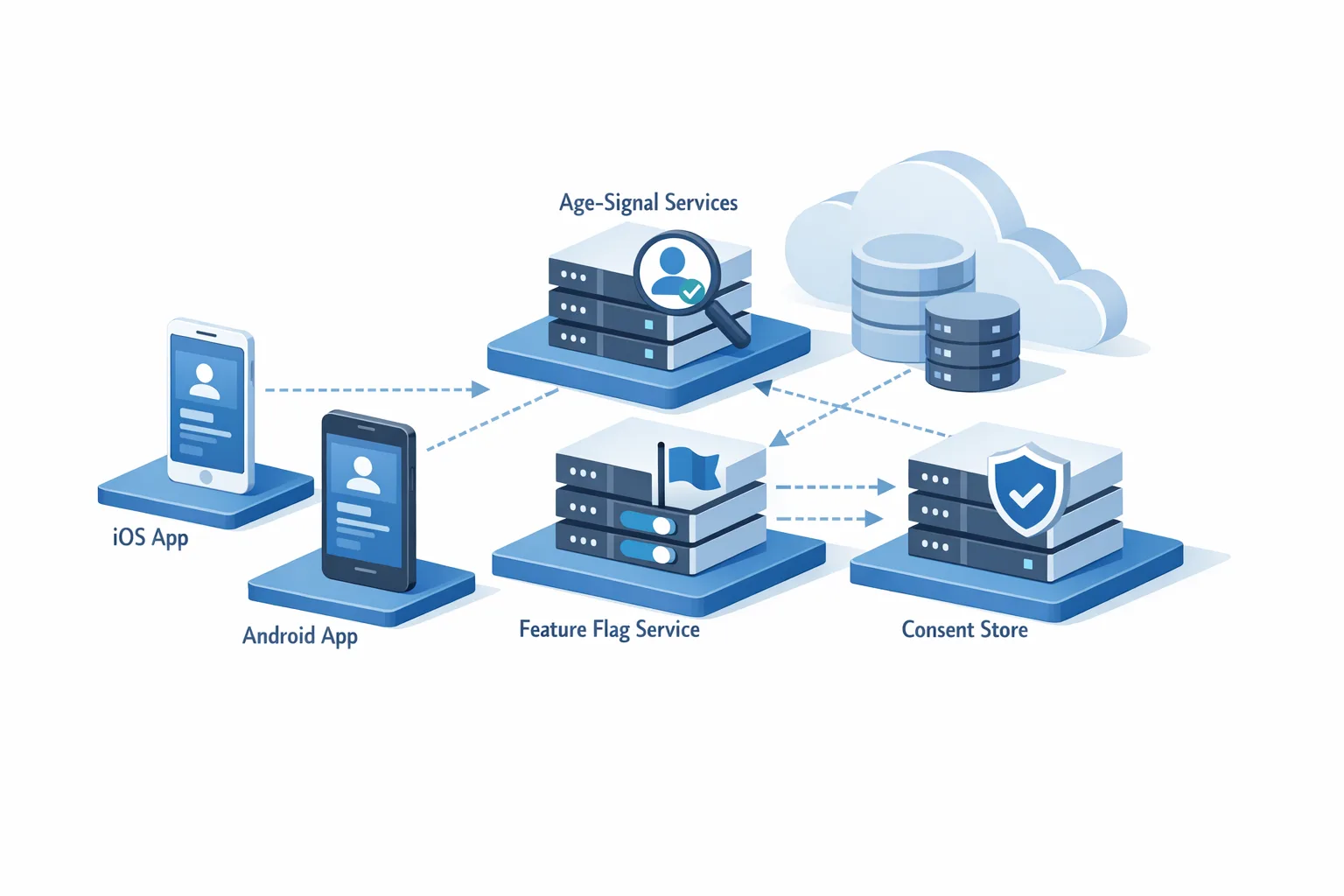
Let’s get practical. For App Store age verification to actually protect minors and reduce your risk, it must live in your architecture, not just the UI. Here’s the model that holds up under load and audits.
1) Map the flows you must gate
Start with a quick inventory. Which journeys potentially expose mature content, networked interactions, or commerce?
- Account creation and sign-in.
- UGC creation and viewing (text, images, video, live streaming).
- Messaging, following, friending, or joining groups.
- In-app purchases, tipping, or withdrawals.
- Profile discovery and recommendations.
- External linking to the open web or third-party content.
Don’t guess—instrument. Add analytics flags that record when a gated screen is hit and whether the age/consent guard allowed or blocked access. Look for deep links and notifications that can drop users past your first-run checks.
2) Keep PII out of your stack
You don’t need to store government IDs or raw birthdates. Align your data model to age ranges and consent state. For example:
// Pseudocode: client-side shape
struct YouthComplianceState {
  AgeRange range;      // e.g., Under13, Age13to15, Age16to17, Age18Plus
  bool hasParentalConsent; // true only if Apple-indicated consent is current
  Date consentLastChecked;
  bool requiresReconsentForMajorChange;
}
The server never needs a DOB. Persist only what you need to enforce policy and prove it worked if audited.
3) Wire the OS signals
Adopt Apple’s age range signal and consent state where available. Cache defensively, refresh on app foreground, and handle offline gracefully. When consent state changes (e.g., a parent revokes access), your app should gracefully sign out the child or disable gated features without data loss.
For sensitive features, implement a blocking guard that evaluates in this order:
- Age range and consent state.
- Local app policy (e.g., your own stricter minimum age).
- Regional overrides (Texas vs. other states; international expansions later).
Every guard should be unit tested and backed by feature flags so you can switch policies by region without a hotfix.
4) Update your App Store Connect data now
Answer the new age rating questions for every live app and SKU variant. Don’t leave this to a single PM; make it a trio: product, legal/policy, and engineering. Keep a change log with screenshots of App Information, the questionnaire responses, and rationale. If Apple reassigned your rating and you think it’s off, adjust the in-app experience or contest it before your next submission to avoid ping-pong rejections.
5) Build a parental consent UX that real families can use
Avoid dead-end dialogs. When a minor tries to access a restricted feature, you should:
- Explain why access is blocked in plain language.
- Offer a “Request Permission” path that triggers the native consent flow where supported.
- Fail soft: if consent isn’t granted, provide a safe alternative (e.g., view-only mode).
Design for the case where a parent approved previously, but your latest release adds a material change (e.g., public profiles or messaging)—you’ll need a re-consent request and a way to defer new features until the parent OKs it. For accessibility, make sure the copy reads well with iOS text scaling and that actions are clearly labeled.
6) Put moderation and reporting under a microscope
If you allow UGC or messaging, your content rating and parental disclosures must align with your actual safeguards. That means documented moderation SLAs, AI/heuristics plus human review for the risky stuff, and a fast track for reports from minors and parents. Keep an audit log of takedowns and escalations; this protects users and your team when issues get scrutinized.
7) Test like you’ll be audited
Run table-top drills: can you pull a list of all accesses to a gated feature by minors in the last 30 days? When a parent revokes consent, does the child’s session expire within a minute? When your feature flag flips, do your server policies and client guards agree? Automate these checks on staging and document them in your release checklist.
Edge cases that routinely trip teams
Device hopping: a teen signs in on a parent’s old iPad where Screen Time is off. Your app mustn’t assume device settings reflect account age. Trust the account’s age range signal, not the hardware.
Travel and relocation: a Texas user visits another state, or vice versa. Treat region as dynamic—derive it from current store/account context, not just IP. Your policy layer should respond without an app update.
WebViews and deep links: if you render account settings or commerce in a WebView, your native age guard must wrap it. Otherwise, a deep link can bypass restrictions.
In-app ads: if your app is 13+ but your ad network serves 18+ creatives, you’ll fail the smell test. Lock your ad network settings to match your rating and document that configuration.
Third-party SDKs: analytics and attribution SDKs must respect parental consent and underage data minimization. Prefer SDK modes that avoid collecting device identifiers from minors and confirm how consent state is propagated.
How to measure impact without collecting more data
You’re going to see behavior changes—fewer minors accessing certain features, consent pendings, re-consent declines after feature changes. Resist the urge to add more invasive tracking. Instead:
- Track states, not identities: counts of blocked vs. allowed attempts, time-to-consent, re-consent success rates.
- Segment by age range bucket and release version; that’s enough to find regressions.
- Capture breakage breadcrumbs: where did users abandon? Was the consent request sent? Did the OS flow return?
Use these signals to tune copy, reduce friction, and prioritize parent-facing improvements—like better explanations of what a new feature does and how it changes visibility.
People also ask
Do I need to verify age in every U.S. state?
Today, Apple is enforcing account-level age attestation and parental consent mechanics for users in Texas. Other states are exploring similar rules. You should architect for regional variation now so you don’t rework flows later. Use a policy provider in your app that can flip per-region rules without a new binary.
Does Apple share a user’s date of birth with my app?
No. The plan is to share age ranges and consent states, not raw birthdates. Treat it as a privacy ceiling, not a hurdle. Build your rules around ranges.
How do we test Texas flows from outside Texas?
Apple provides sandbox testing capabilities. For QA, pair simulated regional policies in your app with TestFlight builds against the latest iOS 26.x. Automate end-to-end tests that exercise request, approve, deny, revoke, and re-consent paths.
What about Google Play?
On Android, your obligations vary by policy and region, but the principles are identical: avoid collecting unnecessary PII, gate sensitive features by age and consent, and align ad and UGC controls to your declared rating. If you already ship on both stores, re-use your policy engine across platforms and plug in store-specific signals.
A 7‑day ship plan that actually works
We use this timeline when clients need to move fast without creating a year of tech debt.
Day 1: Triage and scoping
Lock scope with a single doc: which features are 13+, 16+, or 18+; where consent is required; which SDKs must change. Create a risk register (PII, ads, UGC) and assign owners. Update your release checklist template with compliance steps.
Day 2: App Store Connect and policy wiring
Complete the updated age ratings questionnaire for each app. Add internal notes explaining every answer. In code, scaffold a PolicyProvider with per-region rules and feature flags so you can toggle without resubmitting.
Day 3: OS integration and guards
Integrate age range and consent signals. Wrap gated screens with a single guard component. Make the guard the only path to those screens—no exceptions. Add logging at the guard boundary.
Day 4: Parental consent UX
Design the request/deny/revoke flows. Write copy for parents and teens separately. Localize at least Spanish for U.S. coverage. Add clear exits and alternatives when consent is denied.
Day 5: Moderation and ad alignment
Reconfirm ad network settings match your rating. Document moderation SLAs, escalation paths, and reporting entry points. If you use AI filters, log confidence and human override grounds.
Day 6: QA and sandbox testing
Run scripted tests for first-run, deep link, offline, consent revoked mid-session, and re-consent on feature change. Test on iOS 26.x with latest APIs. Validate analytics and logs.
Day 7: Submission and comms
Prepare your release notes, privacy nutrition labels, and support articles for parents. Submit early; store review questions are easier to handle before the deadline rush.
Risks, limitations, and how to de-risk them
Risk: You over-collect. If you implement your own ID checks for Texas, you’ll inherit breach risk and retention liabilities. Stick to Apple’s account-level approach and age ranges.
Risk: Feature regressions. Messaging or UGC invisibly regresses for adults if guards are too aggressive. Solve this with analytics on guard decisions and targeted QA on frequently used flows.
Risk: SDK drift. Third-party SDKs may not respect age ranges. Maintain an SDK inventory with versions, data collection modes, and age-aware settings. Pin versions for your compliance release.
Risk: Parent confusion. If re-consent is needed for a feature change, the why matters. Invest in clear, human copy and an FAQ inside the app. It reduces support load and speeds approvals.
Real-world scenario: shipping a social app to 16+
A mid-sized social app with DMs and live rooms previously rated 12+. After reassessment, they moved to 16+ due to intensity of interactions and late-night live content. We:
- Raised the App Store rating to 16+ with rationale tied to UGC and moderation.
- Gated DMs and live rooms behind a 16+ and consent check; under-16 users get a read-only feed.
- Enabled re-consent for a new “Open Groups” feature. Parents who declined saw the feature hidden; the teen saw a clear explanation.
- Aligned ad providers to exclude mature creatives in all under-18 contexts.
The outcome: no store rejections, fewer safety incidents, and cleaner analytics on who’s using which features—without storing DOBs or IDs.
What to do next
- Today: Assign one owner to finish the updated App Store ratings questionnaire for every app SKU. Document the justification for each answer.
- This week: Implement an age/consent guard component, wire OS signals, and wrap all sensitive flows. Add analytics at the guard boundary.
- Within 2 weeks: Rehearse parental consent and re-consent UX with real families. Improve copy and accessibility.
- Ongoing: Keep an SDK and ad provider compliance matrix. Audit quarterly.
If you want a deeper dive on the policy specifics, our earlier write-ups break down the nuances and timelines. Start with our guide to Apple’s 2026 age verification update and pair it with the 7‑day age ratings plan. If you need help implementing the guardrails and consent flows, explore our mobile app compliance and engineering services or just talk to us about a pragmatic ship plan.

Zooming out: build once, adapt everywhere
Whether you operate in one state or a hundred countries, the foundation is the same: don’t stockpile sensitive identity data; enforce policy at the feature boundary; prove, with logs and tests, that your rules work. You’ll ship faster now—and when the next jurisdiction adds its own twist, you’ll toggle a rule, not rewrite your app.
App Store age verification isn’t just a checkbox—it’s your chance to formalize safety into your product. Do it right, and you’ll earn parent trust, reduce operational risk, and keep your roadmap moving without late-night fire drills.





Comments
Be the first to comment.