
Ship Safe: Your Node.js Security Release Playbook
The January 13, 2026 Node.js security release landed across all active lines (20.x, 22.x, 24.x, 25.x), and two weeks later OpenSSL published more fixes that many teams rely on indirectly. If you own production traffic, you can’t treat a Node.js security release as a normal Tuesday update—you need a repeatable path to patch fast without breaking SLAs. Here’s the playbook I’ve refined with teams that ship daily in containers, VMs, and serverless.
What changed in January 2026—and why it matters
Three high‑severity issues define the month for Node operators: a race that could expose uninitialized memory in Buffer/TypedArray allocations, permission model bypasses, and an HTTP/2 path that can crash servers with malformed frames. The release also shipped dependency bumps (including undici and c‑ares). On January 27, OpenSSL followed with updates across the 3.x line, prompting many OS images and proxies to rev. You’re dealing with both runtime and crypto stack movement.
Concrete anchors help you reason about risk and scope:
- Node.js shipped security builds on January 13, 2026, including 20.20.0, 22.22.0, 24.13.0, and 25.3.0. If your version is older, you’re missing fixes.
- The Buffer/TypedArray issue (affecting zero‑fill guarantees under specific timeout/race conditions) is high severity because memory disclosure can spill tokens or keys.
- Permission model issues let code escape intended boundaries—especially relevant if you depend on
--permissionor--allow-fs-*in sandboxed or multi‑tenant setups. - Malformed HTTP/2 HEADERS frames can trigger unhandled TLS socket errors and crash processes if you don’t guard the path rigorously.
OpenSSL’s January 27 updates advise upgrades within the 3.x series (for example, 3.6.1/3.5.5/3.4.4 depending on your base). Even if Node bundles its own OpenSSL, your environment likely includes OpenSSL elsewhere—think NGINX ingress, sidecars, or build agents. Treat this as an estate‑wide hygiene task.
Primary risks your patch must address
Here’s the thing: most outages I’ve seen during emergency patching aren’t caused by the CVE itself—they’re caused by rushed rollouts. Map these risks before you touch prod:
- Memory exposure via uninitialized buffers under load or timeouts. If you serialize data from newly allocated buffers (or logs expose them), secrets can leak.
- Filesystem permission model gaps around symlinks or timestamp mutation (
futimes). Sandboxes that looked airtight… weren’t. - HTTP/2 remote DoS conditions if TLS/socket error paths aren’t wired to fail closed and restart cleanly.
- Crypto dependency drift: your Node process may be fine, but your edge proxy or OS image lags the OpenSSL fixes.
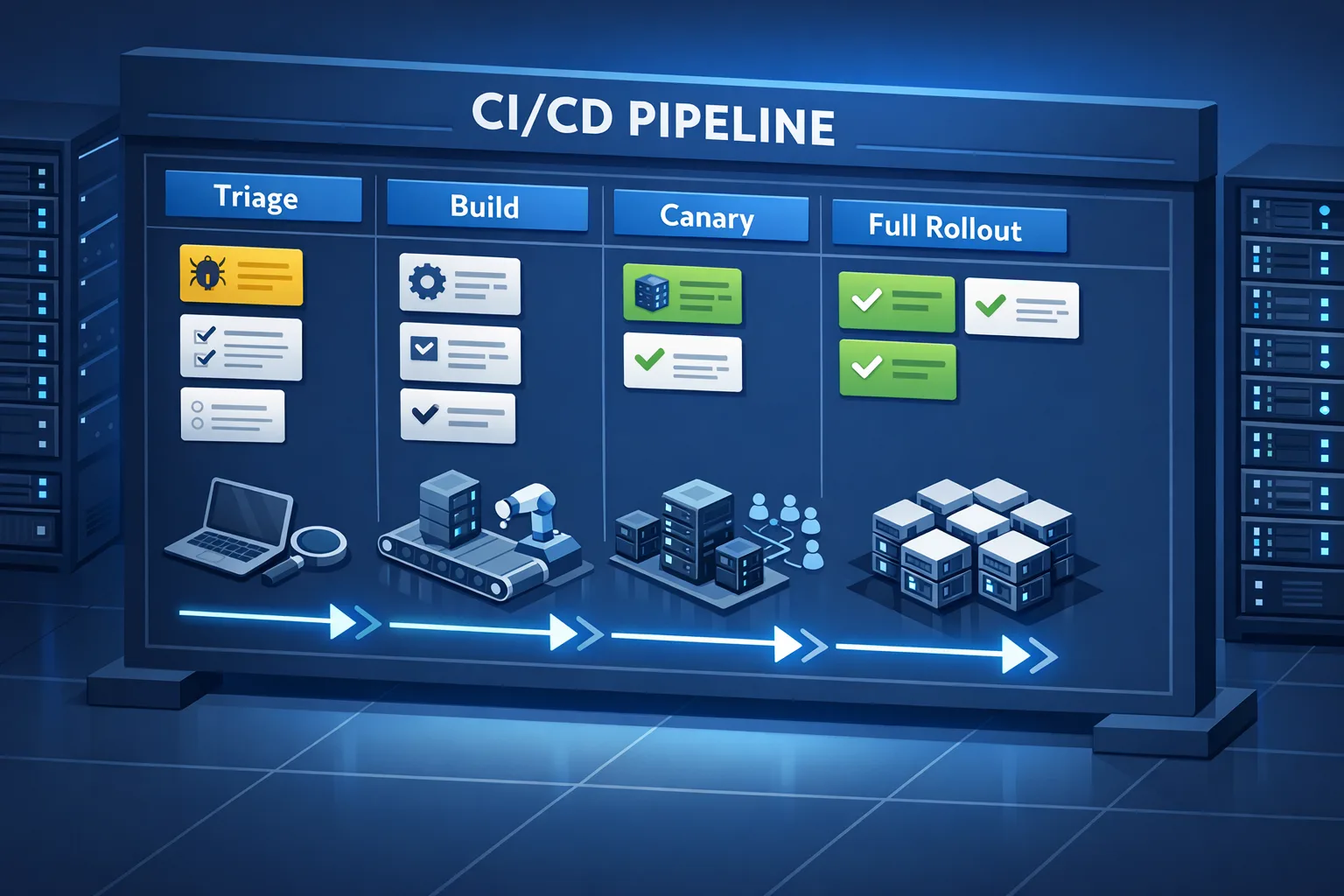
Use this 90‑minute patch window (field‑tested)
Assume you’re running Kubernetes. Adjust the steps for VMs or serverless as needed. The goal: go from triage to full rollout in 90 minutes with hard checks.
1) Triage and plan (15 minutes)
Decide scope fast. Run:
node -p "process.versions"Confirm node, v8, and openssl versions for each service. Inventory fleet exposure: public HTTP/2 endpoints, use of the permission model, and any code paths that allocate/serialize buffers under time pressure (e.g., request timeouts, vm with timeout).
Pick your target versions: 20.20.0, 22.22.0, 24.13.0, or 25.3.0. If you’re bound to a distro Node, ensure their packages include the January 13 patches. For containers, prefer vendor Node images that already include the fixes.
2) Build and smoke test (20 minutes)
Rebuild images with the new Node version. In CI, add three quick tests that specifically catch regressions tied to these fixes:
- Buffer determinism: Allocate and serialize a few large
Buffer.alloc()/Uint8Arrayobjects under artificial timeouts; assert zero‑fill and consistent behavior across runs. - Permission model: With
--permissionenabled, test symlink traversal andfutimesaccess in read‑only dirs. Expect proper denials. - HTTP/2 crash guard: Ensure TLS socket error paths are handled and the server doesn’t bring the whole process down. Add explicit listeners and verify liveness after malformed frames.
Run a 2–5 minute smoke suite. If you use a monorepo, test top‑traffic services first; tail risk is lower on low‑traffic batch jobs.
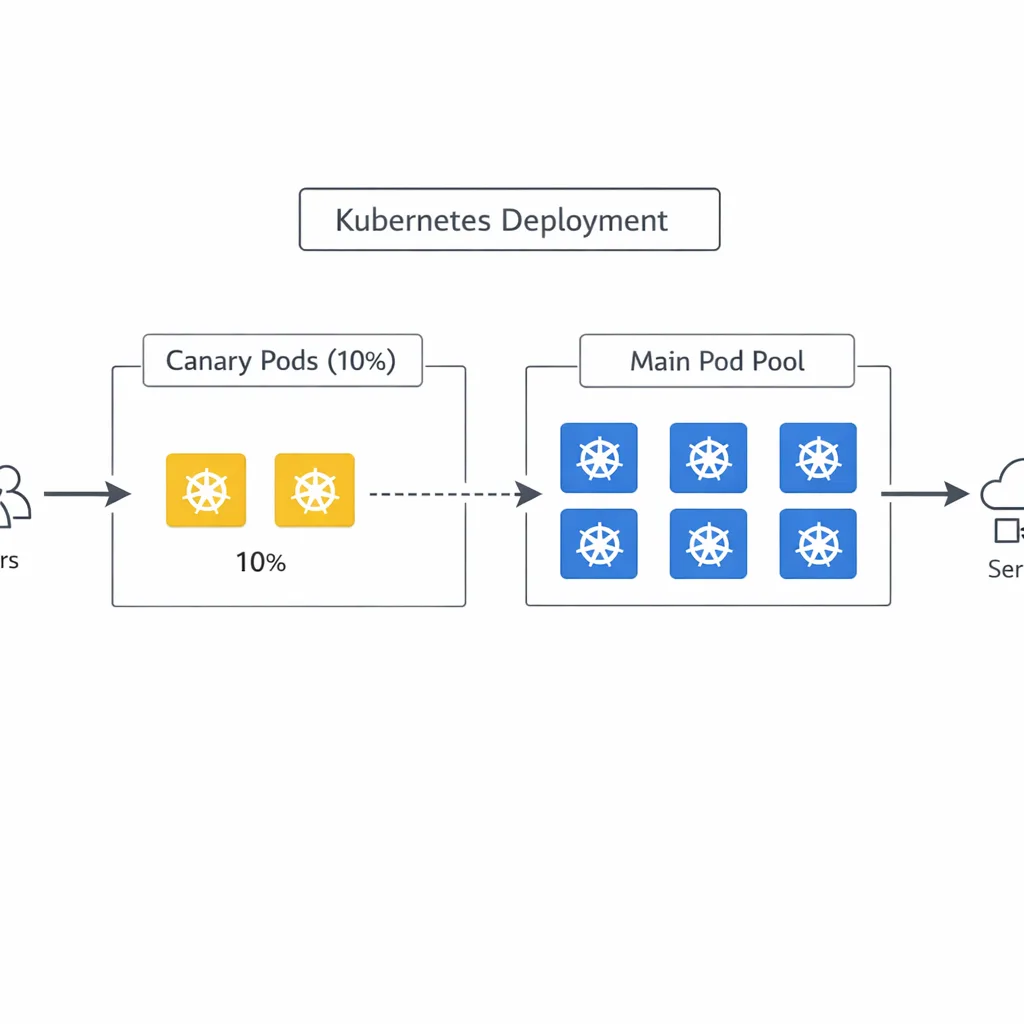
3) Canary and observe (30 minutes)
Rollout 5–10% of pods behind the same service and pin a small percentage of traffic. Watch:
- Error budgets: 5xx rate, saturated node CPU, GC pauses, and memory growth.
- HTTP/2 behaviors: Any spikes in
ECONNRESETor abnormal TLS errors. - Latency tails: Zero‑fill changes might add microseconds on some hot paths; it shouldn’t move your p95, but watch p99s under load.
Keep canary for 10–15 minutes or a minimum of 1,000 requests per instance, whichever comes first.
4) Full rollout and post checks (25 minutes)
Roll the rest with surge=25% and maxUnavailable=0 to preserve capacity. Verify health checks, drain connections, and confirm no pod churn. Post‑deploy, capture immutable evidence that you’re on the patched builds:
kubectl exec deploy/api -- node -p "process.versions.node + ' | ' + process.versions.openssl"Archive the output in your change ticket or runbook. If you operate in regulated industries, this proof is gold during audits.
Will performance change after the Node.js security release?
Short answer: probably not in a way users notice, but measure. The buffer fix restores a safety guarantee (zero‑filled memory) that some workloads implicitly relied on. That can mean a tiny extra init cost when allocating big buffers rapidly. In practice I’ve only seen p99 latency move by low single‑digit percentages in synthetic tests. Real services with I/O waits and caching usually drown out the difference. Still, it’s smart to baseline CPU and memory after the upgrade.
On the HTTP/2 side, your process should now fail safer. If you weren’t wrapping TLS error events, you’ll want those handlers anyway. And if you use undici/fetch heavily, the dependency updates are a net reliability win—run your integration tests to be safe.
How do I know if I’m exposed to the buffer leak issue?
Ask two questions:
- Do you allocate buffers that you then serialize, log, or return to clients?
- Can untrusted input influence timing—timeouts, heavy load, or code paths that yield to the event loop before initialization?
If both are yes, the patch is urgent. Your code can be clean and still leak when the runtime’s invariants are broken by a race. Don’t try to work around it; upgrade the runtime.
What about the permission model—should I rely on it?
It’s useful as a defense‑in‑depth layer, not your primary boundary. Treat --permission as an evolving feature. If you need hard isolation, containers plus read‑only filesystems, seccomp, and per‑service identities are still the baseline. The January fixes improve the model but don’t change that calculus.
Does this hit serverless and edge runtimes?
Yes, but operationally it’s different. On AWS Lambda, Node versioning is tied to the runtime the provider exposes; you redeploy to the latest Node flavor in the console or via IaC, then test cold starts and provisioned concurrency. For edge workers (like Cloudflare Workers or similar), the provider rolls the runtime; your job is to regression‑test memory, TLS behavior, and headers on your side.
Your five‑part evidence checklist (use it in audits)
Prove you’re patched with artifacts you can show to security or compliance:
- Release notes attached to the change request, with the exact Node target (e.g., 24.13.0).
- Image digests for all services built after January 13, 2026.
- Runtime printouts of
process.versions.nodeandprocess.versions.opensslfrom production pods. - Graphs showing error rate, latency, CPU/memory before and after the rollout window.
- Canary logs proving malformed HTTP/2 inputs didn’t crash the process and were handled properly.
OpenSSL follow‑up: what to do this week
Even if Node bundles OpenSSL, you almost certainly have OpenSSL elsewhere. Action the following:
- Edge and ingress: Update NGINX/Envoy images based on OS repos that have consumed the January 27 OpenSSL patches. Roll canaries just like the app tier.
- Build agents: If your CI workers sign artifacts or verify packages using system OpenSSL tooling, patch and re‑attest. Tools invoking
openssl dgstshould be re‑verified on large inputs. - Scan your base images: Pull the latest distro images (Alpine, Debian, Ubuntu) and diff installed OpenSSL libs. Rebuild app images even if app code didn’t change.
In Node itself, confirm the embedded OpenSSL version with process.versions.openssl. If your team wraps Node with a TLS‑terminating sidecar, both layers must be clean.
People also ask
Do I need to restart every pod to be safe?
Yes. A patched binary on disk doesn’t protect a running process. Drain, roll, and verify each deployment. For stateful services, coordinate with failover or maintenance windows.
Can I mitigate the HTTP/2 issue with config alone?
You can reduce blast radius with stricter limits and error handlers, but the vulnerable path is in the runtime. Treat config as mitigation, not a fix.
How do I tell if undici changes will break my clients?
Pin your HTTP client version in integration tests and run contract tests against staging. If you’re using fetch/undici with custom timeouts, pay attention to subtle retry/backoff differences between versions.
Let’s get practical: a minimal test harness
Drop this into a staging service to catch regressions quickly:
// Buffer determinism under pressure
const { performance } = require('node:perf_hooks');
const N = 500;
let bad = 0;
for (let i = 0; i < N; i++) {
  const t0 = performance.now();
  const b = Buffer.alloc(1024 * 1024); // 1MB
  const sum = b.reduce((a, v) => a + v, 0);
  if (sum !== 0) bad++;
  if (performance.now() - t0 > 50) process.stdout.write('.');
}
console.log(`\nnon‑zero buffers: ${bad}/${N}`);
Run it before and after the upgrade. You should never see non‑zero buffers; if you do pre‑patch, that’s your smoking gun. After the upgrade, the counter should be zero.
What to do next (developers)
- Upgrade Node to 20.20.0, 22.22.0, 24.13.0, or 25.3.0, rebuild images, and deploy via canary.
- Add explicit TLS error handlers on servers using HTTP/2.
- Turn your buffer/permission/HTTP2 checks into CI gates so the next Node.js security release is routine.
- Verify
process.versions.openssland patch OS‑level OpenSSL on ingress and CI hosts.
What to do next (business owners)
- Ask for a one‑page rollup: versions, exposure, rollout time, and evidence.
- Budget for monthly “security ship windows” instead of ad‑hoc fire drills. It pays back in lower downtime and fewer late‑night pages.
- Consider a support plan if you run EOL versions; upgrades will get harder and riskier over time.
If you want a deeper, day‑by‑day plan for this month’s patch, our team broke down timelines and test strategy here: January 2026 Node.js security release details and a complementary guide on how to patch now and test smarter. If you’re a mobile‑first shop balancing app stores and backend risk, keep your policy updates tight as well—see our 2026 App Store verification playbook. When you’re ready to harden your pipeline end‑to‑end, our services team can help you codify this playbook so the next push is boring on purpose.
Zooming out: make security patching boring
Patching is only scary if it’s rare. Bake this playbook into your monthly cadence, invest in a fast canary path, and collect artifacts automatically. The next Node.js security release will move just as quickly; your response should be muscle memory.





Comments
Be the first to comment.