
Google Play External Links 2026: Ship the Flow, Model Fees
Google Play external links 2026 is no longer rumor—there’s a dated program, concrete API requirements, and a compliance clock that hits January 28, 2026 for U.S. apps that link out for purchases or downloads or that use alternative billing. If you want to steer users to a web checkout or to install an app outside Play, you must enroll and implement Google’s updated flows and reporting. The business math changes too, with initial acquisition, ongoing service, and proposed per‑install fees in play. Let’s walk through what’s real, what’s proposed, and how to ship without surprises.
What actually changed—and the dates that matter
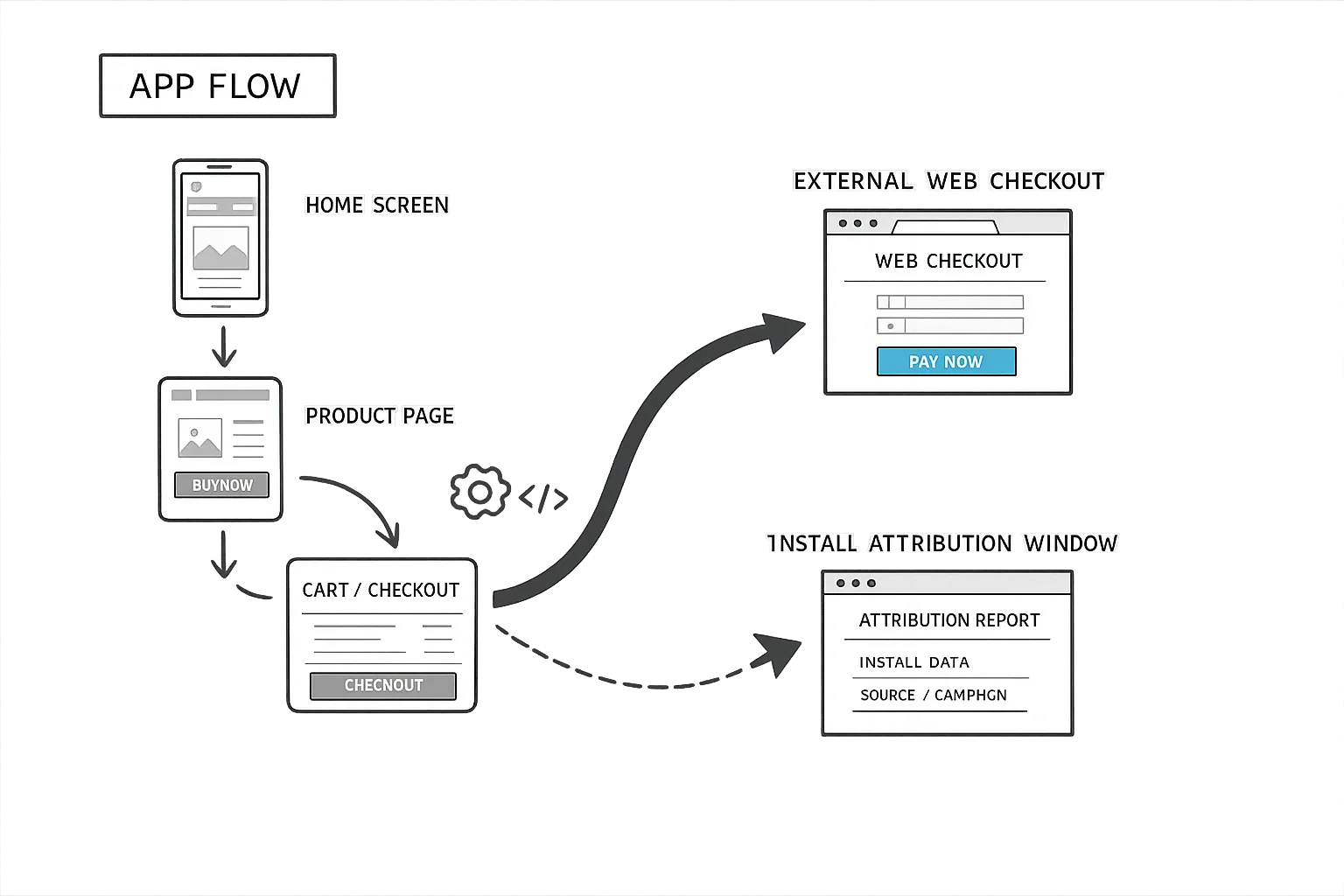
Google formally announced U.S. programs for External Content Links (linking to web purchases and to external app downloads) and for Alternative Billing, with a compliance date of January 28, 2026 if you want to keep linking or offering non‑Play billing. (support.google.com)
On the engineering side, Google introduced new Billing Library capabilities for external content links and external payments in December 2025—8.2.0/8.2.1 for external links and 8.3.0 for external payments—so this is not just policy text; it’s new client APIs you must call. (developer.android.com)
For clarity: these programs don’t remove review, safety, or reporting. Apps still undergo Play review; you must integrate program APIs, display Play’s information dialogs, and report qualifying transactions within specific timelines. (support.google.com)
Google Play external links 2026: the fee model, plainly
Two fee buckets matter for external content links: an Initial Acquisition Fee of 3% on qualifying transactions made within six months of a user’s Play install, and an Ongoing Service Fee of 10% while your app continues to benefit from Play services. For external app downloads that follow a Play‑originating link, Google applies a fixed per‑install fee; in the EEA, Google publishes a rate card (for example, €0.90 per app install in Group 1 under Tier 1). (support.google.com)
For the U.S., Google has outlined—in court‑driven context—proposed per‑install fees of $2.85 for apps and $3.65 for games when the install occurs within a short window (reported as 24 hours) after the user clicks your in‑app link. A hearing scheduled for late January 2026 will determine what sticks; treat these as planning numbers until finalized. (theverge.com)
On alternative billing inside your app, expect a service fee structure that’s distinct from external links. Public documentation and reporting indicate around 20% for most non‑subscription purchases and 10% for auto‑renewing subscriptions, with small‑developer relief bands similar to existing Play terms. Verify your exact eligibility and terms in Play Console. (support.google.com)
How Google tracks attribution—and what you must integrate
External content links rely on new tokens and reporting fields: the Play Billing client gives you an external transaction token; you generate a transaction ID; then you report successful conversions to Play. Users must see an information dialog before you take them out of the app. This requires Play Billing Library 8.2.1 or higher. (developer.android.com)
For alternative billing inside the app, you’ll integrate the Alternative Billing APIs. At minimum, you enable the program on your BillingClient, show the Play‑provided information dialog each time before a non‑Play checkout, and report transactions. Alternative billing only requires 6.1+; user‑choice flows have their own version thresholds. The docs include specific methods like enableAlternativeBillingOnly and the corresponding dialog APIs. (developer.android.com)
Translation: if your app is still on Billing Library 5 or 7, upgrade now. Google also released 8.3.0 on December 23, 2025 to support external payments flow; align your dependency strategy with that timeline. (developer.android.com)
The reference architecture we ship (and why)
Here’s the thing: the most common failure we see is teams bolting a “Buy on the web” button onto an app and calling it done. That approach breaks the policy and your reporting obligations. Instead, we ship a simple, auditable architecture:
- Client gate and dialog. Your app checks API availability, calls the required Play information dialog, and only proceeds if the dialog returns OK.
- Server‑generated link and payload. The app requests a signed, single‑use deep link from your server. That server includes the Play external transaction token, user/session metadata, and a short expiry. No hardcoded URLs.
- Web checkout with idempotent capture. Your web flow completes the purchase with your PSP, logs the result, and posts back to your server.
- Server‑to‑Google reporting. Within minutes (and retried until confirmed), your backend reports the transaction using the token so Google can attribute fees and fulfill reporting. Build an idempotency key so retries don’t double‑report.
- Reconciliation job. Nightly jobs compare your PSP ledger vs. reported events. Anything off by more than a penny flags for manual review.
This aligns with Google’s tokenized reporting, reduces client‑side tampering risk, and gives finance a single source of truth if invoices are questioned. (developer.android.com)
FAQ: practical questions teams keep asking
Do we owe Google a fee if we use Stripe on the web?
Yes—if the purchase is a qualifying digital purchase attributed to your Play app via external content links, plan for the Initial Acquisition Fee (3% if within six months of the Play install) and the 10% Ongoing Service Fee on the transaction amount once Google begins assessing U.S. external‑link fees. For alternative billing inside the app, a separate service fee applies. (support.google.com)
What happens if we link to a different APK mirror?
You must register and submit external apps and declare all landing pages and download URLs in Play Console. Links can’t redirect or mislead, and Google requires approval and ongoing compliance for the external app. Don’t wing it—declare, register, and keep it updated. (support.google.com)
Can we A/B external links vs. Play IAP?
Yes, but honor the required dialogs and reporting for the external path. We typically expose a server‑controlled flag to route a cohort to Play IAP vs. external web. That lets you compare conversion and LTV vs. the proposed per‑install and ongoing service fees in the U.S. programs. (theverge.com)
Is there a deadline we can ignore if we’re not linking out?
If you don’t link out and you don’t offer alternative billing, you’re not in scope. But if you do either, January 28, 2026 is the operational date to have the new flows and enrollment in place. (support.google.com)
Let’s get practical: the 10‑step shipping checklist
- Confirm scope. Inventory every place your Android app links to web purchases or external downloads, and any places you use non‑Play billing. If any exist, you’re in scope for enrollment and API integration. (support.google.com)
- Upgrade Billing Library. Target 8.2.1+ for external content links and review 8.3.0 for external payments. Regression‑test purchase and subscription flows. (developer.android.com)
- Enroll programs. In Play Console, enroll in External Content Links and/or Alternative Billing for the U.S., accept terms, and set the appropriate service tier. (support.google.com)
- Implement dialogs. Wire the required Play information dialogs before any off‑Play flow; block progression if they don’t return success. (developer.android.com)
- Token plumbing. Capture external transaction tokens and IDs, and send them server‑side.
- Server‑side reporting. Implement server‑to‑Google reporting with retries and idempotency; log every payload you send. (developer.android.com)
- Register external apps. If linking to external downloads, register and submit those APKs/versions and declare all landing and download URLs. (support.google.com)
- Instrument analytics. Track dialog views, click‑throughs, web checkout conversion, and install attribution windows so finance can reconcile fees vs. revenue.
- Model fees. Use conservative assumptions on per‑install charges and service fees. Keep rate cards in config so you can switch instantly if the court finalizes numbers. (theverge.com)
- Write SOPs. Document refunds, disputes, and failed report retries. You’ll need this when invoices arrive.
Unit economics: a quick, usable model
For external purchases via links, your contribution margin per order looks like: net = price − (payment processor %) − (Initial Acquisition if <6 months) − (Ongoing Service 10%) − (fraud/chargeback reserve). For external downloads, add a per‑install line item multiplied by installs within the attribution window after a Play‑originating click. Example: a $50 one‑time digital purchase within six months of a Play install could incur ~13% to Google (3% IA + 10% ongoing). If 2,000 of 10,000 clickers install externally within the window at a proposed $3.65 (game), that’s $7,300 in install fees to model. (support.google.com)
Don’t forget the subscription delta. For auto‑renewing subscriptions billed off‑Play, plan for a 10% ongoing service fee per renewal under external‑links economics (once assessed in the U.S.), or the alternative‑billing schedule if you take payments inside the app. (support.google.com)
Risks, edge cases, and how to avoid them
Missing reporting windows. Google expects timely reporting of authorized transactions; build a queue with backoff and alerting so a flaky PSP webhook doesn’t break compliance. (support.google.com)
Dialog bypass. QA the dialog path on OEM skins and low‑end devices; treat any exception as “do not proceed” and prompt again on the next attempt. (developer.android.com)
Broken enrollment/availability. Check program availability at runtime—if the API returns FEATURE_NOT_SUPPORTED or BILLING_UNAVAILABLE, you must not proceed with external billing. Ship a graceful fallback. (developer.android.com)
Version drift. If you’re juggling multiple modules, pin your Billing Library across app modules and shared billing utilities. Google updated major pieces as recently as December 23, 2025. (developer.android.com)
Zooming out: iOS teams have homework too
While Android teams race for January 28, iOS teams face Apple’s age‑rating update deadline on January 31, 2026. Apple auto‑updated ratings and requires developers to answer new questions in App Store Connect; failing to do so will block app updates after that date. We’ve helped teams run a one‑week sweep of answers, audit in‑app content (including AI assistants), and ship clean. (developer.apple.com)
If you need a deeper primer, we’ve published hands‑on playbooks: see our engineering‑focused guide on updating Apple’s age ratings without drama and our product‑oriented plan for content and UX reviews. For Android specifics, start with our fees, flow, and ship checklist for Google Play external links and the Jan‑timed brief on Google Play links plus Apple age ratings.
Implementation notes from the trenches
Keep your pricing and revenue‑share logic behind remote config. With a January 22, 2026 hearing expected to refine U.S. fee specifics, you don’t want to ship a new binary just to update the per‑install rate or fee percentage. (theverge.com)
Treat invoices like APIs. Reconcile Google’s external‑link invoices against your PSP ledger monthly. If you can’t match event‑for‑event within a penny, you’ll burn hours during quarter close. Build the report now—clicks, installs within window, purchases, refunds, and chargebacks.
Roadmap collisions are real. If you’re also upgrading runtimes, set guardrails: for Node services, remember Node.js 20 reaches end‑of‑life for security updates on April 30, 2026, so plan upgrades to 22 or 24 LTS in parallel with your billing work. (github.com)
What to do next (developers, PMs, finance)
Developers
- Upgrade to Play Billing 8.2.1+ and wire the information dialogs and token plumbing. Validate FEATURE_NOT_SUPPORTED/BILLING_UNAVAILABLE paths. (developer.android.com)
- Implement server‑to‑Google reporting with idempotent retries and monitoring. (developer.android.com)
- Register external APKs and declare all URLs if you link to downloads; ship a pre‑launch test with real devices. (support.google.com)
Product/UX
- Design the external‑link pre‑dialog context and web checkout landing pages. Don’t surprise users; make the handoff explicit.
- Set up A/B cohorts to measure conversion and LTV between Play IAP and external pathways.
Finance/RevOps
- Build a unit‑economics sheet with configurable fee inputs: Initial Acquisition 3%, Ongoing Service 10%, proposed per‑install $2.85/$3.65, plus PSP fees. Keep toggles for alternative billing vs. external links. (support.google.com)
- Draft an SOP for disputes, refunds, and invoice variance handling.
If you need help stitching this together, our team has shipped these flows end‑to‑end; see what we do on mobile commerce and compliance builds, browse related guides on the blog, or reach out via contacts.

Comments
Be the first to comment.