
WebGPU in Production: The August 2026 Playbook
WebGPU in production isn’t a moonshot anymore—it’s the practical path for browser graphics and on‑device compute as of August 19, 2026. Chrome and Edge have been steady for a while; Safari 26.x brought WebGPU to Apple’s ecosystem; and Firefox enabled it on Windows and on macOS with Apple Silicon this year. That coverage finally lets teams plan a serious rollout instead of running perpetual experiments.

Where WebGPU actually runs today
Before we talk architecture, let’s ground the decision in facts, versions, and dates—because that’s how you defend a roadmap in front of a CFO or an SRE lead.
• Chrome/Edge: WebGPU has been stable for years across desktop platforms with D3D12/Metal/Vulkan backends. For many teams, your existing Chrome‑first prototypes already behave like production.
• Safari: WebGPU landed in Safari 26.0 (September 2025), and it continues through 26.6 with iterative polish across macOS, iOS, and iPadOS. That closed a major adoption gap for creative tools, media apps, and mobile web products in Apple’s ecosystem.
• Firefox: WebGPU is enabled on Windows and, since January 13, 2026 (Firefox 147), on macOS devices with Apple Silicon. Linux support still lags behind Nightly/beta toggles, so your fallback plan needs to cover that segment.
Coverage isn’t perfect, but it’s robust: global support is roughly mid‑80s percent by usage share as of July 2026, and climbing. For most customer‑facing apps, that crosses the threshold where conditional enablement beats waiting another year.
WebGPU vs. WebGL: what changes for your team
WebGL optimized for drawing. WebGPU is a general‑purpose GPU API with modern pipeline control and compute. Three practical implications matter to leads who have to ship:
1) You control memory, lifetimes, and synchronization. That’s power—and responsibility. Treat buffers and textures as scarce, model their ownership explicitly, and budget for readbacks.
2) Compute is first‑class. Effects you once faked with fragment shaders or CPU loops can move to compute passes without resorting to fragile hacks.
3) WGSL is your lingua franca. The learning curve is real, but it’s consistent across browsers and maps cleanly to native concepts.
WebGPU in production: the non‑negotiables
Your launch plan should be boring—in the best way. These are table stakes if you want WebGPU in production without firefighting:
• Capability gating: Feature‑detect, don’t UA‑sniff. Check for navigator.gpu, request an adapter, then interrogate adapter.features (e.g., “shader‑f16”, “timestamp‑query”) and adapter.limits.
• Progressive enhancement: Always ship a WebGL 2 or CPU path. Keep the UX consistent across tiers; change quality, not behavior.
• Power budgets: Laptops and phones throttle. Design for variable frame budgets (e.g., 8–12 ms for render on desktop, tighter on mobile) and degrade gracefully.
• Error scopes and device loss: Assume devices disappear. Wrap passes in error scopes, centralize device‑lost handling, and keep your pipeline state rebuildable.
• Privacy and security posture: WebGPU expands the platform’s surface area. Constrain untrusted user shaders, validate inputs, and sandbox environments where users can upload arbitrary code or assets.
The RAPIDS rollout framework
Here’s the thing—teams get stuck debating engines and benchmarks while ignoring enablement mechanics. Use RAPIDS to move from spike to ship:
R — Readiness and risk gates
• Audience fit: Use your analytics to bucket users by OS, browser, and GPU vendor. If Safari and Firefox on Apple Silicon/Windows account for most sessions, you’re in range.
• Kill switches: A remote config flag to disable WebGPU by region, browser, or GPU vendor is mandatory for week one of launch.
• Dependency audit: Confirm the versions of your math, compression, and asset pipelines play nicely with WGSL precision and alignment rules.
A — Abstraction and engine choice
Pick the thinnest layer that lets your team be fast:
• Engines with WebGPU backends: Babylon.js ships a mature WebGPU pipeline and is battle‑tested for complex materials and post‑processing. Three.js has active WebGPU work; confirm stability for your specific shaders and extensions before betting the farm.
• Low‑level wrappers: If you need full control, talk directly to the API and keep your wrapper tiny—device setup, pass orchestration, ring buffers, and a minimal material system.
• WASM interop: For existing C++/Rust renderers, build a WASM bridge that owns memory layouts and translates to WGSL entry points. Keep FFI boundaries chunky to avoid death‑by‑syscall.
P — Performance plan
Performance with WebGPU is mostly about eliminating accidental work:
• Batching and residency: Group uploads; reuse buffers with map‑at‑creation or persistent mapping strategies; prefer staging buffers over frequent small allocations.
• Texture discipline: Pre‑bake mipmaps offline when possible; compress (BC/ASTC/ETC2) per target; avoid runtime transcoding on mobile.
• Pass design: Minimize pass switches; coalesce post‑processing; use compute for culling, particles, and skinning to chop CPU cost.
• Queries: Timestamp and occlusion queries belong in your CI perf gates. Regressions of 5–10% should fail a build, not a launch.
I — Interop with the rest of the web
• WebCodecs + WebGPU is a cheat code for video effects and background removal. Keep color spaces explicit and avoid hidden conversions.
• Canvas configuration: Always call getPreferredCanvasFormat(), and match formats across your post chain to avoid costly resolves.
• Workers: Keep CPU‑heavy scene prep in workers. Transferring buffers beats blocking the main thread.
D — Diagnostics and observability
• Error scopes: Wrap resource creation and passes with push/popErrorScope; pipe messages into your telemetry.
• Debug labels: Label pipelines, passes, and buffers. When a user’s laptop cooks itself, you’ll want precise blame.
• Field profiling: Ship a sampling profiler behind consent and throttle. Capture adapter info, frame time histograms, and stall reasons—then aggregate by browser and GPU vendor.
S — Security and privacy
• Untrusted shaders: Treat user‑authored shaders like you would user‑authored JavaScript in a plugin marketplace. Validate, lint, and cap resource limits.
• Data exposure: Be explicit about what you read back from GPU memory. Adopt least‑privilege patterns for buffers used in compute pipelines handling user content.
• Threat modeling: Add WebGPU to your existing app threat model. Consider fingerprinting vectors (adapter/limits), shader‑based timing, and resource exhaustion.
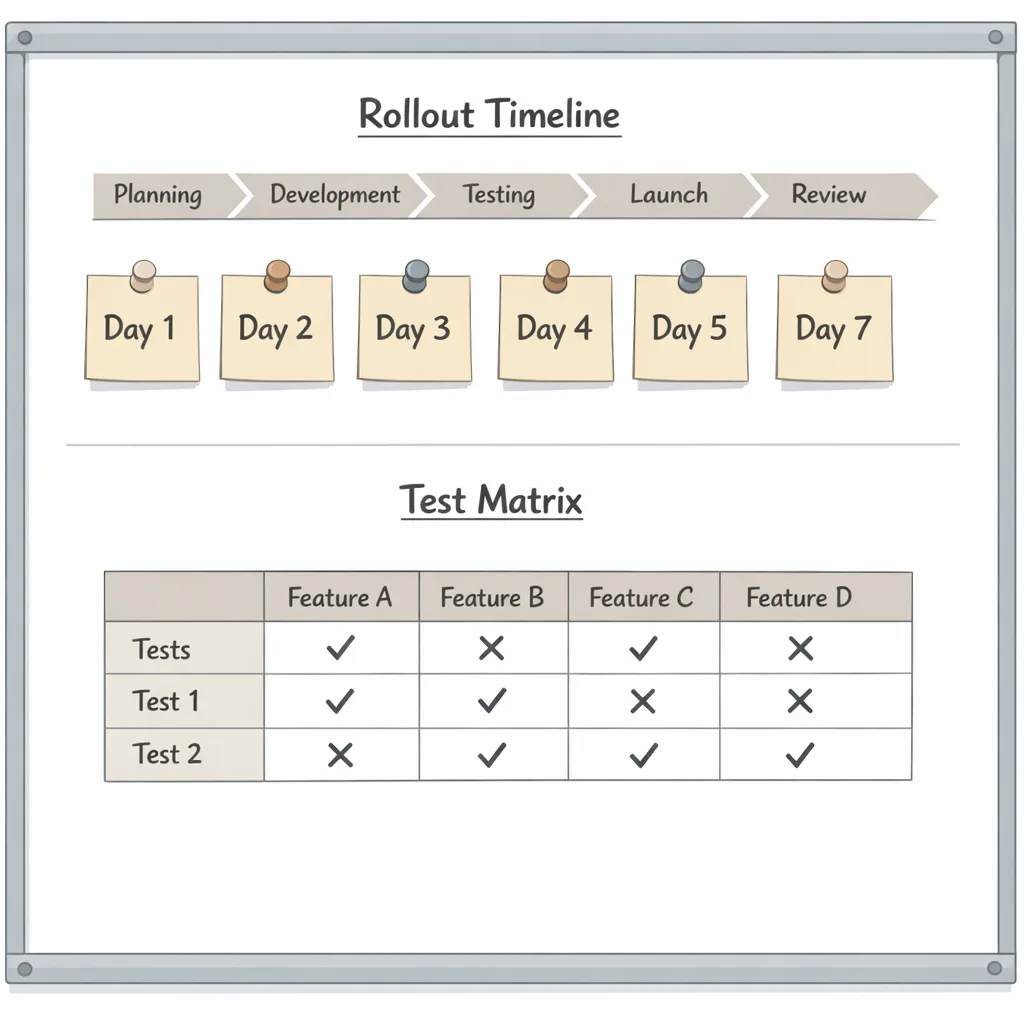
T — Test matrix
• Browser x OS x GPU: At minimum, test Chrome (Windows/macOS), Safari 26.x (macOS + iOS/iPadOS), and Firefox (Windows + Apple Silicon). Add one Intel iGPU, one AMD dGPU, one NVIDIA dGPU, and a mid‑range mobile device.
• CI harness: Spin up WebDriver tests that render a known scene, read back checksums, and assert timing budgets. Track pass rates per commit.
People also ask: quick answers you can share
Will WebGPU replace WebGL?
Not soon. WebGL remains the right baseline for broadest reach, especially on Linux and long‑tail Android devices. Treat WebGPU as the high‑fidelity path with a WebGL 2 fallback.
Can I run ML models in the browser with WebGPU?
Yes, but right‑size your ambition. Convolutional nets for image effects, classical CV, and small language models can be practical on laptops and high‑end phones. If you’re deciding what to keep on‑device versus server‑side, our 30‑Day AI Model Review outlines a disciplined way to evaluate model size, latency targets, and privacy trade‑offs.
Do I need to rewrite everything in WGSL?
Only the GPU side. Keep your asset formats, ECS, and scene graph. Many teams port core materials and compute kernels first, then expand coverage incrementally.
Implementation gotchas we’ve hit on real projects
• Device lost events are part of life. Keep a narrow function that rebuilds pipelines, bind groups, and frame state. If your scene graph can’t survive a full rebuild in under 200 ms, it will show up as a hang.
• Readbacks can quietly dominate your frame. When in doubt, batch to one copyTextureToBuffer per pass and shrink what you read.
• Precision surprises: shader‑f16 can be a win on mobile, but verify visual parity. Some kernels need f32 to avoid nasty artifacts.
• Texture formats: Don’t assume the same compressed format across platforms. Build an ingestion step that selects BC/ASTC/ETC2 variants and records what the runtime chose.
• Safari/WebKit differences: Color management and video textures can diverge from Chromium defaults. Render test cards with known primaries, then lock your transforms.
• Firefox on Apple Silicon vs. Intel macOS: If you still support Intel Macs, you’ll be on a fallback path anyway; don’t try to force feature flags outside the stable set.
A pragmatic architecture for a first release
Here’s a battle‑tested shape for 3D/data‑viz apps moving to WebGPU:
1) Detect and branch early. Initialize an AppRuntime with fields for capabilities (compute, timestamp‑query, texture compression families) and budgets (desired FPS, VRAM limit guesses).
2) Build a thin renderer shell. One module owns device creation, surface config, and pass orchestration. A sibling module encapsulates resource lifetimes and a recycling allocator for transient buffers.
3) Encapsulate post‑processing. If you can toggle effects with a quality level, you can tune per device without branching all over the codebase.
4) Compute where it counts. Start with particle systems, culling, and skinning. Those deliver headroom fast and keep CPU threads free for I/O and scheduling.
5) Record and publish frame telemetry. A single, privacy‑aware trace per thousand frames can find 90% of your cross‑browser pathologies.
Accessibility and UX still matter
Fancy rendering doesn’t excuse poor UX. Provide a persistent “Performance” control that lets users downshift quality, disable heavy effects, and cap FPS. Respect prefers-reduced-motion and high‑contrast modes. Keep keyboard and screen‑reader flows intact regardless of whether you’re on WebGPU or your fallback path.
Security, privacy, and policy guardrails
WebGPU expands what runs in the client. If users can upload assets, shaders, or plugins, review that surface like you would an extension API: validate inputs, apply quotas, and clear GPU state between sessions. Document how you use hardware acceleration in your privacy notice and offer a one‑click opt‑out that reverts to your fallback path.
If you need a template for shipping sensitive changes under time pressure, use the approach we outlined in our GitHub‑focused security guide and monthly release playbooks—disciplined, time‑boxed, and observable. Our team uses the same tactics across platform shifts.
A compact checklist before you flip the switch
• Feature‑detect navigator.gpu and requestAdapter; record adapter.vendor and limits for telemetry.
• Ship a WebGL 2 or CPU fallback path with parity UX.
• Add a remote kill switch keyed by browser, OS, and GPU vendor.
• Gate heavy effects behind a runtime quality level; default conservatively on mobile.
• Label pipelines, passes, and buffers; capture error scopes and device‑lost events.
• Add timestamp queries to CI; fail builds on >10% regression in frame or pass time.
• Test matrix: Chrome (Win/macOS), Safari 26.x (macOS + iOS/iPadOS), Firefox (Win + Apple Silicon), plus one Intel iGPU, one AMD dGPU, one NVIDIA dGPU, and a mid‑tier phone.
• Update your privacy notice and surface a toggle to disable WebGPU.
Let’s get practical: a one‑week rollout plan
Day 1–2: Instrumentation and gating. Add feature detection, telemetry, and the kill switch. Turn on WebGPU for internal staff builds only.
Day 3: Fallback parity. Prove that scenes render acceptably on your WebGL path with the same controls and camera behavior.
Day 4: Performance budgets. Add a simple controller that targets 60/30 FPS tiers and disables non‑essentials under load.
Day 5: Beta cohort. Enable for 5–10% of desktop users in supported browsers, excluding Linux for now. Monitor device loss, error scopes, and frame histograms.
Day 6: Mobile slice. Enable for a tiny iOS cohort on Safari 26.x. Enforce thermal limits and cap FPS on battery.
Day 7: Debrief and expand. Promote to 25–50% if your graphs are clean. Prepare support docs and a user‑visible toggle.
What to do next
• Review your product’s graphics and ML roadmap with our team. Our engineering services include performance sprints and architectural reviews tailored to WebGPU deployments.
• Tour examples and case studies. See how we’ve shipped visualization and interactive media at scale in our portfolio.
• Stay current. We publish focused, time‑boxed playbooks for high‑impact platform shifts on our engineering blog. If you’re weighing on‑device ML, pair this rollout with the 30‑Day AI Model Review.
Zooming out
WebGPU won’t magically fix a weak content pipeline, but it finally gives the web parity with native GPU APIs for the work that matters: modern rendering, tight loops over large datasets, and practical ML on the client. The teams that win next year will be the ones that start boring—feature‑detect, measure, ship—then turn the dial up once the graphs prove it. If that sounds like your culture, WebGPU in production is ready when you are.
If you want a second set of eyes on your rollout, reach out via our contact page. We’ll bring concrete test plans, reproducible benchmarks, and the kind of checklists that turn scary launches into routine ones.






Comments
Be the first to comment.