
SAML to OIDC Migration: A 30‑Day Playbook
If you’ve been postponing a SAML to OIDC migration, August 2026 is a great moment to move. OIDC (on top of OAuth 2.x) is the default for modern web, mobile, and service‑to‑service auth. It simplifies session handling, makes native apps first‑class, and reduces brittle XML parsing. With a disciplined plan, you can ship an OIDC track in 30 days, keep enterprise SSO alive, and avoid long freeze windows.
I’ve led and rescued enough migrations to know the usual traps: half‑documented IdP settings, surprise Just‑In‑Time (JIT) provisioning quirks, and stale SP metadata tucked into a vendor portal nobody owns. This playbook is the shortest viable path I trust in production. It balances speed with safety, keeps customers informed, and gives engineering room to test without drama.
Why move now—what OIDC unlocks
Here’s the thing: SAML still works, but it drags. OIDC was designed for today’s traffic patterns. Tokens are compact, flows are browser‑ and app‑friendly, and standardized scopes/claims reduce custom glue. For product teams, the payoff shows up in three places.
First, developer velocity. OIDC libraries are better maintained, easier to integrate, and less error‑prone than SAML toolkits. Second, platform reach. PKCE and authorization code flow make mobile and desktop clients straightforward, while device code flow unblocks headless or kiosk scenarios. Third, security posture. Short‑lived, audience‑scoped tokens with rotation beat long SAML assertions ricocheting through proxies.
SAML vs OIDC—what actually changes
Boil it down to four differences that matter during a cutover:
• Format and transport: SAML pushes XML assertions, typically via browser POSTs. OIDC uses JSON Web Tokens (JWTs) retrieved from the authorization server over HTTPS.
• Flow semantics: SAML is IdP‑initiated or SP‑initiated SSO. OIDC centers on OAuth authorization code with PKCE, refresh tokens, and explicit consent/scopes.
• Claims and provisioning: SAML attribute names are all over the map. OIDC encourages standard claims (sub, email, name) with a discovery doc, JWKS, and UserInfo endpoint.
• Logout and sessions: SAML Single Logout exists but is fragile. OIDC supports front‑channel and back‑channel logout; most teams pair it with short access tokens and server‑side session revocation.
The 30‑day SAML to OIDC migration plan
You’ll run SAML and OIDC in parallel for a short window. Success comes from boring checklists, crisp customer comms, and test data that matches production reality. Aim for a tight, observable path rather than a heroic big bang.
Week 1: Discovery, risk mapping, and a thin OIDC slice
Start by inventorying who depends on SSO and how. List every app, environment, and automation that touches your auth: web, mobile, CLI, internal admin tools, background jobs. Capture which flows they use (IdP‑initiated vs SP‑initiated SAML), expected attributes, and any JIT provisioning behavior. Pay attention to brittle areas: custom NameID formats, group‑based role mapping, and downstream gateways that assume XML.
Stand up a minimal OIDC track alongside SAML. Generate a client per app surface: web, mobile, and service. Enable authorization code with PKCE everywhere you can. Set access tokens to 5–15 minutes and refresh tokens to 30–90 days with rotation. Document redirect URIs cleanly and lock them down.
Decide your user identity key. In SAML, many tenants use email or a custom NameID. In OIDC, prefer the stable sub claim as the primary key; map legacy identifiers to it. Build a translation layer in your identity middleware so existing accounts continue to match after the switch.
Week 1 checklist
- Complete an SSO dependency map with owners and traffic estimates.
- Define your token lifetimes, rotation policy, and mandatory PKCE.
- Pick standard OIDC scopes and claims; design claim mapping to roles.
- Enable dual‑stack auth middleware that can verify SAML or JWTs.
- Draft customer comms: what changes, dates, opt‑in pilot, support path.
Week 2: Dual‑stack, claim mapping, and integration tests
Build the translation layer for attributes to claims. Normalize email, first/last name, groups, and employee IDs. If you rely on groups for authorization, choose a stable source of truth. OIDC claims should represent roles at login time, but sensitive permissions still belong in your app database.
Wire feature flags to force OIDC for specific tenants or environments. Instrument everything: login time, error rates, token exchanges, refresh success, logout behavior. Establish golden paths for each client and automate them in CI. Simulate IdP outages and slow JWKS rotation to ensure your cache and retry logic are sane.
For mobile and desktop, prove your PKCE flow through the full lifecycle: login, token refresh, logout, and app restarts. Confirm that your app gracefully handles a revoked refresh token and prompts users to re‑authenticate without data loss.
Week 2 checklist
- Map SAML attributes to OIDC claims and stabilize role derivation.
- Create per‑tenant OIDC clients where needed; lock redirect URIs.
- Add structured logs for auth events and correlate to user IDs.
- Automate golden‑path auth tests across web, mobile, and APIs.
- Validate logout flows and session clearing across device/browser.
Week 3: Pilot tenants, token strategy, and back‑compat
Invite 2–5 cooperative tenants into an OIDC pilot. Give them a self‑serve setup guide with screenshots of common identity providers. Provide a rollback toggle and a support Slack channel or ticket priority. Track sign‑in success, time‑to‑first‑token, and help‑desk volume daily.
Decide how you’ll bridge services that still expect SAML. A short‑lived token exchange layer can mint SAML assertions from OIDC tokens during the transition. Keep its scope tiny and log every issuance. If you must keep IdP‑initiated flows alive, add a handoff screen that starts an OIDC authorization code flow to align sessions across surfaces.
Lock down a refresh token policy for browsers. I prefer rotating refresh tokens with reuse detection stored server‑side, plus SameSite=strict, secure cookies, and a back‑channel revoke endpoint. Avoid silent long‑lived sessions that undermine least privilege.
Week 3 checklist
- Onboard pilot tenants with clear documentation and a rollback plan.
- Deploy token exchange only where necessary; instrument heavily.
- Finalize browser refresh policy with rotation and reuse detection.
- Run failover drills: JWKS key roll, IdP metadata change, DNS blips.
- Prepare cutover runbook and staged feature flag rollout.
Week 4: Cutover, deprecate SAML, and close gaps
Announce your production cutover date and maintenance windows early in the week. Roll tenants in cohorts, not all at once. Start with lower‑risk accounts, then medium, then your biggest customers with a staffed war room. For each cohort, flip the feature flag to prefer OIDC and watch dashboards for error spikes. Keep a one‑click rollback per tenant.
After the majority is stable on OIDC, begin sunsetting SAML. Freeze new SAML setups. Schedule decommission dates per tenant with a documented exception process. Archive SAML metadata and certificates securely for audit purposes.
Close the loop: update runbooks, incident guides, and onboarding docs. Hand off the metrics you instrumented to the product team so they can quantify login speed gains and lower auth errors. Capture lessons learned while the team still remembers the sharp edges.
Week 4 checklist
- Execute cohort‑based cutover with per‑tenant rollback toggles.
- Freeze new SAML configs and publish a deprecation timeline.
- Retire token exchange paths as dependencies disappear.
- Update operational docs, dashboards, and on‑call playbooks.
- Publish a customer‑facing postmortem of the rollout and wins.
Deep dive: SAML to OIDC migration gotchas
IdP discovery and federation sprawl. Enterprises often maintain multiple identity providers after mergers. Expect mismatched metadata, inconsistent attribute names, and different signing cert cadences. Build discovery based on domain or tenant key, not guesswork.
Case sensitivity and email canon. SAML sources can hand you uppercase, lowercase, or mixed emails. Normalize early. Decide how you’ll handle dots and plus aliases for providers that collapse them.
Group explosion. Some tenants push hundreds of groups into tokens. Don’t forward them all. Cap the number you accept, then map to roles server‑side. If you exceed header or cookie limits, your users will see random 400s.
Clock skew and token lifetimes. If your JWTs are tight, 30–60 seconds of clock drift across services can cause a storm of invalid token errors. Sync NTP across app servers and gateways, and budget leeway in your validators.
Single Logout illusions. SAML SLO looks attractive but fails in the wild because one broken participant breaks the chain. With OIDC, support back‑channel logout where possible, and accept that client‑side session clearing plus short token lifetimes is often the practical win.
SP‑initiated mental model. Many customers are used to clicking an app tile in their portal. That’s fine. Support inbound starts, then immediately continue with an OIDC authorization code flow so your app’s session reflects current policy.
Provisioning race conditions. If you rely on JIT, watch for first‑login races where the app tries to resolve a user record before the provisioning event lands. Queue and retry sensibly, and prefer idempotent upserts keyed by sub.
Security decisions you should write down
Write the policy once and point everyone to it. It saves a dozen meetings and makes audits painless.
- Flows: Use authorization code with PKCE for browser, mobile, and desktop. Device code for constrained clients. For service‑to‑service, use client credentials with narrowly scoped audiences.
- Tokens: Access tokens 5–15 minutes, refresh tokens 30–90 days with rotation and reuse detection. Avoid long static browser sessions.
- Audience and issuer: Validate
audandisson every hop. Cache JWKS with sensible TTL and verify kid changes quickly. - Claims: Standardize on
sub,email,name, and a compactrolesclaim you control. Don’t trust upstream group sprawl. - Logout: Prefer back‑channel logout; fail closed by clearing local sessions and revoking refresh tokens server‑side.
Architecture sketch: how dual‑stack works
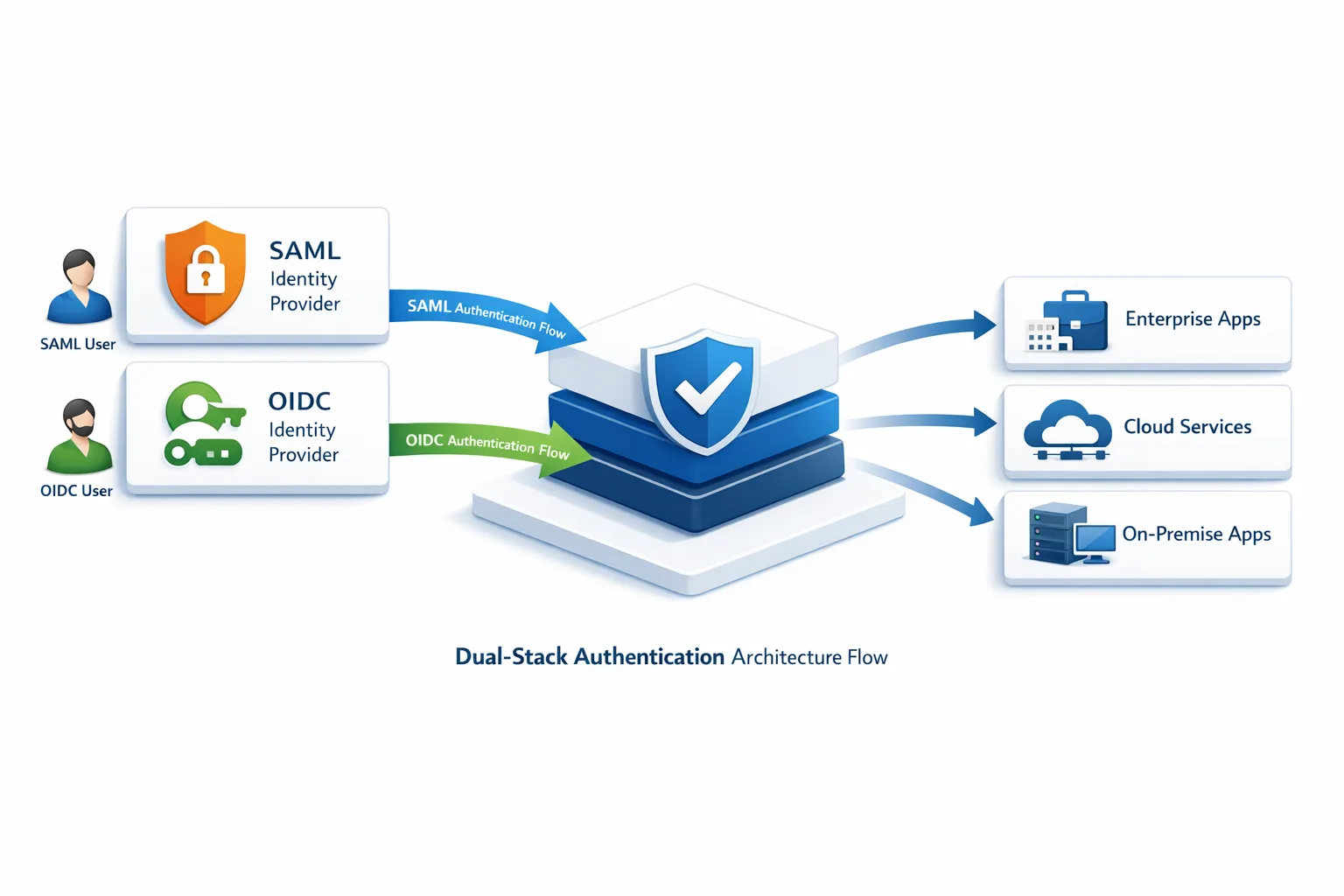
Picture a narrow auth edge that terminates both SAML and OIDC. Incoming SAML assertions hit a translator that verifies signatures, extracts attributes, and emits an internal token your services already understand. OIDC logins go straight to token verification using the IdP’s discovery and JWKS endpoints. Downstream services only see your standard internal token format, so you can phase out SAML without touching every microservice at once.
People also ask
Can I run SAML and OIDC together?
Yes. In fact, that’s the safest path during a cutover. Keep both paths live behind a feature flag, prefer OIDC for pilot tenants, and phase out SAML once usage drops. The trick is standardizing what downstream services see so your blast radius stays small.
Do I need PKCE for web apps?
Use PKCE everywhere. It’s required for public clients and closes interception gaps even for browser‑based apps. The operational overhead is minimal compared to the protection you gain.
What about single logout?
Treat global logout as best‑effort. Support back‑channel where partners can, keep access tokens short, and revoke refresh tokens on sign‑out. Don’t hinge reliability on brittle front‑channel chains across vendors you don’t control.
Operational readiness: dashboards and drills
Before you cut over, wire dashboards for login rate, error classifications, token refresh success, median login time, and logout success. Alert on spikes, not single failures. Run a 30‑minute drill where you rotate signing keys, break the JWKS endpoint, and watch whether caches and fallbacks behave. Practice tenant rollback with the same rigor you practice database failovers.
Support needs tooling too. Build a per‑user timeline that shows auth events: provider, flow, claims, token issuance, refreshes, and revokes. Your help‑desk will solve 80% of tickets in one view if they can see what happened without reading logs.
How to handle enterprise customers without surprises
Enterprise buyers care about three things: no downtime, no re‑training, and traceable change control. Offer a dry‑run window in a staging tenant they control. Provide a mapping table from old SAML attributes to new OIDC claims, plus an audit note that nothing about their role model changes. For portal launches, keep IdP‑initiated starts but immediately continue with your authorization code flow so everyone lands in the same session model.
Document the backout path. If they hit a blocker, you can switch them to SAML for a week while you fix issues. Having a reversible plan calms procurement and security reviewers who have been burned before.
Let’s get practical: implementation framework
Use this framework to keep momentum without skipping safety nets.
- Decide the contract. Choose the canonical user key (
sub), roles claim schema, and token lifetimes. Write it down. - Build the edge. Ship a dual‑stack auth gateway that can verify SAML and OIDC, normalizing to your internal token.
- Automate golden paths. Encode browser, mobile, and API flows into CI; run them on every deploy.
- Pilot with fans. Pick friendly tenants, ship docs, and watch metrics in real time.
- Roll by cohorts. Flip feature flags gradually; keep one‑click rollback per tenant.
- Sunset on purpose. Freeze new SAML configs, set decommission dates, archive metadata.
Real‑world scenario: mobile first, portal later
A common pattern: mobile login is lagging behind because SAML was web‑centric from day one. Start with OIDC for mobile clients using authorization code with PKCE and a system browser. That immediately reduces help‑desk traffic from embedded‑webview issues. Next, align your web session to the same token model so users can move across devices without odd sign‑in prompts. Push portal tiles to start OIDC under the hood, even if they clicked from an IdP dashboard.

Instrumentation: what good looks like
Healthy OIDC rollouts show a few hallmarks. Median login times are steady or slightly faster than SAML. Token refresh success hovers near 100% outside planned rollovers. Error rates cluster into expected buckets (invalid redirect URI, bad client secret for confidential clients, revoked refresh) with playbooks to resolve each quickly. Support tickets about group mapping decline as you move to stable roles.
When something does go wrong, a single dashboard should explain it. If you need to tail logs across five services to trace one login, consolidate. Add correlation IDs and pass them through tokens where appropriate so you can reconstruct a user’s path without guesswork.
Where teams overcomplicate the work
Over‑modeling claims is the classic trap. Keep tokens lean. Don’t stuff a directory into a JWT. If an app needs detailed entitlements, fetch them on demand from your API using the access token’s sub. Another trap: chasing perfect logout. Aim for fast revocation and short lifetimes; spend the extra energy on better audit trails and anomaly detection.
Finally, don’t turn the migration into a platform rewrite. Draw a secure boundary at the auth edge, normalize tokens there, and keep internal services stable. That’s how you ship in weeks, not quarters.
What to do next
• Book a 60‑minute working session to draft your token policy, claim schema, and rollback plan. Don’t schedule a kickoff without those three on paper.
• Pick two pilot tenants and two app surfaces (web and mobile). Wire feature flags and dashboards before the first login.
• Stand up the dual‑stack edge and automate golden paths in CI. Treat auth like payments—no manual testing after day one.
• Publish your deprecation timeline for SAML with dates, cohorts, and an exception process. Calm beats chaos.
Need help shipping this fast?
If you want a hands‑on partner to steer architecture, harden flows, and run the rollout calendar, our team can help. See identity modernization services, browse a few case studies, and learn how we plan migrations on what we do. You can also keep tabs on our latest security playbooks on the bybowu.com blog.
Modernizing identity is one of those upgrades that pays for itself. Teams move faster, sessions get safer, and your product finally treats mobile and APIs as first‑class citizens. Ship it in 30 days, measure it, and don’t look back.








Comments
Be the first to comment.