
GitHub Secret Scanning: July 2026 Playbook
GitHub secret scanning just got meaningfully stronger—and easier to operationalize. In July 2026, GitHub rolled out three notable changes: enterprise public monitoring on July 1, custom-pattern management via the REST API on July 13, and new attribution views and partner detectors on July 15. In parallel, a security hardening for actions/checkout with pull_request_target moved into enforcement on July 20, 2026. This piece breaks down what changed, why it matters, and a step‑by‑step plan to deploy GitHub secret scanning effectively across your org this week.
What changed in July—and the exact dates
Timelines matter because they drive risk windows and behavior change. Here’s what shipped:
July 1, 2026: Public monitoring for enterprises became available. It continuously scans public GitHub surfaces (e.g., public repos, issues, PRs, discussions) to find secrets that map back to your enterprise—via member activity or verified domain attribution—so you can revoke and respond even when the leak happens outside your repos.
July 13, 2026: Security teams can now create and manage custom patterns for secret scanning via REST. That means your internal token formats and one‑off partner keys can be first‑class citizens in push protection and alerting, without waiting on global detectors.
July 15, 2026: Improvements to secret scanning surfaced better attribution and new partner detectors. Practically, that tightens root‑cause loops and reduces wild‑goose triage.
July 20, 2026: Safer defaults for pull_request_target in actions/checkout were enforced broadly, closing a common path for privilege escalation from forked PRs. If your workflows quietly depended on the old behavior, this week is when you felt it.
Why this matters right now
Leaked credentials remain the shortest path to compromise. Most leaks don’t start as malice; they start as friction—copying logs into an issue, pasting a quick token into a PR comment, or shipping a rush fix from a personal fork. Public monitoring narrows your time‑to‑detect for spills you don’t even own. Custom patterns turn your internal keys into detected keys. And safer defaults in Actions reduce the blast radius when untrusted input meets automation.
Primary question: What does GitHub secret scanning actually cover?
Two scopes matter:
Repository scanning. This runs over your repo’s Git history and can also watch non‑code surfaces when enabled—PR titles/bodies/comments, issues, discussions, and wikis—creating alerts in your Security tab and supporting push protection to block risky commits before they land.
Public monitoring for enterprises. This looks beyond your repos at public GitHub locations and flags exposures linked to your enterprise members or verified domains. It’s read‑only detection on what’s already public, but it buys you critical minutes to revoke credentials before they’re abused.
Set up and tune public monitoring (15 minutes)
Before you enable anything, verify your enterprise domains so attribution works. Then:
1) Enable public monitoring at the enterprise level. Confirm that you’ll see findings attributed by member activity (authored by someone in your enterprise) or verified domain (committer email matches your domain).
2) Wire alerts into your real queues. Use webhooks or SIEM integration so incidents don’t rot in a dashboard. Assign ownership by token type (e.g., cloud IAM, GitHub PAT, payments API) so revocation isn’t a debate.
3) Define an SLA by credential sensitivity. Example: cloud root and GitHub PATs with write scopes—5 minutes to revoke, 60 minutes to validate blast radius, 24 hours to close with compensating controls. Lesser scopes can use longer windows, but write it down.
Add custom secret patterns via REST (25 minutes)
Out‑of‑the‑box detectors are great, but your internal tokens, legacy app keys, and third‑party one‑offs won’t match public signatures. Now you can:
1) Inventory internal token formats. Gather patterns for CLI keys, service‑to‑service tokens, legacy HMAC secrets, etc. For each, define a safe regex, a validator (length/charset), and a false‑positive test.
2) Create enterprise or org patterns via REST. Store them in source control as JSON so changes are reviewed. Roll out to a staging org first, then production.
3) Decide push protection coverage. Include custom patterns in push protection if you can validate them with high confidence; otherwise alert‑only until you tune noise down.
4) Backfill intentionally. Kick off a backfill scan for top repos and wikis where legacy leaks hide. Time it during low‑traffic hours and make sure triage is staffed.
People also ask: Does push protection block secrets in PR comments and issues?
Push protection only gates git pushes. But secret scanning still detects in issues, PR bodies/comments, reviews, and discussions and will alert you. Treat those alerts with the same urgency—tokens in text are just as operational as tokens in code.
Hardening GitHub Actions: the pull_request_target catch
Here’s the thing: pull_request_target runs with base‑repo privileges, not the fork’s. That’s why it’s convenient—and dangerous. As of July 20, 2026, safer defaults in actions/checkout prevent risky implicit checkouts of untrusted PR content in privileged contexts. If your CI broke this week, that’s a good sign: unsafe paths were closed.
What to do:
• Avoid checking out untrusted code with write‑scoped tokens. For validation tasks on forks, switch to pull_request and use read‑only GITHUB_TOKEN plus ephemeral test creds.
• Where you must use pull_request_target, pin actions/checkout to a safe version and explicitly opt in to any “allow unsafe” behavior only with documented justification and code‑owner review.
• Audit for secrets exposure in logs and artifacts. Don’t print tokens; rotate anything that might have hit runner memory in a privileged job.
New repos and OIDC: immutable subject claims
For repositories created after July 15, 2026, Actions OIDC tokens use an immutable subject claim by default. That’s security‑positive for cloud trust policies (AWS/Azure/GCP), because it reduces identity drift. If you provision cloud roles with OIDC, double‑check your audience and subject mappings before templating new repos.
The Zero‑Noise Rollout: a 90‑minute plan
If you’ve got 90 minutes today, you can materially reduce risk:
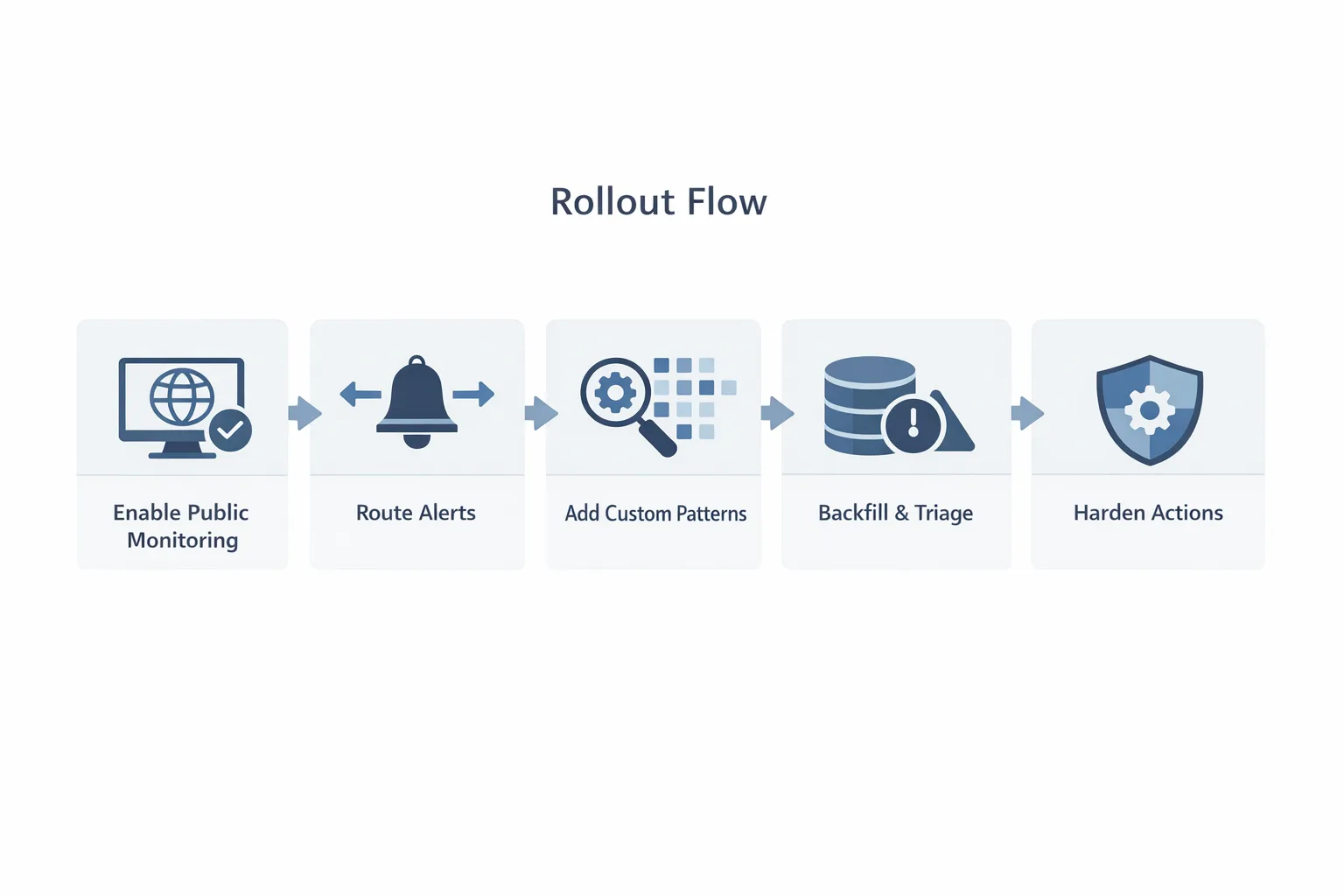
1) 15 min — Turn on public monitoring. Verify your enterprise domain, enable monitoring, and connect alerts to your SIEM/on‑call.
2) 20 min — Wire triage and SLAs. Create a pager rotation for secret alerts. Write three policy lines: revocation SLA (by sensitivity), who approves exceptions, and when to block merges.
3) 25 min — Ship two custom patterns. Start with your internal CLI key and an app‑to‑app token. Add them to push protection if validation is reliable.
4) 10 min — Backfill top repos. Trigger scans on your Tier‑1 repos and the wiki that everyone forgets.
5) 20 min — Audit pull_request_target. Grep org‑wide, open PRs replacing risky jobs with pull_request, and pin actions/checkout to a version you’ve tested. Add a policy check that flags any new allow‑unsafe usage.
Operational guardrails that actually work
Policies that never run are just vibes. Bake these into code and tools:
• Pre‑commit and pre‑receive hooks for secrets. Even if push protection runs, local hooks catch spills before they ever hit remotes.
• CodeOwners + required reviews on workflow directories. Treat CI YAML as application code with privilege.
• SHA‑pin Actions wherever practical. Tag repointing still happens.
• Least‑privilege tokens. Set GITHUB_TOKEN default to read‑only and grant writes only where justified.
• Incident drills. Run a 30‑minute tabletop: leak a PAT in a PR comment, practice revoke→invalidate caches→audit logs→hotfix keys in config stores.
Noise control: cutting false positives
False positives are the fastest way for engineers to tune out alerts. Keep them honest:
• Require a validator for every custom pattern. Length, checksum nibble, or a call‑and‑response to a validation endpoint that never reveals validity to attackers.
• Suppress buckets, not alerts. If a detector is noisy for test fixtures, carve out a path‑based allowlist limited to that directory in test repos—don’t turn off the detector globally.
• Route by type. Cloud keys route to infra; GitHub PATs to platform; third‑party SaaS tokens to the owning team. Ownership reduces back‑and‑forth.
People also ask: Should we scan issues and discussions?
Yes. Issues and discussions are where “temporary” fixes and logs end up. Scanning those surfaces adds negligible overhead and outsized wins. Pair it with a social rule: don’t paste credentials into text—even “just for a minute.”
Metrics that prove it’s working
Executives don’t want dashboards; they want delta. Track:
• MTTD (public leaks) from creation to first alert. With public monitoring enabled, this should fall dramatically within a week.
• Push‑blocked rate for secrets over time. Your aim is a short spike (catching unknown leakage) followed by a decline as developers adapt.
• Time to revoke by credential class. Measure the longest tail; that’s where attackers will live.
• Re‑leak rate of the same token type within 30 days. High re‑leak rates mean process, not tooling, is broken.
Pinch points and real‑world gotchas
• Monorepos with mixed sensitivity. If one subtree is high‑risk and the rest is low, break detectors or exemptions by path. Push protection exemptions exist for roles/teams/apps—use them surgically.
• Air‑gapped or mirrored environments. If you rely on GitHub Enterprise Server and mirrors, align detectors and policies between Cloud and Server. Don’t let an internal fork become the blind spot.
• Runner logs and artifacts. Secrets might not live in code but do live in logs. Redact aggressively and purge artifacts on schedule.
Build it into your platform
If you manage a platform team, wrap these controls as paved‑road modules. Offer a repo bootstrap that auto‑enables scanning, sets read‑only GITHUB_TOKEN, pins Actions, and configures alert routing. Ship a custom pattern catalog repo where security can PR new detectors and roll them out through CI.
Where ByBowu can help
Rolling these changes out across dozens of teams takes coordination. Our team has done this in mixed cloud estates and high‑compliance environments. If you want help implementing enterprise guardrails, see our security engineering services, what we include in platform hardening engagements, and the incident workflow we’ve used in our 72‑hour breach playbook. For supply‑chain exposure in build steps, our npm v12 security playbook pairs well with the Actions guidance here.
FAQ quick hits
Will enabling public monitoring expose our private data?
No. It only flags secrets that are already public somewhere on GitHub and attributable to your enterprise or domain. The value is speed: detect and revoke faster.
How do we stop developers from bypassing push protection?
Make bypasses reviewable. Require a justification note and auto‑open a ticket when someone bypasses. Trend the data and coach repeat offenders.
Can we validate custom tokens without exposing metadata?
Yes. Use a one‑way validator that returns a coarse score (e.g., checksum match + format) and never confirms live status. Treat “likely” as revocation‑worthy anyway.
What to do next (this week)
• Enable enterprise public monitoring and verify your domains.
• Route secret alerts to a staffed queue and define SLAs by token class.
• Ship two custom detectors via REST and decide whether they join push protection.
• Audit pull_request_target jobs, pin actions/checkout, and remove unsafe checkouts.
• Flip GITHUB_TOKEN default permissions to read‑only and grant writes explicitly.
• Schedule a 30‑minute incident drill focused on a leaked PAT in a PR comment.
Zooming out
Credentials will leak. The difference between a scare and a breach is time. July’s updates push GitHub toward safer defaults and broader visibility—even when your first line of defense is someone else’s public thread. Take the hour today. Tune detectors, harden automation, and make revocation muscle memory. Future‑you will thank you.





Comments
Be the first to comment.