npm v12 Security: What Breaks and How to Fix It
On July 8, 2026, npm v12 started shipping with a new install-time posture. In plain English: npm v12 security changes convert silent, automatic behaviors into explicit approvals. Dependency lifecycle scripts don’t run unless you allow them. Git-based and remote-URL dependencies don’t resolve unless you opt in. And 2FA-bypass granular access tokens are slated for new restrictions starting in early August 2026 and into January 2027. If you ship JavaScript professionally, this matters right now.
What exactly changed—and when
Three defaults flipped with v12:
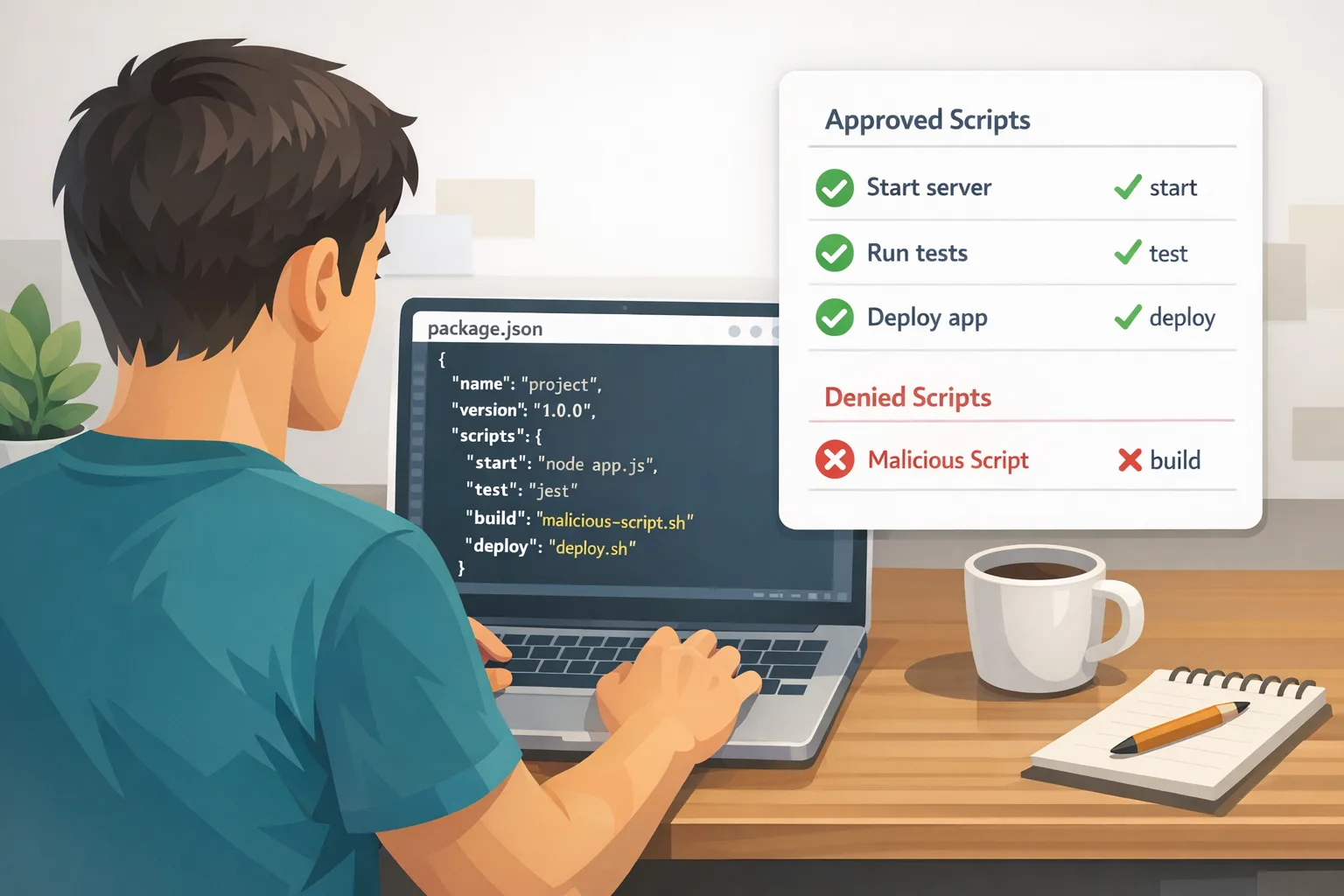
1) allowScripts defaults to off. During npm install, dependency preinstall, install, and postinstall scripts no longer run automatically. That includes implicit native builds via node-gyp when a package has a binding.gyp but no explicit script.
2) --allow-git defaults to none. Git dependencies (direct or transitive) won’t resolve unless you explicitly permit them.
3) --allow-remote defaults to none. Remote tarballs and similar URL-based deps are blocked unless you opt in.
There’s also a staged policy shift on credentials: 2FA-bypass tokens (granular access tokens that could previously skip two-factor for sensitive operations) are losing privileges on a timeline the ecosystem can plan around. Early August 2026 removes the ability to skip 2FA for account and package-admin actions; around January 2027, those tokens can’t publish directly and must move to trusted or staged publishing with a human step.
Why npm v12 security changes flip the default
Here’s the thing: for more than a decade, “npm install” implicitly meant “execute whatever your transitive dependencies want.” That’s convenient—until a dependency goes rogue or an attacker sneaks into your graph. v12 makes execution an explicit decision you record and review, not an accident of dependency resolution. It also closes lesser-known execution paths, like Git dependencies overriding tools via .npmrc, and remote tarballs that bypass normal registry controls.
Will this break my build?
Possibly. The common failure pattern isn’t red Xs—it’s “skipped something important and still returned 0.” The npm v12 default skips unapproved scripts. That’s safer, but it means tools that rely on install-time code gen won’t run unless you approve them. Examples you might see in real projects:
- ORM clients that generate code at install or postinstall.
- Native modules that compile via
node-gypimplicitly. - Packages that prepare artifacts using
preparefrom a Git dep. - Monorepos that used a handful of Git or tarball dependencies for internal plumbing.
Don’t guess. Use the built-in discovery pass before upgrading your CI images widely.
The 60‑minute CI migration playbook
Block 60 focused minutes, run this on a throwaway branch in your main repo, and you’ll know where you stand.
- Pin a modern npm 11 first. Upgrade local and CI runners to npm 11.16.0+ so you’ll see warnings about what v12 would skip.
- Run your normal install with discovery on. Execute
npm approve-scripts --allow-scripts-pending. This lists dependencies that contain lifecycle scripts and would be blocked by v12. - Approve what you trust, deny the rest. Use
npm approve-scriptsto allow vetted packages andnpm deny-scriptsto block others. npm writes your allowlist topackage.json. Commit it. - Audit native builds. Any dependency that compiled implicitly via
node-gypneeds either an approval or a replacement plan. Validate that build flags and toolchains are present in CI. - Handle Git and remote deps. If you truly need them, configure explicit opt-ins (
--allow-git,--allow-remote) in your CI command or lock down acceptable sources via your npm config. Better: replace with published, checksummed packages. - Regenerate your lockfile if it’s old. Older
package-lock.jsonfiles might lack theresolvedURLs npm uses to pin approvals precisely. Refresh to v2 lockfile semantics so script approvals stick to the exact versions you reviewed. - Repeat in your top two repos. Treat this like a canary. Once green, roll the same approvals across other services. Automate the check in CI and fail on unexpected, unapproved scripts.
Pro tip: In monorepos, bake this into the workspace root so packages inherit consistent policy. For Docker builds, prefer a two-stage pattern: install with approvals in a build stage, then copy node_modules into the final image so no install-time code executes at runtime.
How to set guardrails your team will actually follow
Policies that depend on people remembering flags fail. Lock your intent into repo state and CI configuration:
- Commit approvals. The allowlist in
package.jsonis reviewable history. Make it part of PR code review for new dependencies. - Pin Node and npm. Use a tool like
voltaor your CI’s tool cache to pin exact versions so you don’t unknowingly flip defaults mid-sprint. - Guard Git/remote dependencies. If you must allow them, restrict to explicit orgs or hosts via wrapper scripts or CI environment templates.
- Alert on “pending” scripts. Fail builds that introduce unapproved install-time scripts. Consistency beats heroics.
2FA‑bypass tokens: the timeline and the plan
Two key dates:
- Early August 2026: Tokens configured to bypass 2FA can no longer skip 2FA for sensitive account and package-admin actions (like changing maintainers, org membership, or email).
- Around January 2027: Those tokens also lose direct publish rights; they’ll be limited to reads and staged publishes that require a human 2FA approval to go live.
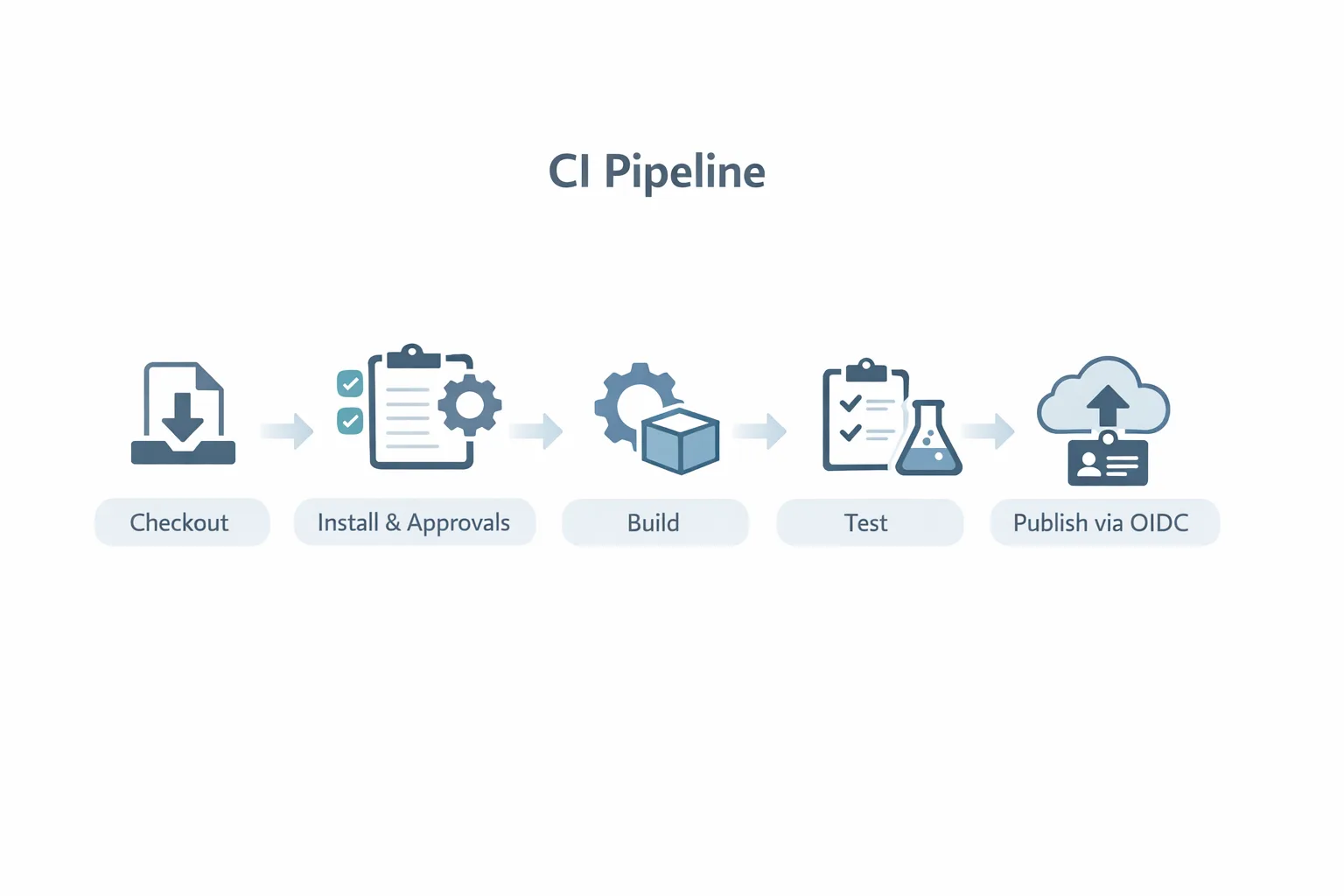
The migration target is clear: shift CI to trusted publishing (OIDC) or staged publishing with a human in the loop for the final step. Long-lived publish tokens age poorly; OIDC ties publishing power to your CI identity and policy, not a secret someone can exfiltrate.
Package maintainers: your three immediate to‑dos
If you publish to npm, help downstream teams avoid surprise breakage.
- Move work out of install scripts. If possible, prebuild artifacts and ship them. If you must run code at install, document it and keep the surface minimal. Consider exposing a
postinstallthat only runs when explicitly approved. - Replace Git/URL deps with published artifacts. Cut new releases, even if they’re canaries. Teams can trust-lock the tarball they reviewed.
- Announce your stance. Add a short “npm v12 compatibility” note to your README. Tell users if your package requires an install-time script approval and why.
People also ask: common questions we’re getting
Will npm v12 break Prisma, native modules, or codegen tools?
It won’t “break” them so much as skip their install-time generation unless you approve it. If your build relies on generated clients, binaries, or compiled bindings, explicitly approve those packages and ensure your CI has the necessary toolchain and environment variables.
Do I need to approve scripts for devDependencies?
Yes—approval is about when code runs, not whether a package is a devDependency. If a dev-only package executes during install (for example in a Docker build stage), it needs approval the same way.
How do I handle Git dependencies now?
First choice: remove them. Publish a versioned package and consume it via the registry. If you must keep a Git dep, document it, opt in explicitly in CI, and scope the allowed orgs or hosts. For internal tooling, consider a private registry instead.
What about remote tarballs?
Same advice: prefer registry-published packages with checksums in package-lock.json. Remote tarballs are brittle and invisible to many security checks.
We use old lockfiles. Is that a problem?
It can be. Older lockfiles without resolved URLs make precise approvals harder. Refresh your lockfile so npm approve-scripts can pin to exact versions and you avoid blanket approvals.
A simple approval framework teams can adopt this week
Use this lightweight rubric during dependency reviews:
- Need: Does the package truly need install-time execution? If not, deny and open an issue upstream.
- Scope: Is the script narrowly scoped to build artifacts, or does it touch the network, shell, or file system broadly?
- Source: Is the package actively maintained, cryptographically signed by the registry, and published from a trusted org?
- Repro: Can we move execution to a build step we control (e.g., a
preparescript in our repo) instead of a transitive dependency? - Rollback: If it misbehaves, can we revert quickly without production impact?
Apply it once, record the decision in package.json, and treat new approvals as change control items in code review.
Security posture: zooming out
Between install-time hardening and token reforms, the npm ecosystem is migrating toward explicit, auditable trust. Pair that with registry provenance and OIDC-based publishing, and the attack surface from compromised dependencies and stolen tokens shrinks substantially. This is the right direction, but policy is only half the story—teams still need good hygiene: minimum access, short-lived credentials, reproducible builds, and fast revocation playbooks.
If you’re responsible for a portfolio of web apps or services, coordinate these changes with other 2026 security work. For browser-side hardening you may also want to read our take on July 2026 browser security updates. Planning your fall runtime baseline? Our Node.js 26 LTS checklist can help you get ready early.
Implementation details and gotchas
Approvals are version-pinned by default. The approvals written by npm approve-scripts typically pin to a specific name@version. That’s good—you approved that script, not all future ones. If your lockfile is missing metadata, npm may fall back to name-based approvals; fix that by refreshing the lockfile.
Workspaces? Centralize approvals at the root to avoid drift. Enforce that developers don’t run installs in subfolders that ignore root policy.
Air-gapped or cached builds? If you mirror registries or cache tarballs, ensure your mirrors preserve metadata so approvals line up. Validate that your cache doesn’t silently serve stale artifacts after you’ve reviewed a newer version.
Local vs CI behavior. Don’t rely on developers passing flags locally. Make the CI pipeline authoritative: CI should fail if new, unapproved scripts appear. Developers can test locally by running the same approve/deny commands.
Trusted publishing setup. Move your automated publishes to OIDC: configure your registry org, grant your CI identity permissions, and remove long-lived publish tokens from secrets. If you need a human sign-off, add staged publishing so releases require an explicit 2FA approval before going live.
Let’s get practical: example CI snippets
Everyone’s pipeline is different, but these patterns travel well:
- Install with approvals enforced: run
npm ci(ornpm install --include=devif you must) after committing your approvals. No extra flags needed—the defaults already block unapproved scripts. - Explicit Git/remote usage: if you truly require them, add a controlled wrapper:
npm ci --allow-git=github:your-org --allow-remote=https://example.com/tarballs/from a locked CI variable, not ad hoc scripts. - Publish via OIDC: replace
npm publishwith a workflow that exchanges your CI identity for a short-lived credential, or uses staged publishing with a required approver.
Where this intersects with broader platform work
Security defaults don’t exist in a vacuum. If you’re updating dependency policy, it’s a great time to knock out adjacent items: rotate secrets, enforce dependency review in PRs, and audit what your apps expose. If you want a structured assessment or help mapping this to your roadmap, explore our security and platform services, skim recent posts on the Bybowu blog, and see how we’ve helped teams modernize in the portfolio.
What to do next
Here’s a tight action list you can run this week:
- Upgrade local and CI npm to 11.16.0+ for discovery, then to 12.x once approvals are committed.
- Run
npm approve-scripts --allow-scripts-pending, approve the essentials, deny the rest, and commit. - Replace Git/remote dependencies with published packages wherever possible.
- Refresh lockfiles so approvals pin to exact versions.
- Switch CI publishing to trusted or staged publishing; remove long-lived publish tokens.
- Set a calendar reminder for early August 2026 to verify token behavior aligns with the new rules, and again for January 2027.
- Train reviewers: any new dependency with install-time code requires an explicit approval and a quick risk review.
If you want a second pair of eyes on your pipeline or a hands-on migration session, get in touch. We’ve guided teams through similar hardening moves across package managers and CI stacks; the key is aligning security with developer speed.







Comments
Be the first to comment.