Real-Time Video Generation: The 2026 Build Guide
Real-time video generation moved from future-talk to sprint boards this month. On May 19, 2026, DeepMind connected Street View to Genie 3 to ground interactive worlds in real places. On May 25, 2026, NVIDIA research highlighted fresh throughput gains for long‑video models. On May 28, 2026, Reactor came out of stealth with $59M to turn world models into developer tooling. Put simply: the stack for real-time video generation is getting opinionated—fast.
Here’s the thing: building an experience that feels native to the web (low latency, reliable, accountable) isn’t just about the model. It’s quantization choices, transport protocols, observability, and cost control. This guide lays out the architecture, a pragmatic latency budget, a 30‑day plan, and the risks nobody tells you about until after the demo falls apart.
What changed this week—and why it matters
Three concrete, verifiable shifts are driving production interest:
• Genie 3’s Street View grounding (May 19, 2026) signals that interactive world models will anchor to real geospatial data, not just prompts. That reduces the uncanny gap for training, simulation, and commerce.
• NVIDIA’s long‑video work showed higher, single‑GPU frame rates and practical W4A4/NVFP4-style inference strategies. Translation: higher FPS with lower memory pressure and better power efficiency.
• Reactor’s $59M raise (May 28, 2026) points to a developer-first platform around world models—inference infra, streaming, and tooling—rather than bespoke research setups. Expect SDKs, SLAs, and usage-based pricing.
Architecture choices for real-time video generation
Control: prompt-in, action-out, or both?
Decide early how users steer the scene:
• Prompted playback: text or sketch generates a stream; controls are scrub, style, camera hints.
• Agentic input: users act, an agent plans, the model streams new frames (think game‑like interactions).
• Hybrid: prompt to start, actions to adapt—best for simulators, training, or creative tools.
Core inference: diffusion vs. autoregressive—and why NVFP4/W4A4 keeps showing up
Real-time requires short, predictable critical paths. Recent papers report single‑H100 frame rates around or above ~20 FPS for minute‑scale video, and even higher under aggressive quantization. The pattern that’s winning:
• Causal or streaming-friendly decoder with key‑value cache refresh to manage scene changes without full re‑encode.
• Quantization at 4‑bit weights/activations (e.g., W4A4) plus compressed KV cache (e.g., NVFP4‑style) to fit long context.
• Lightweight attention windows with an attention sink to keep long‑range coherence without exploding compute.
Practically, that means you should benchmark models with three toggles: 8‑bit vs. 4‑bit, short vs. long attention, and KV cache compression on/off. Measure end‑to‑end—not just model FPS. A model that hits 30 FPS but stalls your muxer is still not “real-time.”
Serving layer: micro‑batching and CUDA graphs
For latency-sensitive streams, pick micro‑batching that stabilizes GPU occupancy without introducing queueing spikes. Use CUDA graphs (or vendor equivalents) to cut kernel launch overhead for steady frame cadence. Keep your pre/post steps (conditioning, super‑res, audio, watermarking) on‑GPU where possible to avoid PCIe ping‑pong.
Transport: WebRTC, LL‑HLS, or WebTransport + MSE?
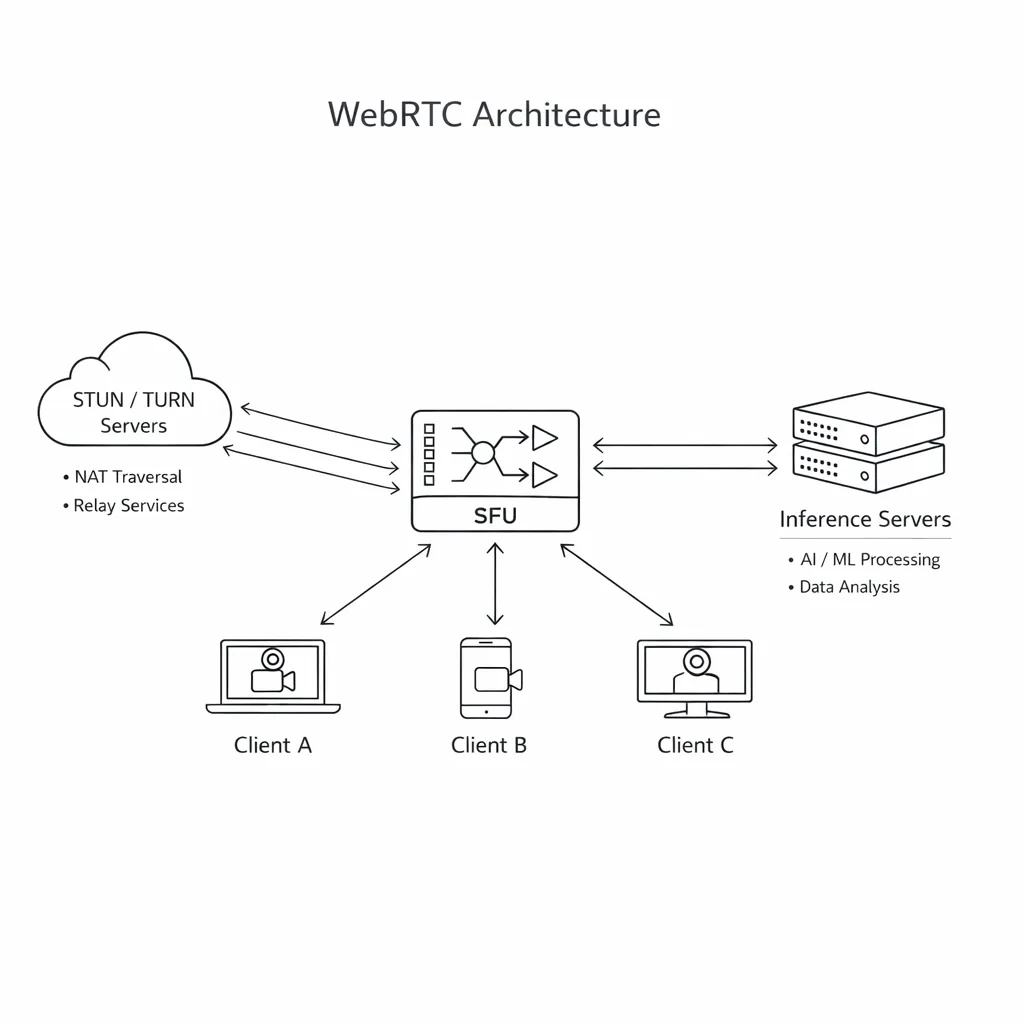
• WebRTC: the lowest glass‑to‑glass latency (sub‑300 ms in stable networks), easy two‑way control, built‑in NAT traversal. Your friend for interactive worlds.
• LL‑HLS/DASH: great reach and CDN leverage, but real-world LAT is often 1–3 seconds. Works for watch‑and‑comment, not twitchy controls.
• WebTransport + MSE/WebCodecs: flexible and promising, but expect more client diversity work. Useful for custom chunking or hybrid streams.
Whatever you choose, instrument one‑way and round‑trip latency at the segment/frame level, not just network RTT.
Real-time world models on the web: the frontend contract
The browser is finally ready for this class of app:
• WebCodecs gives you low-overhead decode paths for H.264/AV1 on most modern browsers; pair with hardware encoders server‑side.
• OffscreenCanvas and WebGL/WebGPU can blend overlays (UI, telemetry, cursors) without blocking decode.
• Backpressure is a feature: design your player to request frames based on decode headroom, not just arrival rate.
If you’re on React/Next.js, server components can pre‑warm state and permissions, but keep the player itself client‑side for consistent frame pacing. For an example of modern Next patterns we like for streaming UI, see our Next.js 16.2 upgrade playbook.

Headline metric: a pragmatic latency budget
Target sub‑400 ms glass‑to‑glass for meaningful interactivity. A workable split:
• Capture/intent to model input: 20–40 ms
• Model inference: 16–33 ms per frame (30–60 FPS), amortized with small lookahead where safe
• Encode/mux: 8–20 ms (hardware encoders, one B‑frame max)
• Network: 60–120 ms one way (median broadband), prioritize TURN proximity
• Decode/render: 20–40 ms (WebCodecs + GPU overlays)
Don’t chase 120 Hz on day one. A locked 30 FPS with consistent pacing beats a jittery 45–60 FPS stream.
Real-time video generation: the L.A.T.E.N.C.Y. checklist
Use this in sprint planning for the next 30 days:
L — Latency budget: Fix targets before coding. Every PR must state its slice (e.g., “saves 6 ms in encode”).
A — Adaptive quality: Implement dynamic resolution (720p→1080p), bitrate ladders (two presets), and optional frame‑skip under backpressure.
T — Transport: Choose WebRTC if users act on the world; otherwise LL‑HLS. Prototype both in week one, decide by week two.
E — Encoding: Prefer H.264 for reach; gate AV1 behind capability checks. Keep GOP short (0.5–1.0 s). Watermark server‑side.
N — Network: Operate your own TURN in 2–3 regions. Measure relay hit rate and promote peer connections when feasible.
C — Cost controls: Enforce per‑room and per‑tenant frame caps and automatic quality drop. Alert on GPU‑minute anomalies and sudden relay spikes. If your edge inference runs on Workers‑style platforms, audit upcoming platform changes; our note on Workers AI deprecations outlines migration timing.
Y — Yield analytics: Log frame RTT, dropped frames, bitrate, and inference queue time. Plot per‑session funnels from prompt to first frame.
Data points to set expectations
To anchor planning conversations, I share these numbers in kickoff decks:
• Single‑GPU (H100) long‑video research has reported ~20–45 FPS depending on quantization and model size.
• Street‑grounded world models (via Street View tie‑ins announced May 19, 2026) reduce “world drift” when users deviate from prompts—helpful for training and navigation demos.
• Funding is flowing into “developer platforms for world models” (May 28, 2026), which means SDKs, not just papers—expect higher reliability baselines by summer.
These aren’t vendor promises—they’re planning guards. Prototype with them, then measure your own glass‑to‑glass numbers under packet loss.
Security, safety, and abuse prevention
Real‑time content invites real‑time abuse. Set guardrails as code, not policy PDFs:
• Token‑gated rooms with rotating keys; isolate GPU sessions per tenant.
• Server‑side watermarking and per‑session signatures so clips shared later can be traced to a generation session.
• Safety filters on prompts and action inputs before conditioning; rate‑limit action loops.
• Human‑in‑the‑loop review flows for flagged sessions; keep 30–60 seconds of encrypted ring buffer for triage.
People also ask
Can I run this on consumer GPUs?
Yes—for prototypes. A single 24–48 GB card can hit acceptable FPS with 4‑bit quantization and small windows. For production concurrency, you’ll want data‑center GPUs and autoscaling with hard guardrails.
Can WebRTC handle 4K?
It can, but only in good network conditions and with tuned encoders. For general audiences, 720p↔1080p with adaptive bitrate is the practical sweet spot. Use 4K for kiosks or controlled venues.
Do I need agents, or is prompt‑to‑video enough?
If users watch more than they act, start prompt‑first and ship sooner. If they steer the scene (training, design, simulation), layer a small planner/agent to translate intent into consistent scene updates.
Gotchas I don’t want you to learn the hard way
• Drift under long horizons: Even with attention tricks, identity and lighting drift accumulates. Insert periodic “anchor” hints or latent nudges.
• Audio sync: Don’t mix audio post‑hoc. Generate conditioned or TTS‑aligned audio in the same clock domain as frames.
• Browser diversity: iOS WebRTC behaviors under backgrounding differ; test tab visibility changes, device rotations, and interruptions.
• GPU fragmentation: Long‑running sessions fragment allocator memory. Periodically re‑graph or restart pods on drain to keep latency tight.
• Observability gaps: Metric names drift between infra and app teams. Define a shared dictionary: rtt_ms, encode_ms, drop_pct, fps_target, fps_actual.
Cost modeling without guessing prices
Build a parametric model your CFO can test:
• Compute minutes per active session = (frames_per_second × seconds × ms_per_frame) ÷ 1000 ÷ (GPU_utilization).
• Ingress/egress GB = bitrate_Mbps × seconds ÷ 8 ÷ 1024 (per stream; multiply by viewers).
• Orchestration overhead = idle headroom + cold starts (inference) + TURN relay percent × relay premium.
Plug regional GPU and bandwidth rates into this sheet. Then enforce budgets in code: cap sessions, downshift quality, and kill zombie rooms automatically. If you store scene metadata for retrieval, pair generations with vector writes; our guide to MongoDB 8.3 native embeddings covers a sane path for retrieval features.
A reference implementation sketch
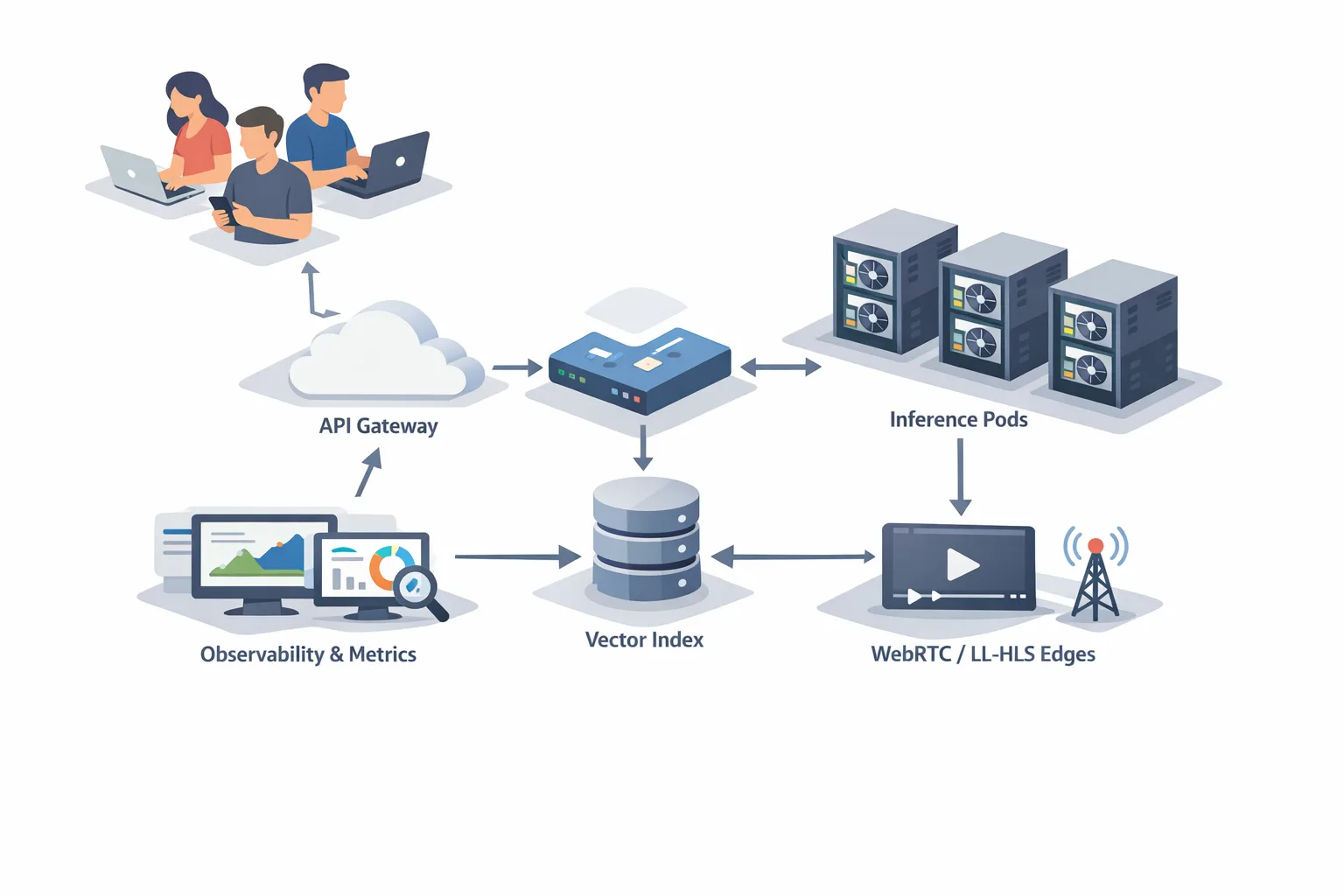
• Backend: gRPC control plane, REST for auth/rooms. Inference pods pinned to GPU nodes with CUDA graph‑captured pipelines, 4‑bit quantization, compressed KV cache.
• Streaming: WebRTC SFU for multi‑viewer rooms; transcode ladders at the edge for fallbacks.
• Frontend: Next.js app with a client‑side player using WebCodecs, OffscreenCanvas overlays, and a minimal React state store to avoid re‑renders.
• Observability: Per‑frame spans (OpenTelemetry), room‑level SLOs (p95 glass‑to‑glass), and live dashboards for drop_pct and relay rate.
If you’d like help designing or hardening this, our team builds and runs systems like this for clients—see what we do and recent work in our portfolio.
What to ship next (next 30 days)
Week 1: Build the skeleton—room service, auth, simple WebRTC publisher/subscriber, and a stub player using WebCodecs. Hard‑code 720p/30.
Week 2: Integrate the model with 4‑bit quantization and compressed KV cache. Instrument end‑to‑end latency and plot fps_actual vs. fps_target.
Week 3: Add adaptive quality and a TURN relay in two regions. Implement watermarking and prompt/action safety filters. Start the cost model sheet.
Week 4: Hardening: GPU pod draining, autoscaling tests under packet loss, chaos drills, and a small canary release to 100 users.
Zooming out
Three lines are converging: grounded world models, efficient long‑video inference, and web‑native transport. That’s the recipe for the next wave of interactive products—training sims that don’t feel canned, design tools that let you act inside your scene, and commerce demos that inhabit a real place, not a backdrop. If you’re evaluating platform choices or want a critical review of your architecture, get in touch on our contact page. We’ve already helped teams turn papers into products; we can help you ship with lower latency and fewer surprises.





Comments
Be the first to comment.