
Cloudflare Agents Week 2026: A Practical Build Plan
Cloudflare Agents Week 2026 landed with substance: a toolkit for the agentic web that dev teams can ship today. Across seven days (April 14–20, 2026), Cloudflare introduced an agents-first stack—Browser Run with live debugging and CDP access, a managed Agent Memory service, new Agents SDK primitives (Project Think), and a scaled-up Workflows control plane—aimed at running agents that think, act, and persist. If you’re deciding what to adopt and in what order, this build plan will keep you fast, safe, and grounded.

What Cloudflare Agents Week 2026 actually shipped
Here’s the condensed brief for web and platform leads evaluating roadmap impact:
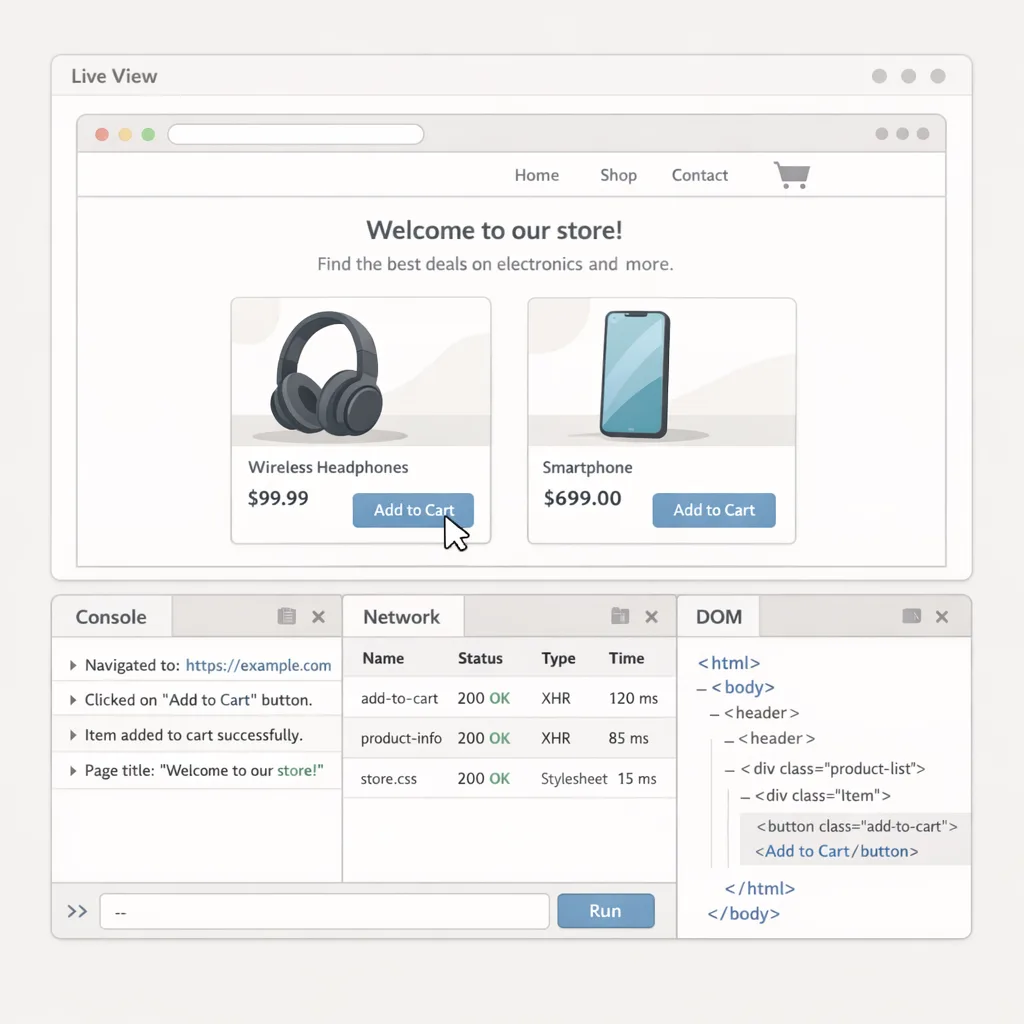
1) Browser Run (formerly Browser Rendering) is now a first-class browser for agents. It adds Live View (watch sessions in real time), Human-in-the-Loop handoff, a direct Chrome DevTools Protocol (CDP) endpoint, session recordings for replay, and a concurrency bump to 120 concurrent browsers (up from 30). There’s also early support for WebMCP—Chrome’s emerging interface for letting websites expose typed tools that agents can call directly.
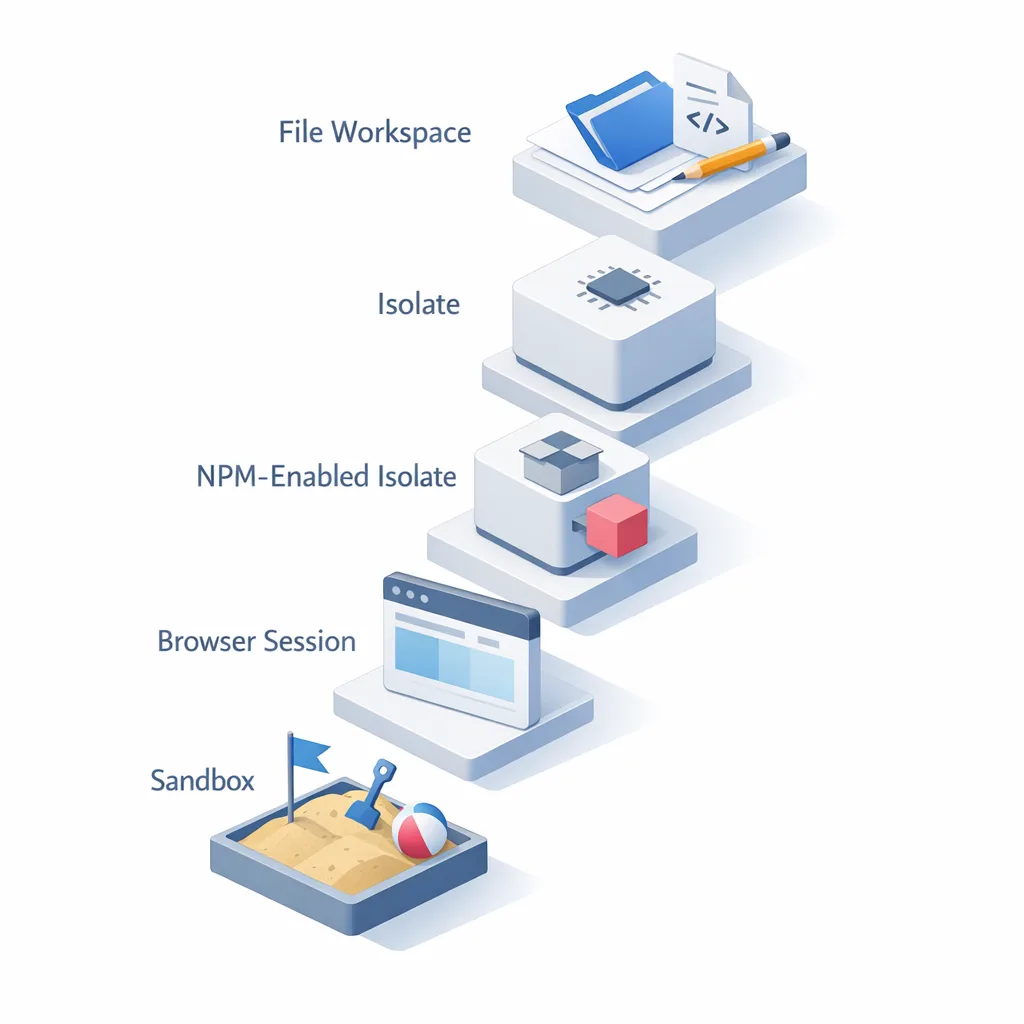
2) Project Think evolves the Agents SDK with durable execution, sub-agents, persistent sessions, sandboxed code execution, and a pragmatic “execution ladder” from lightweight isolates to full sandboxes. The pitch is simple: agents that keep working through restarts and scale from hobby to production without re-architecture.
3) Agent Memory (private beta) gives agents persistent, queryable memory. Instead of bloating context windows, it ingests conversation history, extracts facts/instructions/events, and retrieves what matters on demand, so quality doesn’t decay across long-running workflows.
4) Workflows at scale saw the control plane re-architected to support higher limits—think sustained multi-step automations for background agents without building your own job runner. Cloudflare quoted big jumps, including high concurrency and creation rates tuned for agent workloads.
5) Agentic web readiness includes an Agent Readiness score and crawl controls designed to steer “good bots” toward canonical content while respecting site owners’ boundaries. Paired with Web Bot Auth and signed agent identifiers, the web gets more predictable for well-behaved agents.
Why this matters now (beyond the hype)
Agents aren’t just chat. The useful pattern is: read context, generate code, run it, observe, iterate. That loop needs reliable compute, explicit permissions, an observability surface, and a way to remember what worked. Traditional container hosting is a poor fit at scale—idle costs stack up and orchestration gets messy. Cloudflare’s model of isolates, Durable Objects, and on-demand sandboxes is built for spiky workloads with near-zero idle.
Here’s the thing: even if you’re not “all-in on agents,” you probably have workflows that benefit from browser automation, hybrid retrieval, or event-driven tasks. Browser Run’s Live View alone pays for itself in debugging hours the first time an edge case appears in checkout.
Primary keyword: Cloudflare Agents Week 2026 by the numbers
Numbers that should influence your planning:
- April 14–20, 2026: shipping window for the announcements and public betas.
- 120: concurrent Browser Run instances per account (4× previous limit), with CDP access and session recording.
- Workflows: re-architected control plane designed for high concurrency creation rates suited to background agents.
- Agent Memory: private beta for persistent, structured recall instead of naïve context hoarding.
- 14+ model providers available behind a unified inference layer via AI Gateway, expanding multimodal choices.
- 22% LLM footprint reduction cited for Cloudflare’s inference-time compression approach—useful signal for GPU-bound teams.
Put differently: the stack can run lots of small, short-lived tasks cheaply, elevate to heavier environments when needed, and keep your agents from forgetting hard-won context.
Agent‑Readiness Checklist (45‑minute audit)
Use this quick pass on an existing production site or internal app. You’ll learn where to pilot, what to defer, and what to fix immediately.
- Discovery and access
• Expose canonical content for crawlers and agents (sitemaps, canonical URLs).
• Enable AI crawl controls and verify they respect your policies.
• Adopt WebMCP on a pilot page (e.g., pricing search, support lookup) to expose typed tools to agents without UI scraping. - Identity and safety
• Replace broad service accounts with scoped OAuth flows for agents. Rotate credentials automatically. Log every grant.
• Turn on signed bot/agent auth and ensure rate limiting is agent-aware. - Execution and observability
• Stand up Browser Run and test Live View + session recordings for a flaky flow (checkout, claims intake).
• Decide when to escalate from isolate → npm-enabled isolate → sandbox. Document those rules. - Memory and retrieval
• Wire a small task to Agent Memory (beta) and measure context token deltas vs. your current approach.
• Evaluate a hybrid search primitive (keyword + vector) against messy docs, then set relevance thresholds. - Governance and cost
• Set concurrency guards for Browser Run and Workflows.
• Establish an “agent change review” lane in your deployment process so tools/permissions evolve safely.
From prototype to production: a 7‑step plan
Let’s get practical. Assume you’ve got a working prototype agent handling a weekly data collection task and posting summaries to Slack. Here’s how I’d productionize it on the new stack without derailing a sprint.
1) Define the “execution ladder”
Write down when your agent escalates from a lightweight isolate to npm-enabled code to a sandboxed environment. Examples: “Only escalate to sandbox for PDF parsing with native libs” or “Use npm-enabled isolate for CSV validation; no external egress allowed.” This becomes your guardrail.
2) Stand up Browser Run with CDP
Replace your self-hosted headless Chrome with Browser Run. Start with one flaky workflow—say, pagination in a vendor portal. Use Live View for a day to capture edge cases. Turn on session recordings and store replays for 14 days while you refine selectors and retries.
3) Add WebMCP on a pilot page
Instrument one page in your app with WebMCP tool definitions, e.g., search_orders and download_invoice. Keep payloads typed and conservative. This makes agents reliable without screen-scraping or brittle CSS dependencies.
4) Move long jobs to Workflows
Any loop over 60 seconds with retries? Park it in Workflows. Use alarms, queues, or webhooks to wake work; let the agent hibernate between events. This trims idle costs and improves failure isolation.
5) Wire in Agent Memory
On compaction, send the conversation to Agent Memory and stop hoarding full transcripts in context. Track success metrics: fewer repeats of the same question, improved instruction-following for preferences (“use pnpm,” “dark mode by default”).
6) Lock down identity
Adopt managed OAuth-style access for internal apps so agents don’t carry raw credentials. Scope tokens per tool and per environment. Every permission change should ship via code review, not chat.
7) Set budgets and alerts
Cap browser concurrency (start at 20% of the new ceiling), alert on model token spikes, and log agent tool calls with reason codes. You want anomalies to be boring to diagnose.
Architecture choices: isolates, npm, or full sandboxes?
Most teams will live in three tiers:
- Isolates for request/response agent loops and deterministic tools (fetch, parse, transform). Fast start, minimal permissions.
- npm-enabled isolates when you need library help (zod, csv-parse, htmlparser2). Keep outbound blocked by default.
- Sandboxes for heavy tasks (Puppeteer CDP scripts, data extraction needing system binaries). Grant explicit egress via bindings and timebox aggressively.
Design tip: make escalation explicit in code with a utility like withCapability({ outbound: ["api.example.com"], fs: readOnly }). When a PR opens that adds a new egress host, your security review is automatic.
People Also Ask
Do we need Cloudflare to benefit from WebMCP?
No. WebMCP is a browser-side capability. But pairing WebMCP with Browser Run’s CDP endpoint and signed bot identity makes your automation more reliable and observable. You also get crawl controls and canonicalization tools that reduce “agent drift.”
Is this only for big teams?
Not at all. Start small: one agent, one flaky workflow, one WebMCP-enabled page. The key is disciplined guardrails—cap concurrency, pre-approve tool surfaces, and record sessions for visibility.
What’s the cost profile?
You’re trading fixed idle costs for bursty, usage-based spend. Constrain sandbox time and keep most work in isolates. Track token consumption when you switch from tool-calling to “generate-and-run code” patterns—you’ll often cut tokens on orchestration while adding a little compute.
Risks, limitations, and how to mitigate them
WebMCP churn: it’s early. Keep it behind a feature flag and design defensive tool contracts. If an API shifts, your site should degrade gracefully to traditional endpoints.
Agent overreach: agents that can “write and run code” can also do the wrong thing quickly. Keep default capabilities near-zero; grant access through bindings per environment and per task. Log every tool call with inputs and a correlation ID.
Model/provider sprawl: the unified inference layer is convenient, but standardize approved models per task type to simplify regression testing. Build a golden set of prompts and transcripts for smoke tests before each deploy.
Memory bias: persistent memory can amplify wrong facts. Treat memory like a cache with provenance. Prefer deterministic updates (e.g., “superseded on 2026‑04‑15”) and expire low-confidence items.
Where this intersects your roadmap
If you’re planning a new product or a rebuild, this stack lets you architect for one-agent-per-user scenarios without drowning in idle infrastructure. For existing sites, the win is reliability and observability in the messiest flows. If you’d like a partner sanity-checking architecture and rollout, our team has shipped multi-environment upgrades and runtime rollout strategies before—see our write-up on runtime upgrade strategy for a taste of how we de-risk changes at scale.
Curious what this looks like in practice? Our case study on an AI-forward commerce platform, How We Built ChefAI, shows how we design agent-like workflows around catalog ingestion and recipe generation, with clear handoffs to humans. And if you want the “from idea to launch” view of how we manage scope, guardrails, and quality bars, read our web development process.
What to do next (developers)
- Spin up Browser Run, recreate one brittle Playwright/Puppeteer job, and enable Live View + recordings for a week.
- Add a single WebMCP tool to a pilot page—keep it tiny, typed, and idempotent.
- Move any >60s polling loop into Workflows and wake on events. Measure idle cost deltas.
- Send conversation compaction events to Agent Memory and compare token counts and success rates.
- Set concurrency and token budgets; wire alerts on anomaly thresholds.
What to do next (product and founders)
- Pick one KPI that agents could move in 30 days (ticket resolution time, time-to-refund, lead qualification speed). Build the smallest pilot around it.
- Define a two-tier permission model: read-only tools by default; write actions require human approval or staged rollout.
- Budget for observability—time is saved when you can watch and replay sessions. It’s part of the product, not a luxury.
- Plan a staged rollout with explicit exit ramps. If the pilot doesn’t move the KPI, pause and regroup.
Final take
Cloudflare Agents Week 2026 turned “agent infrastructure” from a research project into a viable platform move. The smart play isn’t to rebuild everything—it’s to target one brittle workflow, wire the execution ladder, and insist on observability and guardrails from day one. If that pilot sticks, expand to memory and WebMCP, socialize the results, and keep the budgets tight.
If you want help pressure-testing an adoption plan or estimating scope, our services team is happy to get hands-on. This stack is ready when you are.






Comments
Be the first to comment.