Red Hat npm Supply Chain Attack: Fix OIDC Trust
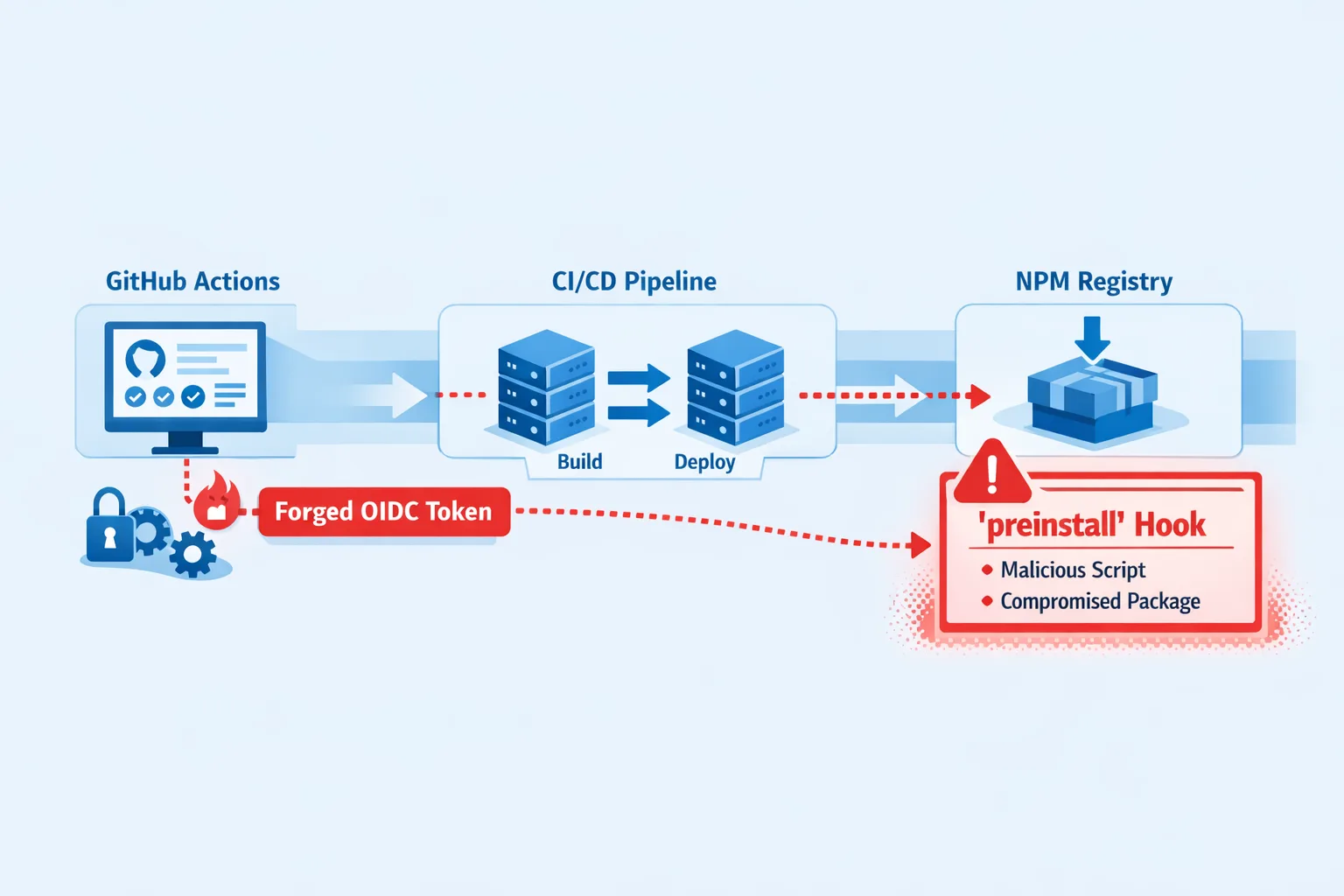
The Red Hat npm supply chain attack isn’t a theoretical blog post. Between June 1 and June 2, 2026, attackers pushed malicious “preinstall” scripts into 30+ packages under the official @redhat-cloud-services scope, shipping over 90 compromised versions and planting a credential-stealing worm dubbed Miasma. The twist: releases carried authentic provenance via GitHub Actions OIDC trusted publishing, so naive checks gave them a green light. (microsoft.com)
Red Hat’s security bulletin confirms the compromise path was a hijacked GitHub account inside a Red Hat org. Red Hat says its Hybrid Cloud Console wasn’t serving the malicious install-time code to customers; the risk window is primarily for developers and CI runners that installed the affected npm versions. The advisory is being updated as the investigation progresses. (access.redhat.com)
What happened (June 1–3, 2026)
Security researchers and Microsoft Threat Intelligence reported that 32 packages across the @redhat-cloud-services namespace were trojanized in two waves on June 1. Each bad release added a preinstall hook that executed a heavily obfuscated 4.29 MB index.js. On run, the payload fetched the Bun runtime, then harvested GitHub, npm, AWS, Azure, GCP, Kubernetes, and HashiCorp Vault credentials, with logic to scrape GitHub Actions runner memory for secrets and to republish more poisoned packages. (microsoft.com)
Snyk’s analysis put the affected set at 32 packages and 96 malicious versions, with roughly 80k combined weekly downloads—enough that many teams likely pulled an affected version indirectly during builds. SecurityWeek added that one automation burst published poisoned iterations across all 32 packages in just over a minute. (snyk.io)
Red Hat removed malicious releases from npm and is validating product pipelines. The company’s bulletin emphasizes that its console deployment process strips install-time scripts before shipping to customers, but that doesn’t protect third-party developers who performed npm install on the compromised versions. (access.redhat.com)
Why this Red Hat npm supply chain attack matters
Here’s the thing: the packages arrived with valid provenance derived from GitHub Actions OIDC trusted publishing. In other words, signatures proved the packages were built by the right repo workflow, yet the workflow itself was hijacked. Provenance is necessary, not sufficient. You must also constrain which branches and workflows can mint that provenance, and watch behavior (e.g., lifecycle scripts, sudden index.js bloat, Bun downloads during install). (snyk.io)
Install-time execution is the killer feature of this family. A single dependency resolution—even as a transitive—can trigger code before your app ever runs. That’s why automatic upgrades plus permissive scripts create a perfect blast radius across developer workstations and ephemeral CI runners holding long-lived cloud roles. (microsoft.com)
How to tell if you were exposed
Two quick reality checks:
- Search your lockfiles for the scope:
grep -r "@redhat-cloud-services" package-lock.json pnpm-lock.yaml yarn.lock 2>/dev/null. Compare resolved versions to active advisories; numerous top packages were affected across multiple minor versions. (snyk.io) - Hunt for post-compromise artifacts. Look for unexpected public repos in your org—many carried the description “Miasma: The Spreading Blight”—and for minimal GitHub Actions workflows that request
id-token: writeand trigger on push-to-any-branch. (microsoft.com)
If a potentially affected build or workstation ran during the window, assume credential exposure and treat it as an incident—not just a dependency bump. Microsoft recommends reviewing runner logs, rotating credentials, and auditing provenance data in build outputs. (microsoft.com)
Red Hat npm supply chain attack: the 48‑hour fix
Use this triage playbook we’ve used with client teams when supply-chain incidents hit. Order matters.
- Freeze dependency resolution. Stop automatic updates in CI. Pin known-good versions or temporarily remove the affected scope from builds until you’ve validated replacements. (snyk.io)
- Reinstall with scripts disabled. Wipe
node_modulesand runnpm install --ignore-scripts. Considernpm config set ignore-scripts trueglobally on CI, then selectively re-enable for packages that truly require build steps. (snyk.io) - Scope your incident window. Identify every host and runner that executed
npm installon or after June 1, 2026, for projects resolving@redhat-cloud-servicespackages. Prioritize runners with cloud roles attached. (snyk.io) - Clean the host before rotating secrets. Miasma variants are known to watch for token changes; eliminate persistence and suspicious startup hooks first. (snyk.io)
- Rotate credentials in priority order. Start with npm tokens and GitHub PATs/SSH keys, then cloud provider credentials (AWS/GCP/Azure), including roles a runner could assume. Log and revoke any unexpected tokens. (microsoft.com)
- Purge attacker-created repos/workflows. Remove repos with the “Miasma: The Spreading Blight” marker and any workflows requesting
id-token: writewithout a strong business reason. (microsoft.com) - Validate artifacts and provenance. Cross-check SBOMs and attestations for affected builds, but don’t stop at “signature valid.” Confirm the attested workflow and branch match your policy. (snyk.io)
Harden OIDC trusted publishing (GitHub → npm)
If you rely on npm’s trusted publishing plus provenance (and you should), add these guardrails so “valid but malicious” can’t happen quietly again:
- Constrain OIDC audiences and branches. Limit trusted publishing to a single, reviewed workflow on a protected branch. Reject OIDC tokens from ephemeral or unreviewed workflows and from forks. (snyk.io)
- Require code owners and status checks before release. Protected branches, mandatory reviews, and required checks block orphan commits that never hit a PR. (snyk.io)
- Least-privilege workflow permissions. Default
permissions: read-all, grantid-token: writeonly in the exact job that publishes, and only when release tags match a pattern you control. (microsoft.com) - Enforce 2FA and publish protection on npm maintainers. Pair that with rotating org tokens regularly and disabling classic PATs. (microsoft.com)
- Behavioral checks alongside provenance. Add CI policies that fail builds if a dependency adds lifecycle scripts unexpectedly, if a package’s
index.jsballoons in size, or if install fetches unusual runtimes (e.g., Bun) duringpreinstall. (microsoft.com) - Adopt an install-age cooldown. Don’t consume a fresh release for 24–48 hours on critical pipelines; let the ecosystem and security vendors flag bad cuts first. (snyk.io)
A quick mental model: Provenance is pedigree, not behavior
Provenance answers “who built this and how,” not “what does it do at install time?” In this incident, valid SLSA attestations traveled with malicious packages because the attacker used the real repo’s workflow. That’s why we pair attestation checks with content and behavior policies on lifecycle scripts. (snyk.io)
People also ask
Is it safe to trust npm provenance alone?
No. Treat provenance as table stakes. Constrain which workflows can mint it, then gate on behavior: deny surprise lifecycle scripts, detect abnormal file growth, and require manual approval when a dependency adds install-time code. This incident showed authentic attestations can still accompany malicious behavior. (snyk.io)
Should I disable preinstall scripts by default?
For CI: yes, start with --ignore-scripts, then allowlist the handful of packages that genuinely need a build step. On developer workstations, consider the same default with a documented override. This blocks most install-time attacks cold. (snyk.io)
How do I check if a package runs scripts during install?
Inspect package.json for scripts keys like preinstall, install, or postinstall. Tools that parse lockfiles and SBOMs can flag changes in script presence between versions as a policy violation—worth automating in your pipeline. (microsoft.com)
Data points you can cite to stakeholders
— 32 packages, 96+ malicious versions shipped across the official Red Hat scope on June 1, 2026. (snyk.io)
— Payload executed via preinstall, harvesting developer and cloud credentials; runner memory scraping observed. (microsoft.com)
— Approx. 80k weekly downloads among affected packages; many installs likely happened indirectly as transitive dependencies. (snyk.io)
— Malicious releases landed within a very short automated window; cleanup and re-publishing followed within hours. (securityweek.com)
— Red Hat’s console pipeline strips lifecycle scripts before web deployment, reducing customer-facing risk, but not the risk to external developers and CI runners who installed the packages during the window. (access.redhat.com)
Let’s get practical: a guardrail checklist
Use this as a standing control set for JavaScript orgs:
- Dependency policy: freeze fresh releases for 24–48 hours; maintain an allowlist for packages permitted to run lifecycle scripts. (snyk.io)
- CI defaults:
npm ci --ignore-scripts; ephemeral runners; block outbound network calls during install unless explicitly allowed. (microsoft.com) - OIDC scoping: one publish workflow on one protected branch;
id-token: writeonly in that job. (snyk.io) - Provenance + behavior: validate SLSA attestations and enforce no-new-scripts, size diffs, and runtime fetch detections. (microsoft.com)
- Credential hygiene: short-lived cloud roles for runners; rotate registry and VCS tokens quarterly; disallow classic PATs. (microsoft.com)
- Hunting playbooks: search for “Miasma: The Spreading Blight” repos; audit for surprise workflows requesting
id-token. (microsoft.com)
What to do next
— Run the lockfile search and artifact hunt today; scope any exposure since June 1, 2026. (snyk.io)
— Rotate npm, GitHub, and cloud creds on any affected hosts—in that order. (microsoft.com)
— Make --ignore-scripts the default in CI and roll out a lifecycle allowlist policy. (snyk.io)
— Tighten OIDC trusted publishing to a single reviewed workflow on a protected branch; enforce code owners and status checks. (snyk.io)
Need help pressure-testing your release pipeline or implementing these controls? See how our team builds and hardens production systems on the web and cloud on our What We Do page, explore our security and engineering services, and read our earlier npm supply‑chain defense guide tailored to Mini Shai‑Hulud waves.
Zooming out, the lesson is clear: automated provenance raised the floor for supply-chain safety—but attackers now aim for the ceiling: the publisher’s own workflow. Lock down who can mint provenance, treat lifecycle scripts as hazardous materials, and watch for behavior that provenance can’t see. That’s how you turn this week’s scramble into next quarter’s muscle memory. (microsoft.com)






Comments
Be the first to comment.